Loading
Form preview
  • US Legal Forms
  • Other Templates
  • More Forms
  • More Multi-State Forms
  • Zenith Bank Internet Banking 2020

Get Zenith Bank Internet Banking 2020-2026

How it works

  1. Open form

    Open form follow the instructions

  2. Easily sign form

    Easily sign the form with your finger

  3. Share form

    Send filled & signed form or save

How to fill out the Zenith Bank Internet Banking online

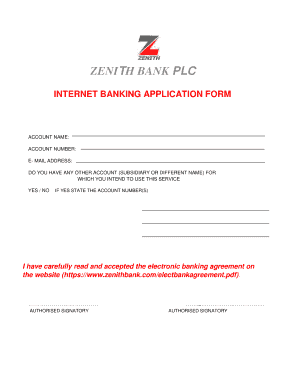
Filling out the Zenith Bank Internet Banking application form is a straightforward process. This guide provides detailed instructions to ensure you complete the form accurately and efficiently.

Follow the steps to complete your application form

  1. Click ‘Get Form’ button to obtain the form and open it in the editor.
  2. Enter your account name in the designated field. This should match the name associated with your bank account.
  3. Input your account number in the appropriate section. Verify that the number is correct to avoid issues.
  4. Provide your email address in the specified field. Ensure that it is an active email that you regularly check, as important information may be sent there.
  5. Indicate whether you have any other account, either subsidiary or under a different name, for which you intend to use this service. Select ‘Yes’ or ‘No’ accordingly.
  6. If you answered ‘Yes’ to the previous question, list the account number(s) of your other accounts in the space provided.
  7. Read the electronic banking agreement carefully. To confirm your acceptance, tick the box indicating your agreement.
  8. Once you have completed all fields, proceed to save your changes, download, print, or share the form as required.

Start filling out your Zenith Bank Internet Banking application form online today.

Get form

Experience a faster way to fill out and sign forms on the web. Access the most extensive library of templates available.
Get form

Related content

USTDA Advances U.S. Digital Banking Technology in...
Jan 13, 2025 — The US Trade and Development Agency announced that it has awarded a...
Learn more
the adoption and impact of internet banking ...
Zenith Bank Ghana adopted internet banking primarily for improved customer accessibility...
Learn more
2015 ANNUAL REPORT
December 31, 2015 brought to a close the Company's most difficult year in more than a...
Learn more

Related links form

Withdrawal Form Adp Fsdd LEAVE REQUEST FORM - Astrix Technology Group I600a

Questions & Answers

Get answers to your most pressing questions about US Legal Forms API.

Contact support

To set up an internet banking account, start by visiting your bank's official website and looking for the internet banking registration section. Follow the on-screen instructions to enter your details and create your account. Once you complete this process, you will be set up to manage your finances conveniently through Zenith Bank Internet Banking.

The 966 911 code is primarily used for connecting with Zenith Bank's customer service. When dialed, it offers immediate access to assistance with Zenith Bank Internet Banking and other banking queries. Utilizing this code can make addressing your banking concerns quicker and more efficient.

The code for Zenith Internet Banking refers to the unique identifier or USSD code that helps you access banking services from your mobile device. This code allows customers to perform various banking operations without needing access to a computer. For the most accurate and updated code, refer to the official Zenith Bank communication channels.

Zenith Bank may periodically update its codes to enhance security and service efficiency. The latest code can typically be found on their official website or through customer service. Staying informed through these channels ensures you have the most current information regarding Zenith Bank Internet Banking services.

Zenith Bank utilizes several codes for various banking services. These codes include those for internet banking, transfers, and more. It's essential to check the official Zenith Bank website or the mobile app to find a comprehensive list of the codes that are relevant to your banking needs.

To set up Zenith Bank Internet Banking, you can visit the official bank website and follow the registration instructions provided. You will need to provide basic personal information and your banking details. Once your registration is complete, you will receive confirmation and can enjoy the features of Zenith Bank Internet Banking immediately.

The number 966 911 is associated with Zenith Bank's customer service and mobile banking solutions. When you call this number, you can access various services related to Zenith Bank Internet Banking, including inquiries, assistance with transactions, and customer support. This code is especially useful for customers seeking quick help without visiting a branch.

The code for Zenith Bank Internet Banking typically refers to the specific USSD code used for accessing certain banking services. This code allows you to perform various transactions directly from your mobile device without needing to visit a physical bank branch. To ensure you have the latest and most accurate code, it's always best to check the official Zenith Bank website or contact customer support.

If your Zenith Bank account is not activated for internet banking, it could be due to incomplete registration or missing documentation. Double-check all your details during the registration process. If problems persist, consider reaching out to Zenith Bank customer support for assistance.

Yes, you can activate your Zenith Bank Internet Banking without visiting a physical branch. The online activation process allows you to complete all necessary steps from the comfort of your home. Just ensure you have a stable internet connection and your account details available.

Get This Form Now!

Use professional pre-built templates to fill in and sign documents online faster. Get access to thousands of forms.
Get form
If you believe that this page should be taken down, please follow our DMCA take down processhere.
Get Zenith Bank Internet Banking
Get form
  • Adoption
  • Bankruptcy
  • Contractors
  • Divorce
  • Home Sales
  • Employment
  • Identity Theft
  • Incorporation
  • Landlord Tenant
  • Living Trust
  • Name Change
  • Personal Planning
  • Small Business
  • Wills & Estates
  • Packages A-Z
  • Affidavits
  • Bankruptcy
  • Bill of Sale
  • Corporate - LLC
  • Divorce
  • Employment
  • Identity Theft
  • Internet Technology
  • Landlord Tenant
  • Living Wills
  • Name Change
  • Power of Attorney
  • Real Estate
  • Small Estates
  • Wills
  • All Forms
  • Forms A-Z
  • Other Templates
  • Legal Hub
  • About Us
  • Help Portal
  • Legal Resources
  • Blog
  • Affiliates
  • Contact Us
  • Delete My Account
  • Site Map
  • Industries
  • Forms in Spanish
  • Localized Forms
  • State-specific Forms
  • Forms Kit
  • Real Estate Handbook
  • All Guides
  • Notarize
  • Incorporation services
  • For Consumers
  • For Small Business
  • For Attorneys
  • USLegal
  • FormsPass
  • pdfFiller
  • signNow
  • altaFlow
  • DocHub
  • Instapage
Form Packages
  • Adoption
  • Bankruptcy
  • Contractors
  • Divorce
  • Home Sales
  • Employment
  • Identity Theft
  • Incorporation
  • Landlord Tenant
  • Living Trust
  • Name Change
  • Personal Planning
  • Small Business
  • Wills & Estates
  • Packages A-Z
Form Categories
  • Affidavits
  • Bankruptcy
  • Bill of Sale
  • Corporate - LLC
  • Divorce
  • Employment
  • Identity Theft
  • Internet Technology
  • Landlord Tenant
  • Living Wills
  • Name Change
  • Power of Attorney
  • Real Estate
  • Small Estates
  • Wills
  • All Forms
  • Forms A-Z
  • Other Templates
Customer Service
  • Legal Hub
  • About Us
  • Help Portal
  • Legal Resources
  • Blog
  • Affiliates
  • Contact Us
  • Delete My Account
  • Site Map
  • Industries
  • Forms in Spanish
  • Localized Forms
  • State-specific Forms
  • Forms Kit
Legal Guides
  • Real Estate Handbook
  • All Guides
Prepared for you
  • Notarize
  • Incorporation services
Our Customers
  • For Consumers
  • For Small Business
  • For Attorneys
Our Sites
  • USLegal
  • FormsPass
  • pdfFiller
  • signNow
  • altaFlow
  • DocHub
  • Instapage
Social Media
Call us now toll free:
+1 833 426 79 33
As seen in:
© Copyright 1999-2026 airSlate Legal Forms, Inc. 17 Station Street, Suite 303, Brookline, MA 02445
  • Your Privacy Choices
  • Terms of Service
  • Privacy Notice
  • Content Takedown Policy
  • Bug Bounty Program