Loading

Open form follow the instructions

Easily sign the form with your finger

Send filled & signed form or save
How to fill out the Charge Dispute Form Pnb online
Navigating the Charge Dispute Form Pnb can be straightforward with the right guidance. This user-friendly guide will help you through each step of filling out the form online, ensuring your dispute is effectively communicated.
Follow the steps to successfully complete the form.
- Press the ‘Get Form’ button to obtain the form and open it in your chosen editing interface.
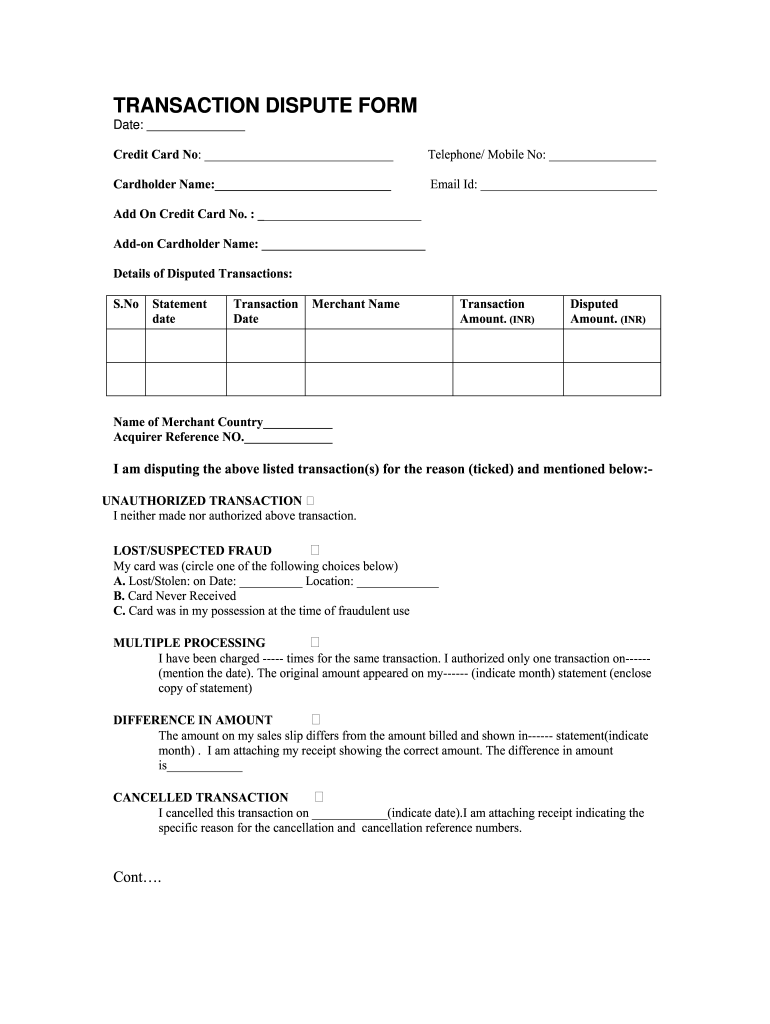
- Enter the date in the designated field at the top of the form, ensuring it reflects the current date or the date of the dispute.
- Input your credit card number accurately in the field labeled ‘Credit Card No.’.
- Provide your telephone or mobile number where indicated.
- Fill in your name as the cardholder in the ‘Cardholder Name’ field.
- Include your email address in the corresponding section for further communication.
- If applicable, enter the add-on credit card number and the name of the add-on cardholder.
- Detail the disputed transactions by filling out the table with the statement date, transaction date, merchant name, transaction amount, disputed amount, and the acquirer reference number for each transaction.
- Indicate the reason for your dispute by checking the appropriate box and providing any additional details required for the selected reason.
- Sign the form in the ‘Primary Cardholder Signature’ section and ensure that the add-on cardholder signature is included if relevant.
- Review the form thoroughly to make sure all information is accurate and complete. Once satisfied, you can proceed to save changes, download, print, or share the form as needed.
Complete your Charge Dispute Form Pnb online today to address your transaction concerns efficiently.
Experience a faster way to fill out and sign forms on the web. Access the most extensive library of templates available.
Related content
Dear [Contact Person or Billing Inquiries Division]: I am writing to dispute a charge of...
Webto dispute a debit card transaction: Log into pnc online banking portal. Click the...
the information provided by the Punjab National Bank (PNB) to the CIC in response to...
Get answers to your most pressing questions about US Legal Forms API.
How do I fill a charge dispute online?
Click here to submit Online dispute form. Provide Your 10 digital Mobile No. Input the OTP. Select Product Type ( Eg Debit /Credit / Prepaid Card) Enter last 4 digit of the Card No. Select Merchant/Beneficiary Name. Select Disputed transaction date ( last 60 days) Enter the dispute reason and details in the text box.
What is a bank dispute?
A dispute occurs when a cardholder contacts their card issuing bank and demands to have their money returned. Disputes are a feature of the Visa, Mastercard and American Express card networks intended to protect cardholders from fraudulent activity.
How do I charge a dispute file?
File a report on a disputed purchase within 60 days of the statement date on which the charge appeared. Before you officially report your issue, the law requires you to try to work out the disagreement directly with the merchant. See if the merchant is willing to provide you with a refund or some sort of store credit.
How to fill PNB charge dispute form online?
The fastest way to redact Charge dispute form pnb online Register and log in. Create a free account, set a strong password, and proceed with email verification to start managing your templates. Add a document. ... Make adjustments to the template. ... Get your documentation completed.
How do I fill out a cardholder dispute form?
ONLINE CARDHOLDER DISPUTE FORM Provide Your 10 digital Mobile No. Input the OTP. Select Product Type ( Eg Debit /Credit / Prepaid Card) Enter last 4 digit of the Card No. Select Merchant/Beneficiary Name. Select Disputed transaction date ( last 60 days) Enter the dispute reason and details in the text box. Enter Submit.
How can I dispute a charge in PNB online?
CUSTOMER INFORMATION. Please fill out this form legibly and send to: TO: DISPUTE PROCESSING AND CHARGEBACKUNIT. EMAIL: PNBCreditCards@pnb.com.ph. SUBJECTEMAIL: DISPUTE (CLIENT'S FULLNAME) Cardholder Name: Card Number: ... DISPUTEFORM. 24/7 Customer Service Hotline: 8818-9818. Domestic Toll-Free:1-800-10-818-9-818.
What is transaction dispute form?
A transaction dispute is a consumer complaint related to a credit or debit card purchase. Transactions are most commonly disputed because of fraud (unauthorized purchases) and a lack of merchant follow-through (merchandise not as expected, services not performed, credit not issued, etc.).
How can I dispute a charge in PNB?
How Do I 1800 180 5555 (For Other Retail Products) 1800 330 3333 (For Digital Products) 1800 180 8888 (For Loan Products) PNB
Use professional pre-built templates to fill in and sign documents online faster. Get access to thousands of forms.
If you believe that this page should be taken down, please follow our DMCA take down process here.