Loading
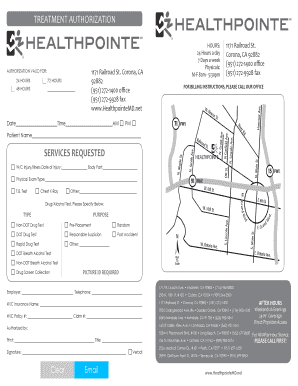
Get Authorization Form - Healthpointe - Healthpointemd
How it works
-

Open form follow the instructions
-

Easily sign the form with your finger
-

Send filled & signed form or save
How to fill out the Authorization Form - Healthpointe - Healthpointemd online
Filling out the Authorization Form for Healthpointe - Healthpointemd online can be straightforward if you follow the right steps. This guide is designed to assist you in successfully completing the form, ensuring that all essential details are accurately provided.
Follow the steps to complete the Authorization Form with ease.
- Click the ‘Get Form’ button to access the Authorization Form for Healthpointe - Healthpointemd. This will open the form in an editable format, allowing you to proceed with entering your information.
- Begin by filling out your personal details in the 'Patient Name' field. Ensure that you enter your name clearly and correctly, as this information is vital for identification purposes.
- In the 'Employer' section, provide the name of your employer and their contact telephone number. This information might be required for billing or verification.
- Complete the 'W/C Insurance Name' and 'W/C Policy #' sections if applicable. This part is important for workers' compensation claims.
- Indicate the type of service needed by selecting from the 'Services Requested' options available in the form. If you require specific tests, such as a drug test or physical exam, make sure to specify in the corresponding fields.
- For the section related to your 'Date of Injury' and 'Body Part,' enter relevant information if this form is for a workplace injury. Ensure accuracy here for proper processing.
- The 'Authorized by' section must be filled out with the name and title of the individual authorized to sign off on the form. This step is crucial for the validation of the document.
- Finally, review all the information entered to confirm accuracy and completeness before submitting the form. Once satisfied, you may choose to save changes, download, print, or share the completed form according to your needs.
Complete your Authorization Form online today for a seamless experience.
0:18 0:59 How to Manually Turn OFF OnePlus Bullets Wireless Z Bluetooth Headset YouTube Start of suggested clip End of suggested clip Okay to manually turn off just press and hold the volume up and down key together for few secondsMoreOkay to manually turn off just press and hold the volume up and down key together for few seconds just. Like. This you can see. Now the blue.