Loading
Form preview
  • US Legal Forms
  • Other Templates
  • More Forms
  • More Uncategorized Forms
  • Dstv Proof Of Payment Email Address

Get Dstv Proof Of Payment Email Address

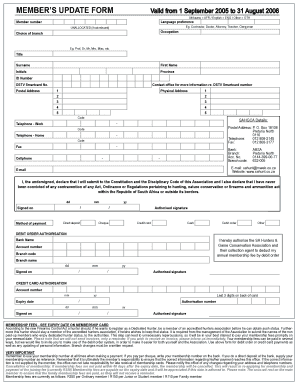
UNALLOCATED (if not relevant) Occupation Choice of branch Eg. Prof, Dr, Mr, Mrs, Miss, etc. Title Surname First Name Initials Province ID Number DSTV Smartcard No. Postal Address Contact office for more information re. DSTV Smartcard number 1 Physical Address 1 2 2 3 3 4 4 5 5 Code SAHGCA Details: - Telephone - Work Postal Address: P. O. Box 18108 Pretoria North 0116 Telephone: 012 808-2145 Fax: 012 808-3177 Code - Telephone - Home Code - Fax - Cellphone Bank: Br.

How it works

  1. Open form

    Open form follow the instructions

  2. Easily sign form

    Easily sign the form with your finger

  3. Share form

    Send filled & signed form or save

How to fill out the Dstv Proof Of Payment Email Address online

Filling out the Dstv Proof Of Payment Email Address form is essential for ensuring your payments are processed correctly. This comprehensive guide will walk you through each step of the process to help you navigate the form seamlessly.

Follow the steps to complete the form accurately.

  1. Click ‘Get Form’ button to obtain the form and open it in your editor.
  2. Begin filling out the form by selecting your language preference from the options provided (Afrikaans, English, or Other).
  3. Enter your member number in the designated field to identify your account.
  4. Provide your occupation in the relevant section, using terms such as Contractor, Doctor, or Teacher.
  5. Select your preferred title (e.g., Mr, Mrs, Dr) and fill in your surname, followed by your first name and initials.
  6. Input your ID number and Dstv Smartcard number to link your account with these identifiers.
  7. Fill in your postal address, including the postal code, to ensure correspondence reaches you without delays.
  8. Provide your physical address in the specified format, if different from your postal address.
  9. Enter your contact details, including your work telephone, home telephone, and cellphone number.
  10. Select your preferred method of payment and fill in the required bank details if applicable.
  11. If using a debit order authorization, complete the relevant bank information, including account number and branch code.
  12. If using a credit card, fill in the credit card authorization section carefully, including the card number and expiry date.
  13. Lastly, review all information entered for accuracy, then save changes, download, print, or share the completed form.

Start completing your Dstv Proof Of Payment Email Address form online today.

Get form

Experience a faster way to fill out and sign forms on the web. Access the most extensive library of templates available.
Get form

Related content

Human Rights Reports: Custom Report Excerpts...
The use of satellite dishes was common nationwide in cities as well as villages. Access to...
Learn more
Reservation Policy and Procedures - Inside NKU
Please email KochL3@nku.edu or call 859-572-6502. University groups: Reservations for any...
Learn more
AVR-3313CI
6 After inputting the “Email address” and “Password”, select “OK”, then press...
Learn more

Related links form

Active Military Duty Certification - Student Web Services At SDCCD - Studentweb Sdccd 2013 Nebraska Individual Income Tax Return, Form 1040N 1040n V Brief Intake-Assessment - New York State Department Of Health - Health Ny

Questions & Answers

Get answers to your most pressing questions about US Legal Forms API.

Contact support

To get a reference for DStv, access your account online or check payment receipts. If needed, you can also reach out to DStv support for assistance. Having this reference will enhance your communication when using your Dstv proof of payment email address.

To email proof of payment for DStv, locate the designated email address provided by their customer service. This information is usually available on their website. When sending, use your Dstv proof of payment email address to ensure proper processing.

You can retrieve your DStv reference number from your DStv account online or through official invoices. If you have difficulties locating it, customer service can provide assistance. This number is particularly useful when needing to use your Dstv proof of payment email address.

To write a proof of payment email, start with a clear subject line indicating the transaction type. In the email body, provide the payment details and attach any relevant documents. Use your Dstv proof of payment email address to submit this to ensure that it reaches the correct recipient.

The reference code for DStv is a unique identifier assigned to your transactions. You can usually find it on your payment receipt or in your DStv online account. This code is useful when sending communications through your Dstv proof of payment email address or when contacting customer service.

In your email sending proof of payment, clearly state the amount and purpose of the payment in the body of the message. Attach the relevant documents and mention the date of transaction. For DStv, ensure to include your Dstv proof of payment email address in the subject line for clarity.

Writing a payment confirmation email involves summarizing the payment details in a clear manner. Start with a polite greeting, mention the amount and date, and specify the services covered. If related to DStv, adding your Dstv proof of payment email address in the signature can streamline communications.

To get your DStv receipt online, log into your DStv account on their website. Navigate to the billing or payment section to find your transaction history, where you can download your receipt. Keep this handy, especially if you plan to use the Dstv proof of payment email address for any queries.

When writing proof of payment, include key details like the date, amount, and purpose of the payment. It’s helpful to format it as a professional document or email. If you are using your Dstv proof of payment email address, use a clear subject line to make it easily recognizable.

To get your DStv number, you can check your previous invoices or log in to the DStv online account portal. Your DStv number will be listed under account details. This number is essential for using your Dstv proof of payment email address efficiently.

Get This Form Now!

Use professional pre-built templates to fill in and sign documents online faster. Get access to thousands of forms.
Get form
If you believe that this page should be taken down, please follow our DMCA take down processhere.
Get Dstv Proof Of Payment Email Address
Get form
  • Adoption
  • Bankruptcy
  • Contractors
  • Divorce
  • Home Sales
  • Employment
  • Identity Theft
  • Incorporation
  • Landlord Tenant
  • Living Trust
  • Name Change
  • Personal Planning
  • Small Business
  • Wills & Estates
  • Packages A-Z
  • Affidavits
  • Bankruptcy
  • Bill of Sale
  • Corporate - LLC
  • Divorce
  • Employment
  • Identity Theft
  • Internet Technology
  • Landlord Tenant
  • Living Wills
  • Name Change
  • Power of Attorney
  • Real Estate
  • Small Estates
  • Wills
  • All Forms
  • Forms A-Z
  • Other Templates
  • Legal Hub
  • About Us
  • Help Portal
  • Legal Resources
  • Blog
  • Affiliates
  • Contact Us
  • Delete My Account
  • Site Map
  • Industries
  • Forms in Spanish
  • Localized Forms
  • State-specific Forms
  • Forms Kit
  • Real Estate Handbook
  • All Guides
  • Notarize
  • Incorporation services
  • For Consumers
  • For Small Business
  • For Attorneys
  • USLegal
  • FormsPass
  • pdfFiller
  • signNow
  • altaFlow
  • DocHub
  • Instapage
Form Packages
  • Adoption
  • Bankruptcy
  • Contractors
  • Divorce
  • Home Sales
  • Employment
  • Identity Theft
  • Incorporation
  • Landlord Tenant
  • Living Trust
  • Name Change
  • Personal Planning
  • Small Business
  • Wills & Estates
  • Packages A-Z
Form Categories
  • Affidavits
  • Bankruptcy
  • Bill of Sale
  • Corporate - LLC
  • Divorce
  • Employment
  • Identity Theft
  • Internet Technology
  • Landlord Tenant
  • Living Wills
  • Name Change
  • Power of Attorney
  • Real Estate
  • Small Estates
  • Wills
  • All Forms
  • Forms A-Z
  • Other Templates
Customer Service
  • Legal Hub
  • About Us
  • Help Portal
  • Legal Resources
  • Blog
  • Affiliates
  • Contact Us
  • Delete My Account
  • Site Map
  • Industries
  • Forms in Spanish
  • Localized Forms
  • State-specific Forms
  • Forms Kit
Legal Guides
  • Real Estate Handbook
  • All Guides
Prepared for you
  • Notarize
  • Incorporation services
Our Customers
  • For Consumers
  • For Small Business
  • For Attorneys
Our Sites
  • USLegal
  • FormsPass
  • pdfFiller
  • signNow
  • altaFlow
  • DocHub
  • Instapage
Social Media
Call us now toll free:
+1 833 426 79 33
As seen in:
© Copyright 1999-2026 airSlate Legal Forms, Inc. 17 Station Street, Suite 303, Brookline, MA 02445
  • Your Privacy Choices
  • Terms of Service
  • Privacy Notice
  • Content Takedown Policy
  • Bug Bounty Program