Loading
Open form follow the instructions
Easily sign the form with your finger
Send filled & signed form or save
How to fill out the P45 online
Filling out the P45 online can streamline your transition after leaving a job. This guide provides a clear, step-by-step process to help you accurately complete the form, ensuring you have the necessary documentation for your future employment or tax obligations.
Follow the steps to fill out your P45 efficiently.
- Click ‘Get Form’ button to obtain the P45 and open it in the editor.
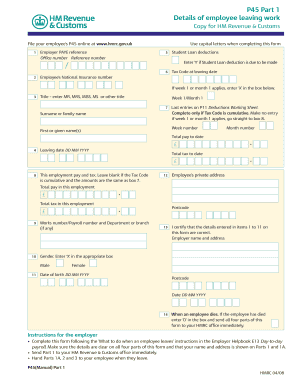
- Fill in the employer PAYE reference, which includes the office number and reference number. Ensure to input this information correctly, as it links to your previous employment.
- Enter the employee’s tax code at the leaving date. If a week 1 or month 1 tax code applies, mark 'X' in the designated box.
- Provide personal details including the employee’s title (MR, MRS, MISS, MS), surname, first name(s), and the leaving date formatted as DD MM YYYY.
- Record the employee's National Insurance number and indicate if there are any student loan deductions due by marking 'Y' in box 5.
- Complete fields for total pay to date and total tax to date in the current employment.
- Make sure to fill in the employer’s name and address, along with the employee’s private address.
- Finally, review all entries for accuracy. Save your changes, and then download, print, or share your completed P45 as needed.
Complete your P45 online today to ensure a smooth transition to your next job.
Experience a faster way to fill out and sign forms on the web. Access the most extensive library of templates available.
Related content
by K Schubert · 2000 · Cited by 88 — P45 was shown to have peptidoglycan lytic...
May 11, 2007 — P45 ; Formula, C19 H14 Cl N ; Molecular Weight, 375.814 ; Type...
The Ser es ma nboards are based on Intel® B75 ch pset for opt mal system effic ency. Des...
Get answers to your most pressing questions about US Legal Forms API.
Is P45 good?
Yes, the Yamaha P45 is an excellent choice for anyone looking for a quality digital piano. It combines great sound, realistic key action, and ease of portability. For both beginners and experienced musicians, the P45 serves as a reliable instrument to hone your skills and enjoy playing music.
Is the Yamaha P-145 any good?
The Yamaha P-145 is a commendable upgrade from the P45, offering enhanced sound quality and features. This digital piano caters to those seeking richer tones and expanded functions while maintaining an authentic playing feel. If you're considering a step up from the P45, the P-145 is worth checking out for its added benefits.
What is the US equivalent of a P45?
In the US, the closest equivalent to a P45 would be the W-2 form, which provides similar information about an employee's income and tax withholdings. This form is crucial for tax filing and serves to summarize your earnings for the year. If you seek to manage your income reporting effectively, understanding the W-2 and its contents is beneficial.
What is P45 in Jamaica?
In Jamaica, the term P45 refers to a tax form that outlines an employee's earnings and tax contributions. This form is essential for employees when they transition to new jobs or manage their tax responsibilities. While it's unrelated to the Yamaha P45, understanding its significance can help ensure proper handling of your taxes.
Is the P45 better than the P71?
The P45 and P71 both offer great features, but they serve slightly different purposes. The P71 is often marketed as a more advanced version, with additional features like built-in songs and more sound options. However, the P45 is often preferred for its simplicity and ease of use, making it a great choice for beginners.
Does the Yamaha P-45 feel like a real piano?
Yes, the Yamaha P-45 feels very much like a real piano. It features weighted keys that respond to your touch, simulating the action of an acoustic piano. This design provides an authentic playing experience, helping you develop your skills effectively. You'll appreciate the natural feel of the P45 as you play.
How to request for P45?
Requesting a P45 involves direct communication with your employer or HR department. Start by gathering necessary details such as your employment history and reason for needing the P45. You can submit your request in writing, preferably via email or an official letter. For template options and guidance, consider visiting US Legal Forms to facilitate this request.
How to write an email requesting P45?
To write an effective email requesting a P45, begin with a respectful opening and then succinctly explain your request. Mention your full name, employment period, and why you require the P45. Adding a closing statement expressing appreciation can foster a positive interaction. Utilizing our resources at US Legal Forms can simplify this process.
Should you email a P45?
Emailing a P45 is generally acceptable, provided the recipient is equipped to handle electronic documents. Many employers prefer sending forms like the P45 via email for efficiency. Ensure that the file is in a common format and includes any necessary information. Always check with your employer about their preferred method of receiving the P45.
How do you write an email asking for P45?
When writing an email to request a P45, start with a polite greeting, followed by your intent. Clearly state why you need the P45 and include details such as your employment period. Ending the email with a thank you can enhance your chances of a prompt response. Using our templates at US Legal Forms can help you structure your email effectively.
Use professional pre-built templates to fill in and sign documents online faster. Get access to thousands of forms.
If you believe that this page should be taken down, please follow our DMCA take down process here.