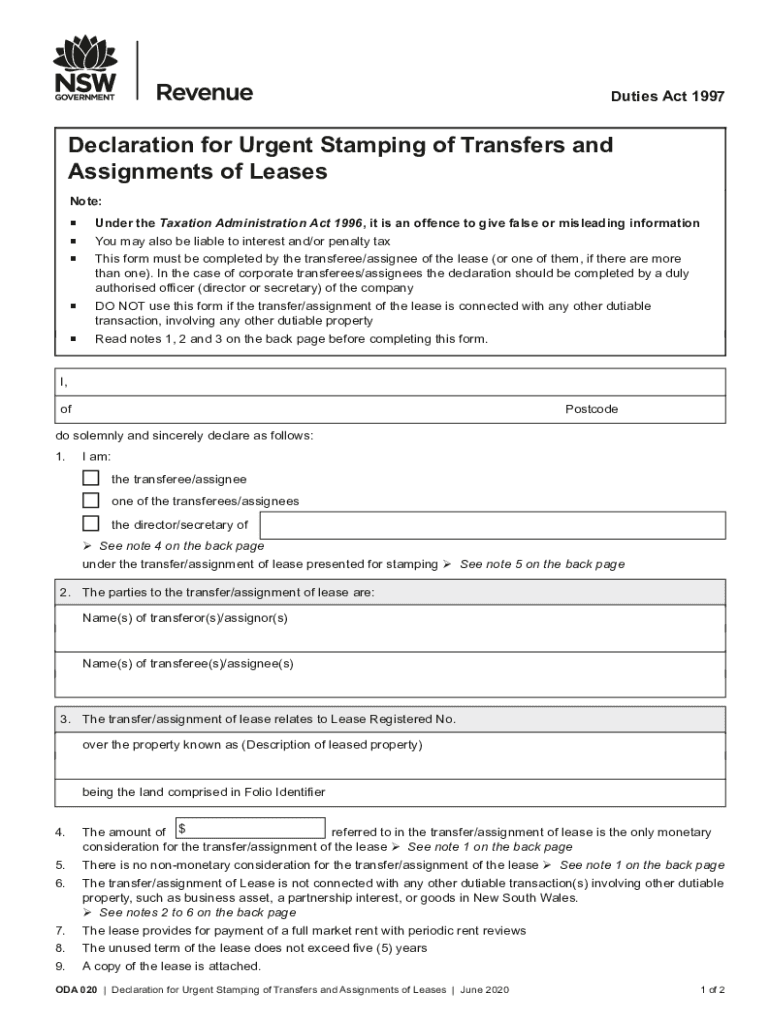
Ce to give false or misleading information You may also be liable to interest and/or penalty tax This form must be completed by the transferee/assignee of the lease (or one of them, if there are more than one). In the case of corporate transferees/assignees the declaration should be completed by a duly authorised officer (director or secretary) of the company DO NOT use this form if the transfer/assignment of the lease is connected with any other dutiable transaction, involving any other dutia.
Loading

Open form follow the instructions

Easily sign the form with your finger

Send filled & signed form or save
How to fill out the AU ODA 020 online
Filling out the AU ODA 020 form is essential for the urgent stamping of transfers and assignments of leases. This guide provides detailed, step-by-step instructions to assist you in accurately completing the form online, ensuring compliance with relevant regulations.
Follow the steps to successfully complete the AU ODA 020 form.
- Click ‘Get Form’ button to access the AU ODA 020 form and open it for editing.
- Begin completing the form by providing your name and postcode in the designated fields to identify yourself as the transferee or assignee.
- Indicate your role in the transfer/assignment by selecting from the options, such as 'the transferee/assignee' or 'one of the transferees/assignees'.
- List the names of all parties involved in the transfer/assignment, ensuring you include both the transferor(s) and transferee(s).
- Provide the lease registered number related to the property by filling in the appropriate field.
- Describe the leased property by entering details in the specified area.
- State the monetary consideration amount for the transfer or assignment of the lease accurately.
- Confirm that there is no non-monetary consideration associated with this transfer by checking the relevant box.
- Declare that the transfer/assignment is not tied to any other dutiable transactions by checking the applicable box.
- Attach a copy of the lease agreement as required.
- Finally, ensure all information provided is truthful and accurate, then sign and date the declaration at the bottom of the form.
- Once all fields are completed, you can save your changes, download a copy, print the completed form, or share it as needed.
Complete your AU ODA 020 form online today to ensure a smooth transfer process.
Experience a faster way to fill out and sign forms on the web. Access the most extensive library of templates available.
Related content
Apr 7, 2014 — Es realitzarà una bancada amb bloc de form ... gruix; i full interior...
Use professional pre-built templates to fill in and sign documents online faster. Get access to thousands of forms.
If you believe that this page should be taken down, please follow our DMCA take down process here.