Loading
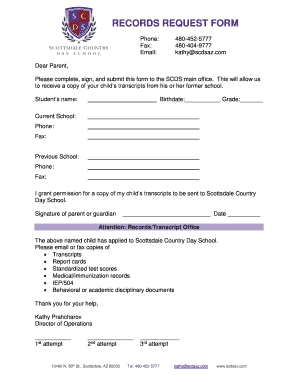
Get Elementary School Records Request Form 2020-2026
How it works
-

Open form follow the instructions
-

Easily sign the form with your finger
-

Send filled & signed form or save
How to fill out the Elementary School Records Request Form online
Filling out the Elementary School Records Request Form online is a straightforward process that helps ensure your child’s educational records are transferred efficiently. This guide provides step-by-step instructions to help you complete the form accurately and promptly.
Follow the steps to complete the form successfully
- Click ‘Get Form’ button to obtain the form and open it in the chosen editor.
- Enter the student's name in the designated field to identify who the records pertain to.
- Fill in the student's birthdate and current grade level to provide additional identification.
- Indicate the current school the child is attending by entering its name in the appropriate field.
- Provide the current school's phone and fax numbers to facilitate communication.
- Specify the previous school the child attended by entering its name.
- Grant permission for a copy of the child's transcripts to be sent to Scottsdale Country Day School by signing the form.
- Insert the date next to your signature to document when the consent was given.
- Before submitting, review all entered information for accuracy. Make any necessary corrections.
- Save the changes made to the form. You may also download or print a copy for your records.
- Share or submit the completed form as instructed, ensuring it reaches the appropriate office.
Begin completing your documents online today to ensure a smooth records transfer.
To request school records from NYC schools, you should contact the specific school or the NYC Department of Education. Provide the necessary details, including the student's information and the type of records required. Utilizing the Elementary School Records Request Form can help streamline this process, ensuring you receive the correct documentation in a timely manner.