Get Referral Form - Baylor Health Care System
How it works
-

Open form follow the instructions
-

Easily sign the form with your finger
-

Send filled & signed form or save
How to fill out the Referral Form - Baylor Health Care System online
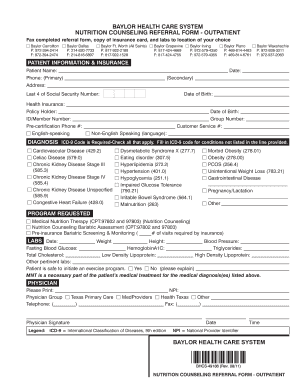
This guide is designed to help users navigate the Referral Form for Baylor Health Care System’s nutrition counseling services. By following these clear instructions, you can efficiently complete the form online, ensuring all necessary information is accurately submitted.
Follow the steps to complete your referral form online
- Click ‘Get Form’ button to obtain the referral form and open it in your preferred editor.
- Begin by entering patient information in the designated fields, including the patient's name, phone number, and address. Ensure the primary phone number is entered first.
- Proceed to the diagnosis section. Indicate the applicable ICD-9 codes by checking all relevant conditions. For conditions not listed, write the corresponding ICD-9 code in the provided line.
- In the program requested section, select the appropriate service (e.g., Medical Nutrition Therapy or Nutrition Counseling Bariatric Assessment). If required by insurance, specify the number of visits needed.
- Indicate whether the patient is safe to initiate an exercise program by checking 'Yes' or 'No', and provide an explanation if necessary.
- The physician should print their name, provide their National Provider Identifier (NPI), group affiliation, and contact information. Ensure the physician's signature and date are included.
Complete your referral form online today for a seamless submission process.
A referral order in healthcare is an instruction from a primary care physician to a specialist, indicating that a patient needs specialized attention. This order typically provides details about the patient's condition and the type of care required. The use of a Referral Form - Baylor Health Care System ensures that all critical information is transferred accurately, facilitating effective patient care.