Loading
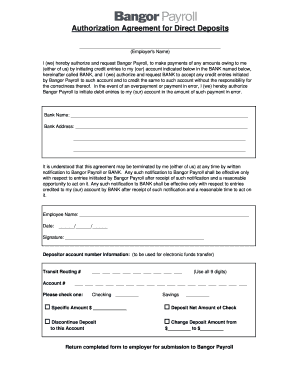
Get Auth For Direct Deposits - Bangor Savings Bank
How it works
-

Open form follow the instructions
-

Easily sign the form with your finger
-

Send filled & signed form or save
How to fill out the Auth For Direct Deposits - Bangor Savings Bank online
Navigating the Auth For Direct Deposits - Bangor Savings Bank form can be simple and efficient with the right guidance. This guide will provide you with step-by-step instructions to successfully complete the online form with ease.
Follow the steps to fill out the form accurately.
- Click ‘Get Form’ button to obtain the form and open it for editing.
- In the first section, locate the field labeled 'Employer's Name.' Enter the name of your employer who will be handling your payroll.
- Next, in the section that begins with 'I (we) hereby authorize and request Bangor Payroll,' ensure you check that all necessary authorizations are clearly marked as per your understanding.
- For 'Bank Name,' fill in the name of the bank where your direct deposit will be made. This should be your main banking institution.
- In the 'Bank Address' section, provide the complete address of your bank. This ensures proper processing of your direct deposits.
- The next fields require your 'Employee Name' to be filled in. Make sure to use your full legal name as it appears on your bank account.
- Enter the 'Date' of completing the form in the specified format (MM/DD/YYYY).
- In the 'Signature' field, sign your name to confirm your authorization.
- Proceed to fill in your 'Depositor account number information.' Provide your Transit Routing Number and Account Number as required for the electronic funds transfer.
- Choose your type of account—Checking or Savings—by marking the appropriate box.
- Select your deposit preference from the options available: 'Specific Amount,' 'Deposit Net Amount of Check,' 'Discontinue Deposit,' or 'Change Deposit Amount.' Fill in the respective details based on your selection.
- Once all fields are completed, review the form for accuracy, then save changes, download, print, or share the form as needed.
Complete your forms online today to streamline your direct deposit setup.
To get your bank information for direct deposit, simply log in to your online banking account with Bangor Savings Bank. There, you’ll find your account number and routing number clearly listed. If you prefer, you can also reach out to customer support for guidance or visit a nearby branch. Remember, with Auth For Direct Deposits - Bangor Savings Bank, setting up your direct deposit is quick and secure.
Industry-leading security and compliance
US Legal Forms protects your data by complying with industry-specific security standards.
-
In businnes since 199725+ years providing professional legal documents.
-
Accredited businessGuarantees that a business meets BBB accreditation standards in the US and Canada.
-
Secured by BraintreeValidated Level 1 PCI DSS compliant payment gateway that accepts most major credit and debit card brands from across the globe.