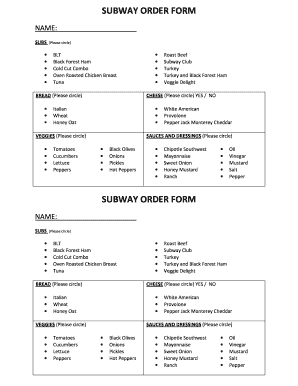
Open form follow the instructions
Easily sign the form with your finger
Send filled & signed form or save
How to fill out the Subway Menu Pdf online
This guide provides you with comprehensive instructions on how to complete the Subway Menu Pdf form online. Follow these steps to ensure your order is filled out accurately and efficiently.
Follow the steps to complete your Subway Menu order form online.
- Use the ‘Get Form’ button to access the Subway Menu Pdf online and open it in your chosen editor.
- Begin by entering your name in the space provided at the top of the form.
- Select your desired subs by circling the options available. Choices include BLT, Black Forest Ham, Cold Cut Combo, Oven Roasted Chicken Breast, Tuna, Roast Beef, Subway Club, Turkey, Turkey and Black Forest Ham, and Veggie Delight.
- Next, choose your bread type by circling one of the options: Italian, Wheat, or Honey Oat.
- Indicate your choice of cheese by circling 'Yes' or 'No' and select any applicable options from the cheese list that includes White American, Provolone, Pepper Jack, or Monterey Cheddar.
- Proceed to circle your preferred veggies. You can choose from options like Tomatoes, Cucumbers, Lettuce, Peppers, Black Olives, Onions, or Pickles, among others.
- Finally, select your sauces and dressings by circling your preferred choices. Options include Chipotle Southwest, Mayonnaise, Sweet Onion, Honey Mustard, Ranch, Oil, Vinegar, Mustard, Salt, and Pepper.
- After completing all required fields, you can save your changes, download the filled form, print it, or share it as needed.
Complete your Subway Menu Pdf online now!
Experience a faster way to fill out and sign forms on the web. Access the most extensive library of templates available.
Related content
Dec 10, 2020 — Subway Catering Menu. UH. All orders require 24 hours notice. Date of...
Chocolate Chip | White Chip Macadamia Nut | Double Chocolate Cookie. Oatmeal Raisin |...
Press ENG and 1 to address your Subway Set with your LEGACY CAB-2 Remote. Controller. 5...
Get answers to your most pressing questions about US Legal Forms API.
Is Subway ending its $6.99 Meal Deal early?
Subway occasionally adjusts its promotions, including the $6.99 Meal Deal. To stay updated on any changes, it’s best to check the Subway Menu Pdf and look for announcements on their official site. This way, you'll be in the loop about any special deals before they end.
How to see the Subway menu without ordering?
To view the Subway menu without placing an order, you have various options. You can check the Subway website, download the Subway Menu Pdf, or visit the nearest location to browse the offerings. This allows you to familiarize yourself with their options before making a decision.
What is the simple $6 menu at Subway?
The simple $6 menu at Subway contains a curated list of sandwiches designed to satisfy your hunger without breaking the bank. It includes popular choices that customers enjoy regularly. For an easy reference to all menu items included, the Subway Menu Pdf provides a clear and organized layout.
What subs are $6.99 at Subway?
At Subway, the $6.99 subs change periodically, highlighting a selection of popular options. The offerings may include various classic subs, featuring fresh ingredients that appeal to many customers. For current options and promotions, refer to the Subway Menu Pdf, ensuring you don’t miss any great deals.
What is the most unhealthiest food at Subway?
The most unhealthiest food at Subway is often considered to be the Meatball Marinara sub, primarily due to its high calorie and sodium content. While Subway offers healthier choices, this sub can exceed your daily recommended intake if you're not careful. For a complete overview of nutritional information, the Subway Menu Pdf is a valuable resource.
How to make a custom order on Subway?
To make a custom order at Subway, simply visit a location or use their online ordering system. You can select your bread, protein, fresh vegetables, and any sauces or extras. For a detailed view of your options, check the Subway Menu Pdf to find the combinations that suit your taste.
What is on the simple $6 menu at Subway?
The simple $6 menu at Subway features select footlong sandwiches that provide good value. Customers can choose from various meats, veggies, and sauces, allowing for customization. Always refer to the Subway Menu Pdf for the latest offerings available on this budget-friendly menu.
What is the 50 code for Subway?
The 50 code at Subway usually refers to a specific menu item, and it's handy to know when ordering. You can find the meaning of these codes in the Subway Menu PDF, which acts as a guide for navigating the menu. Familiarizing yourself with these codes can enhance your ordering experience and help you make informed decisions. Don’t hesitate to refer to the PDF for detailed explanations of all codes and items.
Can I create my own sandwich at Subway?
Yes, you can create your own sandwich at Subway, allowing you to customize it to your liking. When you create your own sandwich, you choose from a variety of breads, meats, toppings, and sauces. This flexibility is one of the reasons many people refer to the Subway Menu PDF, as it outlines all the available options to help you design the perfect sandwich. Enjoy the process of crafting your unique meal.
How do I see the Subway menu without ordering?
You can view the Subway menu without making an order by accessing their official website or downloading the Subway Menu PDF. This document provides a comprehensive look at all menu items, including ingredients and prices. It's a great way to explore options at your leisure, without any pressure to order. Enjoy browsing the menu and planning your next meal.
Use professional pre-built templates to fill in and sign documents online faster. Get access to thousands of forms.
If you believe that this page should be taken down, please follow our DMCA take down process here.