Loading
Form preview
  • US Legal Forms
  • Other Templates
  • More Forms
  • More Multi-State Forms
  • Heavy Equipment Inspection Form 2020

Get Heavy Equipment Inspection Form 2020-2026

How it works

  1. Open form

    Open form follow the instructions

  2. Easily sign form

    Easily sign the form with your finger

  3. Share form

    Send filled & signed form or save

How to fill out the Heavy Equipment Inspection Form online

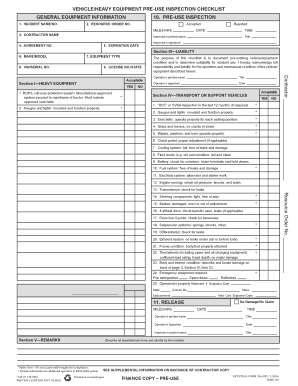
Completing the Heavy Equipment Inspection Form online is essential for documenting the condition of your equipment prior to use. This guide will provide you with a clear, step-by-step overview of each section and field of the form to ensure accuracy and compliance.

Follow the steps to successfully complete the Heavy Equipment Inspection Form.

  1. Click ‘Get Form’ button to obtain the form and open it in the editor.
  2. In the general equipment information section, enter the incident name or number, resource order number, contractor name, agreement number, and expiration date. Ensure that all relevant details are provided accurately.
  3. In the pre-use inspection section, mark whether the inspection was accepted or rejected. Include the date, time, inspector’s printed name, and signature.
  4. Provide details about the equipment, including its make and model, type, VIN or serial number, and license number with state.
  5. In the liability section, confirm that the roll-over protection system and other safety features are in place and functioning by providing the necessary details.
  6. For transport or support vehicles, indicate whether a ‘DOT’ or CVSA inspection has occurred within the last 12 months. Record the condition of gauges, lights, seatbelts, brakes, and other essential components, ensuring compliance with safety regulations.
  7. Fill out the details regarding any attachments, pumps, or chainsaws, indicating if they are functioning correctly and do not have missing or broken components.
  8. In the remarks section, describe any unsatisfactory items and include identifying information by line number. This ensures proper accountability and follow-up.
  9. Review the entire form for completeness and accuracy. Once satisfied, save your changes, and choose to download, print, or share the form as necessary.

Complete your Heavy Equipment Inspection Form online today for a smooth and organized equipment management process.

Get form

Experience a faster way to fill out and sign forms on the web. Access the most extensive library of templates available.
Get form

Related content

vehicle/heavy equipment pre-use inspection...
The purpose of this checklist is to document pre-existing vehicle/equipment condition and...
Learn more
vehicle/heavy equipment pre-use inspection...
The purpose of this checklist is to document pre-existing vehicle/equipment condition and...
Learn more
Vehicle Equipment and Inspection Regulations
... inspection on Form MV-431. The replacement certificate of inspection shall be recorded...
Learn more

Related links form

Biosafety Application Approval Form - James Cook University - Jcu Edu DRO Volunteer Application Form - James Cook University - Jcu Edu Ncic 25n Online Ncic Registration Forms

Questions & Answers

Get answers to your most pressing questions about US Legal Forms API.

Contact support

Certain organizations may be exempt from routine OSHA inspections, such as very small businesses or specific agricultural operations. However, these exemptions do not apply to all equipment types. Even if you think you may qualify for an exemption, using a Heavy Equipment Inspection Form helps promote safety regardless of exemption status.

The frequency of equipment inspections varies based on the type of machinery and its usage. Generally, heavy equipment should be inspected at least annually or more frequently if it is used in demanding conditions. Using a Heavy Equipment Inspection Form can help you schedule and track inspections effectively.

Indeed, OSHA mandates that specific equipment undergo regular inspections to ensure safe operation. These inspections are crucial for preventing accidents and injuries in the workplace. A Heavy Equipment Inspection Form is a useful tool for documenting these inspections and demonstrating compliance with OSHA requirements.

Yes, OSHA requires that equipment inspections be conducted regularly to promote workplace safety. These inspections help identify potential hazards and ensure that machinery is functioning correctly. Utilizing a Heavy Equipment Inspection Form can simplify compliance with OSHA regulations and help maintain safety standards in your workplace.

To get heavy equipment certified, you must complete a thorough inspection and ensure it meets all industry standards and regulations. Using a Heavy Equipment Inspection Form can streamline this process by guiding you through the required checks. Once the inspection is completed, you may submit the findings to an accredited certifying body for approval.

An equipment inspection report details the condition and functionality of heavy machinery. This report is essential for identifying any issues that could affect safety or performance. A Heavy Equipment Inspection Form is often used to create these reports, ensuring that all necessary checks are conducted and documented.

Filling out a home inspection report follows a systematic approach. Begin with general property information, then proceed to detailed observations of each room and system. Incorporating a Heavy Equipment Inspection Form within your home inspection process promotes consistency in documenting crucial findings. This structured method ensures you comprehensively evaluate the home’s condition.

An example of a sentence in an inspection report could be: 'The crane passed all operational checks, but the safety harness requires replacement.' This well-structured sentence provides a clear and concise summary of findings. Using a Heavy Equipment Inspection Form allows for more structured observations, ultimately leading to improved equipment oversight. Well-written reports contribute to better decision-making in safety and maintenance.

To fill out an inspection report, start with the information header, which includes the date, equipment type, and location. Next, document each inspection point, noting any issues or maintenance needed. The Heavy Equipment Inspection Form can guide you in organizing this data effectively. Remember, clear documentation supports better maintenance practices and enhances safety protocols.

Writing a vehicle inspection report requires clarity and thoroughness. Clearly note the vehicle’s condition, focusing on safety features and operational readiness. Include all findings in a Heavy Equipment Inspection Form to keep your reporting standardized and consistent. This ensures you and your team have accessible records for future reference and accountability.

Get This Form Now!

Use professional pre-built templates to fill in and sign documents online faster. Get access to thousands of forms.
Get form
If you believe that this page should be taken down, please follow our DMCA take down processhere.
Get Heavy Equipment Inspection Form
Get form
  • Adoption
  • Bankruptcy
  • Contractors
  • Divorce
  • Home Sales
  • Employment
  • Identity Theft
  • Incorporation
  • Landlord Tenant
  • Living Trust
  • Name Change
  • Personal Planning
  • Small Business
  • Wills & Estates
  • Packages A-Z
  • Affidavits
  • Bankruptcy
  • Bill of Sale
  • Corporate - LLC
  • Divorce
  • Employment
  • Identity Theft
  • Internet Technology
  • Landlord Tenant
  • Living Wills
  • Name Change
  • Power of Attorney
  • Real Estate
  • Small Estates
  • Wills
  • All Forms
  • Forms A-Z
  • Other Templates
  • Legal Hub
  • About Us
  • Help Portal
  • Legal Resources
  • Blog
  • Affiliates
  • Contact Us
  • Delete My Account
  • Site Map
  • Industries
  • Forms in Spanish
  • Localized Forms
  • State-specific Forms
  • Forms Kit
  • Real Estate Handbook
  • All Guides
  • Notarize
  • Incorporation services
  • For Consumers
  • For Small Business
  • For Attorneys
  • USLegal
  • FormsPass
  • pdfFiller
  • signNow
  • altaFlow
  • DocHub
  • Instapage
Form Packages
  • Adoption
  • Bankruptcy
  • Contractors
  • Divorce
  • Home Sales
  • Employment
  • Identity Theft
  • Incorporation
  • Landlord Tenant
  • Living Trust
  • Name Change
  • Personal Planning
  • Small Business
  • Wills & Estates
  • Packages A-Z
Form Categories
  • Affidavits
  • Bankruptcy
  • Bill of Sale
  • Corporate - LLC
  • Divorce
  • Employment
  • Identity Theft
  • Internet Technology
  • Landlord Tenant
  • Living Wills
  • Name Change
  • Power of Attorney
  • Real Estate
  • Small Estates
  • Wills
  • All Forms
  • Forms A-Z
  • Other Templates
Customer Service
  • Legal Hub
  • About Us
  • Help Portal
  • Legal Resources
  • Blog
  • Affiliates
  • Contact Us
  • Delete My Account
  • Site Map
  • Industries
  • Forms in Spanish
  • Localized Forms
  • State-specific Forms
  • Forms Kit
Legal Guides
  • Real Estate Handbook
  • All Guides
Prepared for you
  • Notarize
  • Incorporation services
Our Customers
  • For Consumers
  • For Small Business
  • For Attorneys
Our Sites
  • USLegal
  • FormsPass
  • pdfFiller
  • signNow
  • altaFlow
  • DocHub
  • Instapage
Social Media
Call us now toll free:
+1 833 426 79 33
As seen in:
© Copyright 1999-2026 airSlate Legal Forms, Inc. 17 Station Street, Suite 303, Brookline, MA 02445
  • Your Privacy Choices
  • Terms of Service
  • Privacy Notice
  • Content Takedown Policy
  • Bug Bounty Program