We use cookies to improve security, personalize the user experience, enhance our marketing activities (including cooperating with our marketing partners) and for other business use.
Click "here" to read our Cookie Policy. By clicking "Accept" you agree to the use of cookies. Read less
Read more
Accept
Loading
Form preview
  • US Legal Forms
  • Form Library
  • More Forms
  • More Uncategorized Forms
  • Id Verification Form - State Bank Of India Sydney

Get Id Verification Form - State Bank Of India Sydney

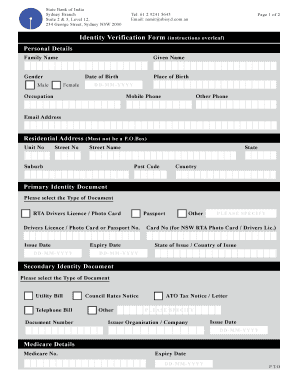
State Bank of India, Sydney Branch ARBN 082 610 008 Suite 2 & 3, Level 12, 234 George Street Sydney NSW 2000. Tel: 61 2 9241 5643 Fax: 61 2 9241 6972 Email: remit sbisyd.com.au IDENTITY VERIFICATION.

How it works

  1. Open form

    Open form follow the instructions

  2. Easily sign form

    Easily sign the form with your finger

  3. Share form

    Send filled & signed form or save

How to fill out the ID Verification Form - State Bank Of India Sydney online

This guide provides step-by-step instructions for users filling out the ID Verification Form for the State Bank Of India in Sydney. It ensures that individuals can complete the form accurately and efficiently online.

Follow the steps to successfully complete the ID Verification Form.

  1. Click ‘Get Form’ button to obtain the ID Verification Form and open it for editing.
  2. In the 'Personal Details' section, enter your family name and given name. Provide your gender, date of birth in the format DD-MM-YYYY, place of birth, occupation, mobile phone number, other phone number, and email address.
  3. Fill in your residential address by entering the unit number, street number, street name, suburb, state, post code, and country. Ensure that the address is not a P.O. Box.
  4. For the 'Primary Identity Document' section, select the type of primary document you will provide. Input the document number, issue date, and expiry date accordingly.
  5. In the 'Secondary Identity Document' section, choose a type of document and fill in the document number, issuer organization or company, and the issue date.
  6. If applicable, provide your Medicare details, including your Medicare number and expiry date.
  7. Read the regulations regarding identity document requirements, ensuring you have one primary and one secondary document selected.
  8. Complete the 'Declaration of Applicant' section by acknowledging the truthfulness of your information. Your signature must be witnessed by a prescribed person or SBI official.
  9. Finally, review the form for accuracy, save your changes, and prepare to submit it in person at the State Bank of India Sydney branch. Ensure that original identity documents are presented.

Complete your ID Verification Form online today to streamline your banking experience.

Get form

Experience a faster way to fill out and sign forms on the web. Access the most extensive library of templates available.
Get form

Related content

Syndicated Facility Agreement
State Bank of India, Sydney Branch. Suite 2, Level 31, 264 George Street, Australia...
Learn more
AUSTRALIAN GOVERNMENT GUARANTEE SCHEME FOR ...
Nov 20, 2008 — Changes to Scheme Rules. 10. Schedule 1 ELIGIBLE INSTITUTIONS. 11...
Learn more
FORM 20-F
In this Annual Report, references to "U.S.," the "United States" or "USA" are to the...
Learn more

Related links form

Apsr Toh Project Document On Protection And Empowerment Of Women Undp Pdf Individual Contract - United Nations Development Programme - Undp RAD 55-REV 2010.F3F - The Ottawa Hospital

Questions & Answers

Get answers to your most pressing questions about US Legal Forms API.

Contact support

Filling out the SBI re KYC form is a straightforward process. Start by downloading the ID Verification Form - State Bank Of India Sydney from the SBI website or collect it from your bank branch. Complete all sections accurately, attach the required documents, and submit it as directed.

For KYC in the Bank of India, typically, you need to provide an identity proof, address proof, and a recent passport-sized photograph. The ID Verification Form - State Bank Of India Sydney will guide you in listing all the necessary documents required for the process. It's always a wise idea to check the latest updates on the SBI website.

If an amount is debited from your SBI account but not credited to the beneficiary, it may be due to processing delays or issues with beneficiary details. In such cases, it's crucial to contact SBI customer service for assistance. You may also check your transaction status and verify your KYC compliance using the ID Verification Form - State Bank Of India Sydney to expedite resolution.

Awaiting verification in SBI eremit means that your submitted transaction is pending until the bank completes its necessary checks. This status generally occurs when KYC information is being validated or when an ID Verification Form - State Bank Of India Sydney has not been verified. To speed up this process, confirm that all your details are accurately submitted.

The approval time for a beneficiary in SBI usually ranges from a few hours to 2 business days. Factors such as the completion of the ID Verification Form - State Bank Of India Sydney and the bank's compliance procedures can affect this timeline. To ensure a quick approval, make sure your documents and details are entered correctly when you add a beneficiary.

An international transfer through SBI typically takes 2 to 5 working days. The exact time may vary based on the destination country and the compliance checks performed by the bank. It's advisable to ensure that your KYC is updated through the ID Verification Form - State Bank Of India Sydney to prevent any unnecessary delays in the transaction process.

You can submit your KYC documents to the State Bank of India through the online banking portal or by visiting your nearest branch. If you're submitting online, complete the ID Verification Form - State Bank Of India Sydney to ensure all necessary information is provided. Make sure to attach all relevant documents securely to facilitate a smooth verification process.

NRIs can easily update their KYC in SBI Online by logging into their SBI online banking account. Once logged in, navigate to the KYC update section and fill out the ID Verification Form - State Bank Of India Sydney. Ensure that all required documents are uploaded to avoid any delays in the verification process. This method provides a quick and efficient way to maintain your account's compliance.

Yes, the State Bank of India offers international transfer services to its customers. You can initiate these transfers through various options, including online banking or visiting a local branch. For secure and compliant international transactions, ensure that you complete the ID Verification Form - State Bank Of India Sydney as required.

If you do not update your Know Your Customer (KYC) information with the State Bank of India, you may face restrictions on your account. The bank may freeze transactions or limit services until your KYC is up to date. It is essential to complete the ID Verification Form - State Bank Of India Sydney to maintain your banking functions without interruption.

Get This Form Now!

Use professional pre-built templates to fill in and sign documents online faster. Get access to thousands of forms.
Get form
If you believe that this page should be taken down, please follow our DMCA take down processhere.

Industry-leading security and compliance

US Legal Forms protects your data by complying with industry-specific security standards.
  • In businnes since 1997
    25+ years providing professional legal documents.
  • Accredited business
    Guarantees that a business meets BBB accreditation standards in the US and Canada.
  • Secured by Braintree
    Validated Level 1 PCI DSS compliant payment gateway that accepts most major credit and debit card brands from across the globe.
Get ID Verification Form - State Bank Of India Sydney
Get form
Form Packages
Adoption
Bankruptcy
Contractors
Divorce
Home Sales
Employment
Identity Theft
Incorporation
Landlord Tenant
Living Trust
Name Change
Personal Planning
Small Business
Wills & Estates
Packages A-Z
Form Categories
Affidavits
Bankruptcy
Bill of Sale
Corporate - LLC
Divorce
Employment
Identity Theft
Internet Technology
Landlord Tenant
Living Wills
Name Change
Power of Attorney
Real Estate
Small Estates
Wills
All Forms
Forms A-Z
Form Library
Customer Service
Terms of Service
Privacy Notice
Legal Hub
Content Takedown Policy
Bug Bounty Program
About Us
Blog
Affiliates
Contact Us
Delete My Account
Site Map
Industries
Forms in Spanish
Localized Forms
State-specific Forms
Forms Kit
Legal Guides
Real Estate Handbook
All Guides
Prepared for You
Notarize
Incorporation services
Our Customers
For Consumers
For Small Business
For Attorneys
Our Sites
US Legal Forms
USLegal
FormsPass
pdfFiller
signNow
airSlate WorkFlow
DocHub
Instapage
Social Media
Call us now toll free:
+1 833 426 79 33
As seen in:
  • USA Today logo picture
  • CBC News logo picture
  • LA Times logo picture
  • The Washington Post logo picture
  • AP logo picture
  • Forbes logo picture
© Copyright 1997-2025
airSlate Legal Forms, Inc.
3720 Flowood Dr, Flowood, Mississippi 39232
Form Packages
Adoption
Bankruptcy
Contractors
Divorce
Home Sales
Employment
Identity Theft
Incorporation
Landlord Tenant
Living Trust
Name Change
Personal Planning
Small Business
Wills & Estates
Packages A-Z
Form Categories
Affidavits
Bankruptcy
Bill of Sale
Corporate - LLC
Divorce
Employment
Identity Theft
Internet Technology
Landlord Tenant
Living Wills
Name Change
Power of Attorney
Real Estate
Small Estates
Wills
All Forms
Forms A-Z
Form Library
Customer Service
Terms of Service
Privacy Notice
Legal Hub
Content Takedown Policy
Bug Bounty Program
About Us
Blog
Affiliates
Contact Us
Delete My Account
Site Map
Industries
Forms in Spanish
Localized Forms
State-specific Forms
Forms Kit
Legal Guides
Real Estate Handbook
All Guides
Prepared for You
Notarize
Incorporation services
Our Customers
For Consumers
For Small Business
For Attorneys
Our Sites
US Legal Forms
USLegal
FormsPass
pdfFiller
signNow
airSlate WorkFlow
DocHub
Instapage
Social Media
Call us now toll free:
+1 833 426 79 33
As seen in:
  • USA Today logo picture
  • CBC News logo picture
  • LA Times logo picture
  • The Washington Post logo picture
  • AP logo picture
  • Forbes logo picture
© Copyright 1997-2025
airSlate Legal Forms, Inc.
3720 Flowood Dr, Flowood, Mississippi 39232