Get Ui Texasworkforce Org Register 2020-2025
How it works
-

Open form follow the instructions
-

Easily sign the form with your finger
-

Send filled & signed form or save
How to fill out the Ui Texasworkforce Org Register online
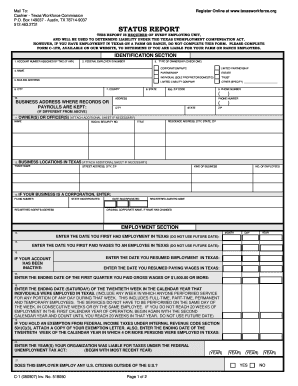
The Ui Texasworkforce Org Register is essential for organizations operating in Texas to report employment status and ensure compliance with state regulations. This guide provides straightforward, step-by-step instructions on how to effectively complete the register online.
Follow the steps to complete your online registration.
- Click ‘Get Form’ button to obtain the form and open it in the editor.
- Begin by filling out the identification section. Enter the account number assigned by the Texas Workforce Commission (TWC) if available, followed by the federal employer identification number. Select the type of ownership by checking the appropriate box, such as corporation, partnership, or sole proprietor.
- Continue completing the address information. Provide the mailing address, business address, and contact numbers where records or payrolls are maintained. Ensure this information is accurate to avoid delays in processing.
- Provide details about the owner(s) or officers, including names, titles, and residential addresses. Be thorough, as this section is vital for proper identification.
- In the employment section, enter the dates relevant to your employment activities in Texas, including the first day of employment and payment of wages. This is crucial for establishing your liability under the Texas Unemployment Compensation Act.
- If applicable, complete the domestic household employment section with the required details if you have domestic employees. This includes the date you first paid significant wages.
- Describe the nature of your business activities in Texas and the principal products or services offered. This information helps TWC understand your business better.
- If your business was acquired from another entity, fill out the relevant sections, including previous owner's details and acquisition dates. Make sure to check the applicable boxes as instructed.
- Complete the voluntary election section if you wish to elect to pay state unemployment taxes voluntarily. Make sure you meet the obligations as specified.
- Finally, review all entered information for accuracy. Sign the document, including your title and date. Ensure that the signature is from an individual authorized to execute the report.
- Once all information is complete and reviewed, save changes, download, print, or share the form as necessary.
Start filling out your Ui Texasworkforce Org Register online now to ensure compliance and avoid any potential liabilities.
Filling out a work search for unemployment requires you to document each job application and interview you have pursued during the reporting period. You can find templates and resources on the Ui Texasworkforce Org Register website to guide you through this process. Be sure to include details such as employer names, positions applied for, and dates. Accurate recording is crucial to continuing your unemployment benefits.
Industry-leading security and compliance
-
In businnes since 199725+ years providing professional legal documents.
-
Accredited businessGuarantees that a business meets BBB accreditation standards in the US and Canada.
-
Secured by BraintreeValidated Level 1 PCI DSS compliant payment gateway that accepts most major credit and debit card brands from across the globe.