
Open form follow the instructions

Easily sign the form with your finger

Send filled & signed form or save
How to fill out the School Emergency Card Template online
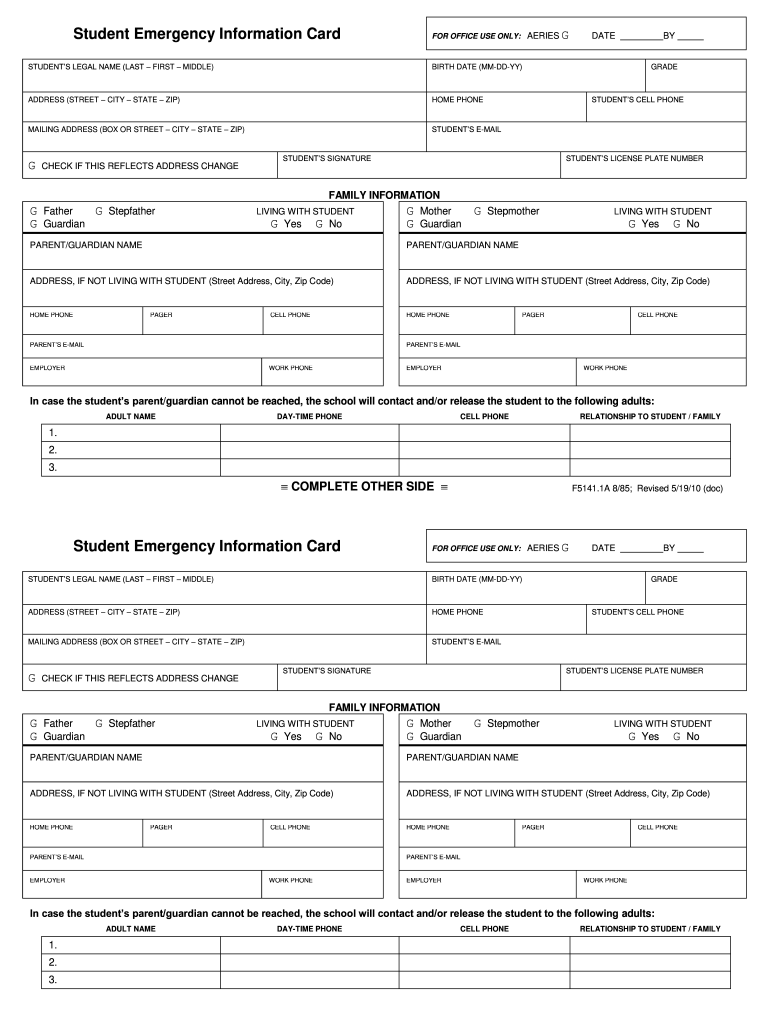
Filling out the School Emergency Card Template accurately is essential for ensuring that your child’s school has the necessary information during an emergency. This guide provides clear instructions for completing each section of the form online, helping you navigate the process with ease.
Follow the steps to complete your School Emergency Card Template.
- Click ‘Get Form’ button to access the School Emergency Card Template and open it in the digital editor. This will allow you to start filling out the necessary information online.
- Enter the student’s legal name in the format of last name, first name, and middle name in the designated field.
- Input the birth date using the MM-DD-YY format to ensure it is recorded correctly.
- Fill in the home address, including street, city, state, and zip code. Make sure to check whether this is an address change.
- Provide the home phone number, mailing address (if different), and the student’s email address.
- Complete the family information section by selecting the appropriate relationship options for the individuals living with the student.
- Fill in the contact details for the primary parent or guardian, including name, address (if different from the student), home phone, pager, cell phone, email, employer, and work phone.
- In case the parent/guardian cannot be reached, list up to three adults who can be contacted, along with their daytime phone numbers and relationships to the student.
- Complete the medical information section by indicating any allergies, medical conditions, and medications the student is currently taking. Include the name and contact details of the student’s doctor and health insurance carrier.
- Review the authorization statement concerning medical care, sign the form with both parent's or guardian’s signatures, and date it appropriately.
- Once all fields are completed, save your changes, then choose options to download, print, or share the School Emergency Card Template as needed.
Complete your School Emergency Card Template online today to ensure your child's safety.
Experience a faster way to fill out and sign forms on the web. Access the most extensive library of templates available.
Related content
by G Card — A printable checklist to help parents prepare for emergencies during the...
(1) Complete the following items, as appropriate, if your child has a condition(s) which...
7-1 PURPOSE. This chapter provides definitions, responsibilities, and procedures for...
Get answers to your most pressing questions about US Legal Forms API.
How to make an emergency contact card?
To make an effective emergency contact card, begin with a School Emergency Card Template that organizes all essential information clearly. Include personal details, emergency contacts, medical notes, and relevant instructions for caregivers or school staff. Platforms like US Legal Forms can provide templates and guidance, helping you craft a card that serves its purpose efficiently.
What is an example of an emergency contact?
An example of an emergency contact on a School Emergency Card Template could be a parent or guardian. This should include their name, relationship to the child, and phone number. It's also beneficial to include an alternative contact, such as a close neighbor or family member, who can be reached if primary contacts are unavailable.
How to create an emergency contact form?
To create an effective emergency contact form using a School Emergency Card Template, start by identifying necessary fields. Include sections for personal information, medical needs, and a list of primary and secondary contacts. You can find easy-to-use templates on platforms like US Legal Forms, which simplify this process and ensure you capture vital information.
What information to put on an emergency card?
When creating a School Emergency Card Template, include vital details such as the child's full name, date of birth, and any medical conditions. Additionally, list emergency contact numbers, including parents and guardians, along with their addresses. Don’t forget to add important information like allergies and insurance details, ensuring quick access to essential data in a crisis.
What is a medical warning card?
Medical Alert Information Cards help communicate information regarding your medical history, allergies, insurance, medications, emergency contacts, and doctor(s).
What is the card in case of emergency?
ICE stands for In Case of Emergency. Having an ICE Card with you in your wallet or purse can greatly speed up notifying your loved ones in an emergency, and for First Responders to quickly have basic medical information such as blood type, allergies, and medical concerns at their fingertips.
How do I make an emergency card for my wallet?
How to make a traveller's emergency contact card Step 1: Find a laminating tool. Step 2: Identify what to put on the card. Step 3: Create a document containing the information. Step 4: Print one copy. Step 5: Laminate the desired number of cards.
How do I make an emergency card?
An emergency health information card communicates to rescuers what they need to know about you if they find you unconscious or incoherent, or, if they need to quickly help evacuate you....Put these items on the front: Name. Street Address. City, State, Zip. Phone (Home, Work) Fax No. Birth date. Blood Type. Social Security No.
Use professional pre-built templates to fill in and sign documents online faster. Get access to thousands of forms.
If you believe that this page should be taken down, please follow our DMCA take down process here.