Loading
Form preview
  • US Legal Forms
  • Other Templates
  • More Forms
  • More Multi-State Forms
  • Hpcsa Iregister 2020

Get Hpcsa Iregister 2020-2026

How it works

  1. Open form

    Open form follow the instructions

  2. Easily sign form

    Easily sign the form with your finger

  3. Share form

    Send filled & signed form or save

How to fill out the Hpcsa Iregister online

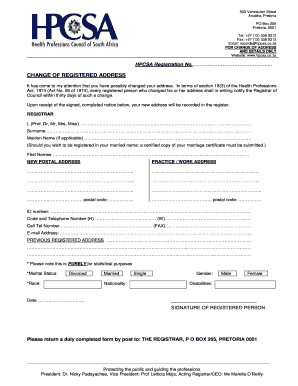
Filling out the Hpcsa Iregister is an essential step for registered individuals who need to update their address and personal details. This guide will walk you through the process clearly and comprehensively.

Follow the steps to complete the Hpcsa Iregister online

  1. Click ‘Get Form’ button to access the Hpcsa Iregister online and open it in the editor.
  2. Identify and complete the section for your HPCSA registration number. Accurately enter this number as it is crucial for identifying your record.
  3. In the section for personal information, fill in your title (e.g., Prof, Dr, Mr, Mrs, Miss) and complete your surname, maiden name (if applicable), and first names. Ensure all names are spelled correctly.
  4. Enter your new postal address and practice/work address clearly. Include all relevant details, ensuring that each line of your address is filled out to avoid confusion.
  5. Fill out your previous registered address to help the registrar update your records correctly. Maintain clarity to avoid any potential issues.
  6. Sign the form to confirm that all the information provided is accurate and true to the best of your knowledge.
  7. Review all information entered to ensure its accuracy and completeness. After verifying, save changes, download, print, or share the completed form as needed.

Take action now and complete your Hpcsa Iregister online to keep your information up to date.

Get form

Experience a faster way to fill out and sign forms on the web. Access the most extensive library of templates available.
Get form

Related content

Registering with the Health Professions Council of...
by CC van der Bijl · 2022 · Cited by 1 — Here are the steps and practical tips to...
Learn more
(PDF) Urology care in South Africa: A call for...
Health Professions Council of South Africa. HPCSA iRegister. 2023...
Learn more

Related links form

EMPLOYEE REFERRAL FORM - Jobing.com Replacement Form The Danger Assessment Temporary Food Permit Guidelines - Algoma Public Health

Questions & Answers

Get answers to your most pressing questions about US Legal Forms API.

Contact support

To register a private clinic in South Africa, you need to complete the registration process with the relevant health authorities and the HPCSA. This includes submitting your business plan, obtaining necessary permits, and ensuring compliance with health regulations. Following these steps will help you successfully establish your private clinic.

Yes, a nurse can own a clinic in South Africa, but they must comply with specific regulations set by the HPCSA. It is essential for the nurse to meet all legal requirements and have the appropriate qualifications. Additionally, partnering with a doctor can enhance the clinic's scope and services offered.

To start a private clinic in South Africa, you need to follow a structured approach. Begin by obtaining the necessary licenses and registering with the HPCSA. Develop a business plan that includes financial planning, staffing, and marketing strategies to attract patients to your clinic.

You can check if a doctor is registered in South Africa by visiting the HPCSA's official website. They provide an online verification tool where you can enter the doctor's details to confirm their registration status. This ensures that you are receiving care from a qualified professional in good standing.

Starting a private medical clinic requires careful planning and adherence to legal requirements. You should begin by drafting a business plan that outlines your services, target market, and financial projections. It’s also essential to secure the necessary licenses and HPCSA registration to ensure compliance and build trust with your patients.

To obtain an HPCSA certificate in South Africa, you must first complete the registration process that includes submitting your qualifications and passing relevant assessments. You can start this process online through the HPCSA website where guidelines and required documents are detailed. Once approved, you will receive your HPCSA certificate, allowing you to practice legally.

Yes, a foreigner can register with the HPCSA in South Africa, provided they have met certain qualifications and criteria. They must submit proof of their qualifications, undergo the relevant assessment, and demonstrate proficiency in English. This process allows foreign healthcare professionals to practice legally in South Africa.

In South Africa, a non-doctor cannot directly own a medical practice that provides healthcare services. However, they can invest in the practice or partner with a qualified medical doctor. To ensure compliance with the Health Professions Council of South Africa (HPCSA) regulations, it’s wise to understand the stipulations before entering into any agreements.

To verify a doctor's license in South Africa, you can use the HPCSA iRegister platform. This tool allows you to enter the doctor's details and confirm their registration status. Verifying a doctor's license helps ensure your safety and confidence in your healthcare provider.

Doctors in South Africa register with the Health Professions Council of South Africa (HPCSA). This process can be efficiently managed online through the HPCSA iRegister platform. If you're a medical professional, ensuring your registration is current is crucial for your practice.

Get This Form Now!

Use professional pre-built templates to fill in and sign documents online faster. Get access to thousands of forms.
Get form
If you believe that this page should be taken down, please follow our DMCA take down processhere.
Get Hpcsa Iregister
Get form
  • Adoption
  • Bankruptcy
  • Contractors
  • Divorce
  • Home Sales
  • Employment
  • Identity Theft
  • Incorporation
  • Landlord Tenant
  • Living Trust
  • Name Change
  • Personal Planning
  • Small Business
  • Wills & Estates
  • Packages A-Z
  • Affidavits
  • Bankruptcy
  • Bill of Sale
  • Corporate - LLC
  • Divorce
  • Employment
  • Identity Theft
  • Internet Technology
  • Landlord Tenant
  • Living Wills
  • Name Change
  • Power of Attorney
  • Real Estate
  • Small Estates
  • Wills
  • All Forms
  • Forms A-Z
  • Other Templates
  • Legal Hub
  • About Us
  • Help Portal
  • Legal Resources
  • Blog
  • Affiliates
  • Contact Us
  • Delete My Account
  • Site Map
  • Industries
  • Forms in Spanish
  • Localized Forms
  • State-specific Forms
  • Forms Kit
  • Real Estate Handbook
  • All Guides
  • Notarize
  • Incorporation services
  • For Consumers
  • For Small Business
  • For Attorneys
  • USLegal
  • FormsPass
  • pdfFiller
  • signNow
  • altaFlow
  • DocHub
  • Instapage
Form Packages
  • Adoption
  • Bankruptcy
  • Contractors
  • Divorce
  • Home Sales
  • Employment
  • Identity Theft
  • Incorporation
  • Landlord Tenant
  • Living Trust
  • Name Change
  • Personal Planning
  • Small Business
  • Wills & Estates
  • Packages A-Z
Form Categories
  • Affidavits
  • Bankruptcy
  • Bill of Sale
  • Corporate - LLC
  • Divorce
  • Employment
  • Identity Theft
  • Internet Technology
  • Landlord Tenant
  • Living Wills
  • Name Change
  • Power of Attorney
  • Real Estate
  • Small Estates
  • Wills
  • All Forms
  • Forms A-Z
  • Other Templates
Customer Service
  • Legal Hub
  • About Us
  • Help Portal
  • Legal Resources
  • Blog
  • Affiliates
  • Contact Us
  • Delete My Account
  • Site Map
  • Industries
  • Forms in Spanish
  • Localized Forms
  • State-specific Forms
  • Forms Kit
Legal Guides
  • Real Estate Handbook
  • All Guides
Prepared for you
  • Notarize
  • Incorporation services
Our Customers
  • For Consumers
  • For Small Business
  • For Attorneys
Our Sites
  • USLegal
  • FormsPass
  • pdfFiller
  • signNow
  • altaFlow
  • DocHub
  • Instapage
Social Media
Call us now toll free:
+1 833 426 79 33
As seen in:
© Copyright 1999-2026 airSlate Legal Forms, Inc. 17 Station Street, Ste. 203, Brookline, MA 02445
  • Your Privacy Choices
  • Terms of Service
  • Privacy Notice
  • Content Takedown Policy
  • Bug Bounty Program