Loading
Get Canada Manulife Af1042e 2018-2026
How it works
-

Open form follow the instructions
-

Easily sign the form with your finger
-

Send filled & signed form or save
How to fill out the Canada Manulife AF1042E online
This guide provides a comprehensive overview of how to properly fill out the Canada Manulife AF1042E form online. It is designed to assist users in navigating each section of the form with clarity and confidence.
Follow the steps to complete the form accurately.
- Click ‘Get Form’ button to access the form and open it for editing.
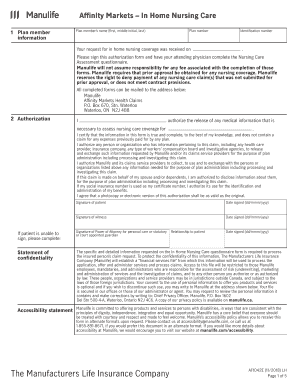
- Begin by entering the plan member information at the top of the form. Include the plan member's name (first, middle initial, last), plan number, request date for in-home nursing coverage, and identification number.
- In the authorization section, complete the authorization for the release of medical information by filling in the patient's name and certifying the accuracy of the information provided. Ensure to include the patient's signature along with the date signed.
- Proceed to fill in the patient information section. Input the patient's name, date of birth, address, and contact details. Specify the relationship to the subscriber if applicable.
- Address the involvement of any community organizations in the patient's care by selecting 'Yes' or 'No.' If yes, provide the name and services offered.
- Detail the hours of care provided, types of caregivers, and contact information for the home care coordinator or case manager.
- In the medical questionnaire section, the attending physician must fill out the patient's primary and secondary diagnosis, as well as medication details, prognosis, and level of care requested.
- Complete the functional assessment part where the physician must describe mobility, continence, cognitive function, and any special needs of the patient.
- In case the patient has any additional needs or conditions, provide relevant information in the space provided at the end of the functional assessment.
- Finally, the physician must sign and date the document. Ensure to provide the physician's contact information and office stamp if available.
- Once the form is fully completed, users can save changes, download, print, or share the form as needed.
Complete your documents online for a smooth and efficient process.
You can find your Manulife policy number on the insurance card issued by Manulife or within your policy documents. Additionally, logging into your online account or the mobile app provides quick access. It's important to keep your Canada Manulife AF1042E policy number handy for any insurance-related inquiries.