Loading
Get Ga Dol Dol-408 2019-2026
How it works
-

Open form follow the instructions
-

Easily sign the form with your finger
-

Send filled & signed form or save
How to fill out the GA DoL DOL-408 online
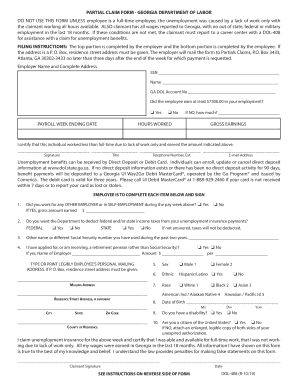
The GA DoL DOL-408 form is essential for employees seeking partial unemployment benefits in Georgia. This guide provides clear and supportive instructions on how to accurately complete this form online, ensuring a smooth submission process.
Follow the steps to successfully complete your DOL-408 form
- Press the ‘Get Form’ button to obtain the form and access it in your preferred online format.
- Enter the employer's name and complete address in the designated fields at the top of the form.
- Provide the employee's Social Security number to ensure proper identification.
- Fill in the employee's name as it appears officially.
- Input the GA DOL account number associated with the employer for effective processing.
- Indicate whether the employee earned at least $7,300 during their employment. If 'No,' specify the amount earned.
- Enter the payroll week ending date for which the claim is being filed.
- Document the hours worked and gross earnings for that week.
- The employer must sign the form, providing their title, telephone number with extension, and email address.
- The employee must complete the following sections, answering whether they worked for any other employer or engaged in self-employment during the pay week.
- Specify if the employee wishes to have federal and/or state income taxes deducted from their unemployment insurance payments.
- Enter any other name or different Social Security number the employee has used within the past two years, if applicable.
- Indicate whether the employee is receiving a retirement pension and provide the corresponding employer name and amount.
- Complete the personal mailing address accurately; if a P.O. Box is used, the residence street address must also be provided.
- Choose the employee’s sex and complete the ethnic and racial identification fields.
- Enter the employee's date of birth, ensuring to provide the correct month, day, and year.
- Indicate whether the employee has a disability and confirm their citizenship status.
- The employee must sign and date the form, certifying the accuracy of the provided information.
- Upon completion, users can save changes, download, print, or share the form as necessary.
Complete your DOL-408 form online today for efficient processing of your unemployment benefits.
To speak with a representative at the Georgia Department of Labor, call their customer service number. They're available to help answer your questions regarding unemployment benefits and the GA DoL DOL-408 forms. You can also visit their office for direct assistance if necessary.