
Open form follow the instructions

Easily sign the form with your finger

Send filled & signed form or save
How to fill out the NC BCBS Form BE236 online
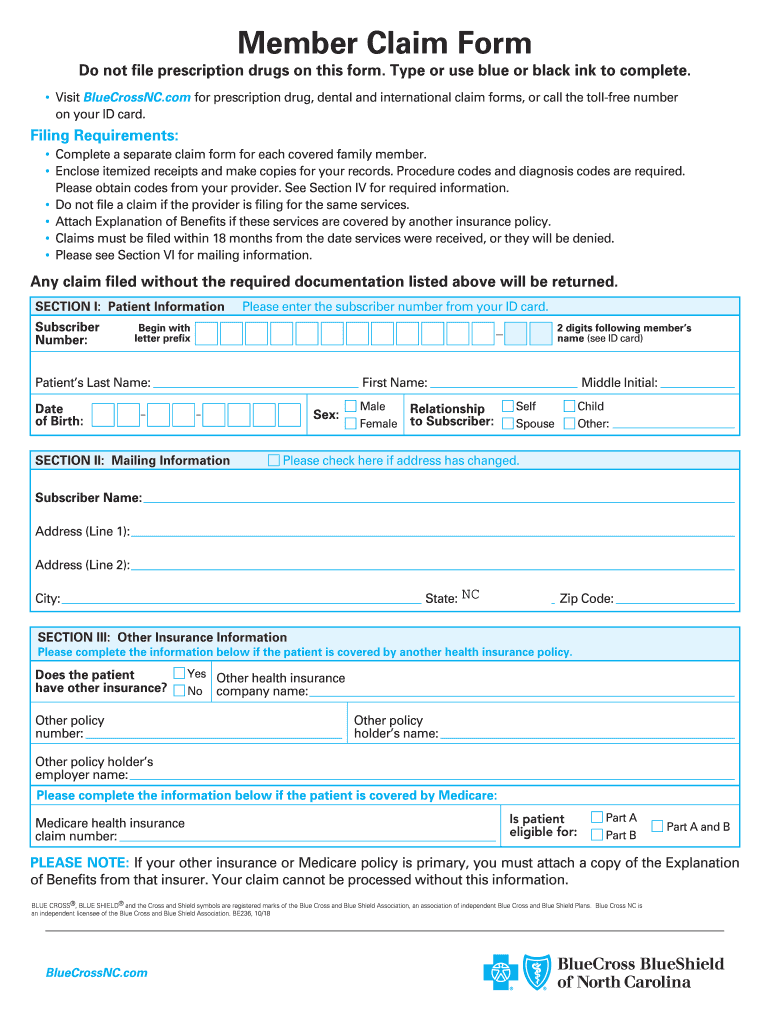
Filling out the NC BCBS Form BE236 online can streamline the process of submitting your claims for medical services. This guide will provide you with clear steps to ensure your form is completed accurately and efficiently.
Follow the steps to complete the NC BCBS Form BE236 online.
- Click ‘Get Form’ button to obtain the form and open it in the online editor.
- In Section I, enter the patient information. Fill in the subscriber number from your ID card, followed by the patient’s last name, first name, middle initial, date of birth, and gender selection.
- Move to Section II for mailing information. Provide the subscriber's name, complete address including address line 1, address line 2 if needed, city, state (NC), and zip code.
- In Section III, if the patient has additional insurance, select 'Yes' and fill in the other policy number, company name, the name of the policy holder, and the employer's name. If applicable, provide Medicare information, including the Medicare health insurance claim number and eligibility for Parts A or B.
- Proceed to Section IV, where you will indicate the services and supplies to be considered for reimbursement. Enter the date of service, procedure codes, and a brief description of the services or supplies provided.
- In Section V, provide details for private duty nursing services, including date of service, diagnosis codes, charges, the name of the nurse along with their license number, hours worked, and total charge.
- Finally, review Section VI, ensuring all required documentation is attached. Confirm you used blue or black ink to complete the form, attached itemized receipts and Explanation of Benefits where applicable. Provide your signature, date, and daytime phone number.
- Once all information is complete and verified, save your changes. You can then download, print, or share the form based on your needs.
Complete your documentation effectively by filing the NC BCBS Form BE236 online today.
Experience a faster way to fill out and sign forms on the web. Access the most extensive library of templates available.
Related content
Complete a separate claim form for each provider. • Attached receipts must include...
SM1 Mark of Blue Cross and Blue Shield of North Carolina. BE236, 12/07 ... I certify that...
Get answers to your most pressing questions about US Legal Forms API.
How do I submit a claim to Blue Cross Blue Shield of NC?
To submit a claim to Blue Cross Blue Shield of NC, fill out the insurance claim form with all required information. You may submit the form through the online portal or by mailing it to the claims department. Always follow up to ensure your claim has been processed correctly.
Can I access my 1095-A form online?
Yes, accessing your 1095-A form online is quite easy. By logging into your Blue Cross Blue Shield NC member account, you can find the NC BCBS Form BE236 in the documents section. This feature allows you to manage your insurance paperwork conveniently from home.
How do I get my 1095 A form online for Blue Cross NC?
You can retrieve your 1095 A form online by accessing your member account on the Blue Cross Blue Shield NC website. After logging in, look for the section dedicated to tax documents. The NC BCBS Form BE236 will be available for you to view and print quickly.
How do I submit an insurance claim form?
To submit an insurance claim form, first, complete the necessary claim form accurately. Then, send it to Blue Cross Blue Shield NC through the designated submission methods, such as mail or online claim submission. Ensure that you retain copies for your records and reference your claim number upon submission.
Does Blue Cross have 1095-A?
Yes, Blue Cross Blue Shield offers the 1095-A form. This form provides important tax information about your health insurance coverage. The NC BCBS Form BE236 is specifically designed for members in North Carolina to help with tax filing.
How do I get my 1095-A from Blue Cross Blue Shield NC?
You can access your 1095-A from Blue Cross Blue Shield NC through your online member account. Log in with your account details, and find the tax documents section. The NC BCBS Form BE236 will be listed among your available documents, ensuring easy access.
How do I get my Blue Cross Blue Shield Form 1095-A online?
To obtain your Blue Cross Blue Shield Form 1095-A online, simply visit the official Blue Cross Blue Shield NC website. You will need to log into your member account with your credentials. Once logged in, navigate to the documents section where the NC BCBS Form BE236 should be available for download.
How to fill out a life insurance claim form?
To fill out a life insurance claim form, you need to clearly document the policy number, the insured individual's details, and a certified copy of the death certificate. With the NC BCBS Form BE236, ensure all information matches the insurance records. This attention to detail can significantly facilitate the claims process.
How do I fill out a health insurance claim form?
When filling out a health insurance claim form, accuracy is key. Using the NC BCBS Form BE236, ensure you provide all requested information about treatments received and personal details. By being thorough, you help ensure that your claim is processed quickly and efficiently.
What is the first step in completing a claim form?
The first step in completing a claim form is to read the instructions carefully to understand the requirements. For the NC BCBS Form BE236, gather all necessary documents including receipts and provider statements before you begin filling it out. An organized approach minimizes errors and enhances your submission.
Use professional pre-built templates to fill in and sign documents online faster. Get access to thousands of forms.
If you believe that this page should be taken down, please follow our DMCA take down process here.
This form is available in several versions. Select the version you need from the drop-down list below.