
Open form follow the instructions

Easily sign the form with your finger

Send filled & signed form or save
How to fill out the Liberty Mutual PLA-2005142 online
This guide provides a clear and supportive approach to completing the Liberty Mutual PLA-2005142 form online. Whether you are making a contract change request or updating personal information, following these steps will help ensure a smooth process.
Follow the steps to complete the Liberty Mutual PLA-2005142 form carefully.
- Click ‘Get Form’ button to obtain the form and open it for editing.
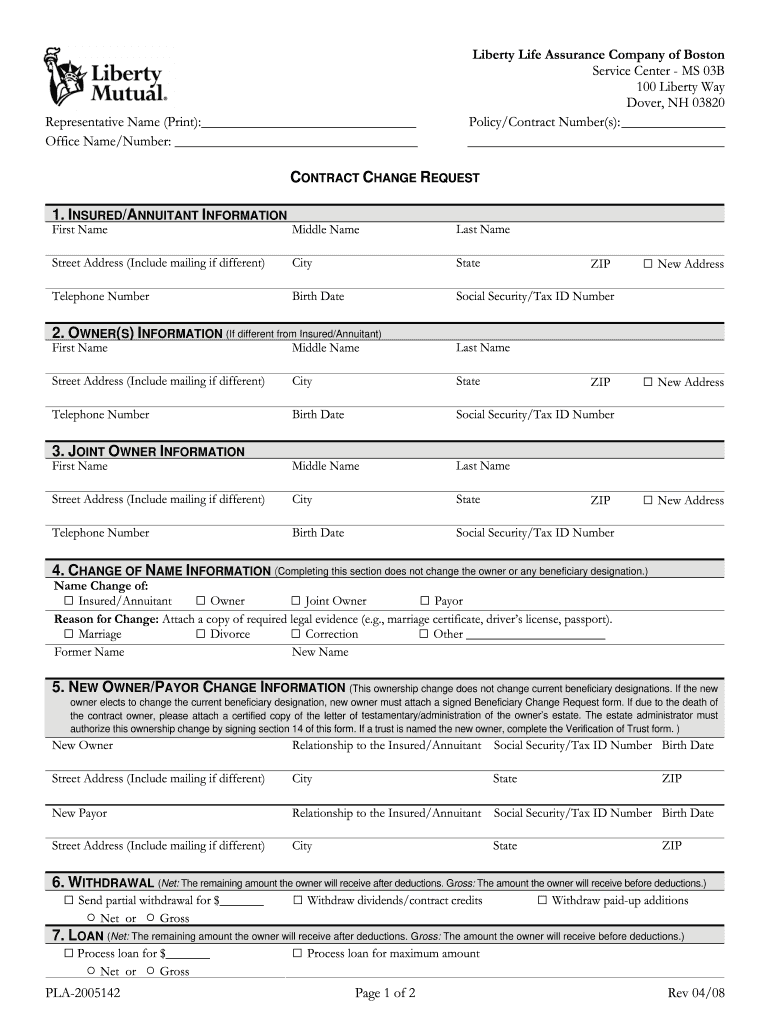
- In the 'Insured/Annuitant Information' section, fill out the first name, middle name, last name, street address, city, state, telephone number, birth date, and Social Security/Tax ID number. Ensure all information is accurate and up to date.
- If the owner is different from the insured/annuitant, complete the 'Owner(s) Information' section with the required details. Repeat the same steps as in step-2.
- For 'Joint Owner Information', input the necessary details for any additional owner, if applicable.
- If there is a name change, indicate this in the 'Change of Name Information' section. Select the reason for the change and remember to attach any required legal documentation.
- To designate a new owner or payor, complete the 'New Owner/Payor Change Information' section with all relevant details, including relationship to the insured/annuitant.
- If you wish to withdraw funds, specify the type of withdrawal (partial, dividends, or paid-up additions) in the 'Withdrawal' section and include the withdrawal amount.
- In the 'Loan' section, indicate the loan amount you wish to process and whether it is net or gross.
- For the 'Surrender/Right to Return' section, check the box that applies to your situation.
- Complete the 'Tax Withholding Information' section based on your preferences regarding withholding federal income tax from the proceeds.
- Include any other requests or information in the 'Other Requests/Information' section, if necessary.
- Review the 'Authorization' section carefully, then sign and print your name, along with the date.
- Ensure to complete the 'Social Security/Tax ID Number (TIN) Certification' section as required.
- Gather signatures from all necessary parties at the end of the form, making sure each person prints their name and the date.
- Once all sections are completed and reviewed, save your changes, download, print, or share the form as required.
Complete your Liberty Mutual PLA-2005142 form online today for a quick and efficient process.
Experience a faster way to fill out and sign forms on the web. Access the most extensive library of templates available.
Related content
Everest Security Insurance Company. 20001425. 22110. Everett Cash Mutual Insurance Company...
by JC Davis · 2025 — The relevant Article of the Declaration of Rights reads,. “The...
Get answers to your most pressing questions about US Legal Forms API.
What is the Liberty Mutual ID code?
The Liberty Mutual ID code is a specific identifier tied to your insurance policy, including your Liberty Mutual PLA-2005142 coverage. You can find this ID code in your policy documents or by logging into your Liberty Mutual account. If you're unable to find it, Liberty Mutual's customer service team is ready to assist you in retrieving it.
How to get proof of insurance from Liberty Mutual?
To procure proof of insurance for your Liberty Mutual PLA-2005142 policy, you can access your documents through the Liberty Mutual online portal. You can conveniently download or print your proof of insurance from there. If you need a physical copy sent to you, contacting customer service will ensure you receive it promptly.
What is the 5 digit code for Liberty Mutual?
The 5 digit code typically used for Liberty Mutual is unique to your policy. To find your specific code related to Liberty Mutual PLA-2005142, check your policy documents or your online account. If you're having trouble, contacting Liberty Mutual customer service will help you retrieve your 5 digit code swiftly.
How to get a declaration page from Liberty Mutual?
To obtain a declaration page for your Liberty Mutual PLA-2005142 policy, you can log in to your Liberty Mutual online account. Once logged in, navigate to the 'Documents' section. If you prefer, you can also call customer service for assistance in getting your declaration page sent directly to your email or home address.
How long after an accident can you file with insurance?
Most insurance providers, including Liberty Mutual, allow you to file a claim for a specific time after an accident, which can sometimes extend to years. However, it is highly recommended to report the incident as soon as you can, especially with Liberty Mutual PLA-2005142. This not only helps you comply with your policy but also enhances your chance of receiving timely assistance.
How do I file a preferred mutual claim?
Filing a preferred mutual claim typically involves contacting your insurance agent or using an online claims platform. If you have Liberty Mutual PLA-2005142, ensure you have the necessary details and documentation ready. This enables you to describe the incident effectively, which will assist in expediting your claim.
How long after an accident can you file a claim Liberty Mutual?
You can file a claim with Liberty Mutual after an accident for a certain period, often dictated by state law. It’s wise to use your Liberty Mutual PLA-2005142 policy to guide your decisions and act quickly, ideally within a few days post-accident. Early filing tends to streamline the claims process and improve your chances for a favorable outcome.
Is there a time limit to make an insurance claim?
Yes, there is a time limit to make an insurance claim, which can vary based on your state and the specifics of your policy. For Liberty Mutual PLA-2005142, it's essential to reference your policy documents, as they outline the specific time limits you must adhere to. Generally, sooner is better to ensure you do not miss out on your rights.
How long after an accident can you file a claim with Liberty Mutual?
You typically have a reasonable timeframe to file a claim with Liberty Mutual, even up to several years after an accident, depending on the circumstances and state laws. However, it is advisable to report the claim as soon as possible to leverage your Liberty Mutual PLA-2005142 benefits fully. Prompt reporting can lead to quicker investigations and resolutions.
How to file a claim against Liberty Mutual?
Filing a claim against Liberty Mutual is similar to submitting any claim, as you can do this online or by phone. Users with Liberty Mutual PLA-2005142 can document the incident thoroughly, including details about the event and any involved parties. This documentation helps ensure a smooth process and faster resolution.
Use professional pre-built templates to fill in and sign documents online faster. Get access to thousands of forms.
If you believe that this page should be taken down, please follow our DMCA take down process here.
This form is available in several versions. Select the version you need from the drop-down list below.