Loading
Get Canada Imm 5476 E 2015
How it works
-

Open form follow the instructions
-

Easily sign the form with your finger
-

Send filled & signed form or save
How to fill out the Canada IMM 5476 E online
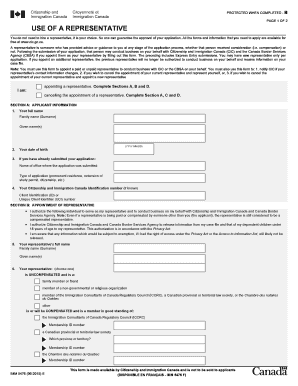
The Canada IMM 5476 E form is essential for appointing a representative to act on your behalf with Citizenship and Immigration Canada (CIC) and Canada Border Services Agency (CBSA). This guide provides a step-by-step approach to filling out the form online, ensuring that you understand each component clearly and completely.
Follow the steps to successfully complete your IMM 5476 E form online.
- To begin, press the ‘Get Form’ button to access the IMM 5476 E document. This will open the form in your online editor, ready for you to fill out.
- In Section A, provide your applicant information. Fill in your full name, including your family name and given names, and enter your date of birth in the format YYYY-MM-DD.
- If you have previously submitted an application, indicate the name of the office where it was submitted and specify the type of application, such as permanent residence or extension of study permit.
- Include your Citizenship and Immigration Canada Identification number, if known, as well as your Client Identification number or Unique Client Identifier (UCI) number.
- Proceed to Section B, where you will authorize your representative. Enter their full name, noting if they are compensated or uncompensated, and provide the necessary details based on their status.
- If your representative is compensated, ensure you complete the section pertaining to their membership with the Immigration Consultants of Canada Regulatory Council, a Canadian provincial law society, or the Chambre des notaires du Québec.
- Fill out the representative's contact information, including their mailing address, telephone number, fax number, and email address. Authorize CIC to transmit information to the provided email, if applicable.
- Your representative must sign and date the form to confirm their declaration of truthfulness regarding the information provided in Section B.
- If you need to cancel the appointment of your current representative, complete Section C with their full name and any relevant organizational details.
- In Section D, make your declaration by signing the form and providing the date. If applicable, include the signature and date from your spouse or common-law partner for sponsorship applications.
- Review the entire form for completeness and accuracy, then save your changes, download the form, print it, or share it as required.
Complete your Canada IMM 5476 E form online today to ensure your representative is appointed correctly.
Get form
Experience a faster way to fill out and sign forms on the web. Access the most extensive library of templates available.
To view your biometrics appointment details, log into your account on the IRCC website. Your appointment information should be listed under the relevant section for tracking your application status. Ensure that you have your Canada IMM 5476 E form handy as it may contain important reference information.
Get This Form Now!
Use professional pre-built templates to fill in and sign documents online faster. Get access to thousands of forms.