Loading
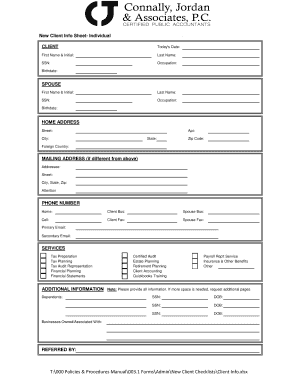
Get Connally Jordan & Associates New Client Info Sheet - Individual
How it works
-

Open form follow the instructions
-

Easily sign the form with your finger
-

Send filled & signed form or save
How to fill out the Connally Jordan & Associates New Client Info Sheet - Individual online
Completing the Connally Jordan & Associates New Client Info Sheet - Individual online is a straightforward process that allows you to provide essential information efficiently. This guide will help you navigate each section of the form to ensure all necessary details are accurately filled out.
Follow the steps to fill out the form accurately and efficiently.
- Click ‘Get Form’ button to obtain the form and open it in the editor.
- Start by entering today’s date in the designated field to indicate when you are completing the form.
- Provide your first name and initial, followed by your last name, to ensure accurate identification.
- Enter your Social Security Number (SSN), occupation, and birth date in the corresponding fields.
- If you have a spouse, fill in their first name and initial, last name, SSN, occupation, and birth date in the provided spousal section.
- Complete the home address section by providing your street address, apartment number if applicable, city, state, and zip code. If you reside in a foreign country, specify this as well.
- If your mailing address differs from your home address, indicate this and fill in the addressee, street, city, state, and zip in the mailing address section.
- Provide your phone numbers: home, business (for both you and your spouse), cell, and fax numbers if available. Additionally, include primary and secondary email addresses.
- Select the services you require by marking the appropriate options, including tax preparation, planning, audit representation, financial planning, or financial statements.
- In the additional information section, list any dependents, services like certified audit, estate planning, retirement planning, and any other relevant details.
- If you own or are associated with any businesses, provide that information in the designated area.
- Finally, ensure that you have included the name of the person or entity who referred you, if applicable.
- Review all filled-out fields for accuracy. If you require more space for any information, request additional pages.
- Once all information is complete, you can choose to save changes, download the form, print it, or share it as needed.
Complete your documents online today for a seamless experience.