Loading

Open form follow the instructions

Easily sign the form with your finger

Send filled & signed form or save
How to fill out the Staffmark TRANS 177 online
Filling out the Staffmark TRANS 177 form online can streamline your timesheet submission process. This guide provides step-by-step instructions to help you accurately complete the form and ensure timely processing of your timesheet.
Follow the steps to successfully fill out the Staffmark TRANS 177 online.
- Click the ‘Get Form’ button to access the Staffmark TRANS 177 form. This will open the document and allow you to begin filling it out.
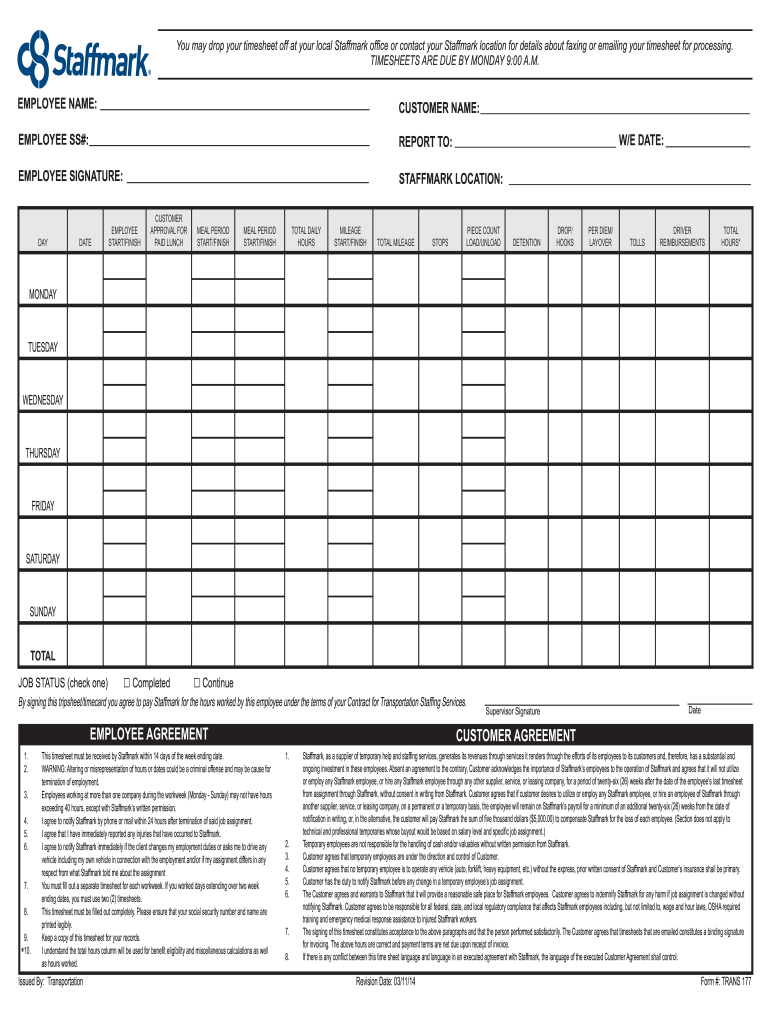
- Begin by entering your personal information. This includes your name, Social Security number (SS#), and the specific Staffmark location relevant to your employment.
- Fill in the 'Customer Name' and your respective 'Report To' supervisor information, ensuring these details are accurate.
- In the 'Day' and 'Date' sections, input the work days and corresponding dates for the week your timesheet covers. Be sure to enter all days you worked from Monday to Sunday.
- Record your start and finish times for each workday in the 'Employee Start/Finish' section. Ensure that the hours are documented clearly to avoid any discrepancies.
- In the 'Meal Period Start/Finish' fields, indicate your meal breaks for each day worked. Note the specific times accurately.
- Calculate total daily hours worked for each day and enter these totals in the 'Total Daily Hours' field.
- If applicable, provide any mileage details in the respective 'Mileage Start/Finish' and 'Total Mileage' sections. Be sure to document all relevant stops.
- Complete the 'Piece Count Load/Unload', 'Detention', 'Drop/Hooks', 'Per Diem/Layover', and 'Tolls' sections with appropriate details regarding your work activities and reimbursements.
- Once all necessary fields have been filled in, review your entries for accuracy. It is crucial that all information is legible and complete.
- Finally, indicate your job status and sign the form in the 'Employee Signature' field. Make sure to keep a copy of the submitted timesheet for your records.
- After ensuring that all required fields are filled and checked, you can save changes, download a copy, print the timesheet, or share it as needed.
Complete your Staffmark TRANS 177 form online today to ensure timely processing of your timesheet!
Experience a faster way to fill out and sign forms on the web. Access the most extensive library of templates available.
Related content
Staffmark Investment LLC, one of the nation's largest commercial staffing companies, will...
by NQ Cuttino · 2021 · Cited by 44 — It identifies three potentially applicable legal...
Mar 30, 2010 — Officer for Staffmark, Inc., a temporary staffing company where he was...
Get answers to your most pressing questions about US Legal Forms API.
What are the subsidiaries of Staffmark Investment LLC?
Staffmark Investment LLC has several subsidiaries that specialize in different sectors of staffing and workforce management. Each subsidiary operates with the goal of delivering high-quality services under the umbrella of Staffmark TRANS 177. This structured approach enables Staffmark to cover a broad spectrum of industries effectively. The subsidiaries work collaboratively to provide comprehensive solutions for both employers and employees.
What is a staffmark group?
The Staffmark group is an organization that encompasses several key staffing agencies and brands. It operates in diverse sectors, providing tailored staffing solutions that meet various business demands. As part of the Staffmark TRANS 177 network, the group aims to connect skilled workers with employers, creating a seamless hiring process. This group focuses on enhancing workforce management across a range of industries.
What is the new name for Staffmark?
Recently, Staffmark has undergone a rebranding initiative to better reflect its evolving services. The new name represents an expanded vision and commitment to excellence in staffing solutions. This change aligns with the innovative strategies at the core of Staffmark TRANS 177, enhancing value for clients and candidates alike. The rebranding marks a bright new chapter in its service offerings.
What brands are part of the Staffmark group?
The Staffmark group includes several well-known brands that operate under its umbrella. These brands provide a variety of staffing solutions tailored to meet specific industry needs. With a strong focus on trusted services, the Staffmark group ensures clients have access to the best talents available. Every brand under Staffmark enhances the overall effectiveness of the Staffmark TRANS 177 network.
How do I get my W-2 from Staffmark?
To obtain your W-2 from Staffmark, you will need to visit the Staffmark online portal. Once there, log in to your account where you can access your tax documents, including your W-2. In case you encounter any difficulties, reaching out to the Staffmark customer service team can provide additional assistance in retrieving your W-2 easily.
Who is Staffmark payroll provider?
For those wondering about the Staffmark payroll provider, it is a trusted entity that specializes in managing payroll operations. This partnership enables Staffmark to deliver reliable payment services to employees, enhancing overall employee satisfaction. With the expertise of the payroll provider, Staffmark can maintain precise financial records and adhere to compliance requirements.
Who is the Staffmark payroll provider?
The payroll provider for Staffmark is a reliable partner that ensures employees receive accurate and timely compensation. They manage payroll processing, tax calculations, and other financial responsibilities for Staffmark. By using a dedicated payroll provider, Staffmark can focus on its core services while ensuring compliance with payroll regulations.
What is the phone number for Staffmark employment verification?
To contact the employment verification department for Staffmark TRANS 177, please use our dedicated phone line. Our knowledgeable staff is available to assist with verification requests promptly and efficiently. We aim to support you throughout the process, ensuring smooth communication.
How does Staffmark verify employment?
Staffmark TRANS 177 verifies employment through a structured process that includes documentation review and direct communication with previous employers. We ensure the verification process is thorough and secure, providing peace of mind for all parties involved. Should you need assistance during this verification, we are here to help.
What is the phone number for Staffmark corporate?
If you need to contact Staffmark corporate, please call our main phone number for Staffmark TRANS 177. Our corporate team is equipped to assist you with general inquiries and provide guidance on various services we offer. We are always here to help you succeed.
Use professional pre-built templates to fill in and sign documents online faster. Get access to thousands of forms.
If you believe that this page should be taken down, please follow our DMCA take down process here.