Loading
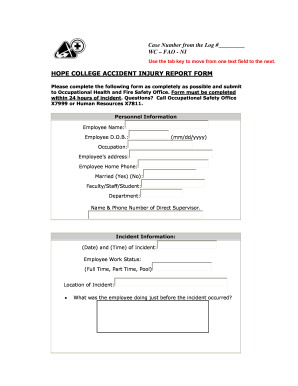
Get Hope College Accident Injury Report Form 2008
How it works
-

Open form follow the instructions
-

Easily sign the form with your finger
-

Send filled & signed form or save
How to fill out the Hope College Accident Injury Report Form online
Filing an accident injury report promptly is crucial for ensuring proper documentation of incidents at Hope College. This guide will walk you through the step-by-step process of completing the Hope College Accident Injury Report Form online, ensuring you provide all necessary information accurately and efficiently.
Follow the steps to complete the report accurately.
- Click ‘Get Form’ button to obtain the Hope College Accident Injury Report Form and open it in the editor.
- Begin with the personnel information section. Fill in the employee's name, date of birth in mm/dd/yyyy format, occupation, address, home phone number, marital status, affiliation (faculty, staff, or student), department, and the name and phone number of the direct supervisor.
- In the incident information section, provide the date and time of the incident, the employee's work status (either full-time, part-time, or pool), and the specific location of the incident.
- Answer the questions about the incident: Describe what the employee was doing before the incident, how the injury or illness occurred, which part of the body was affected, identify the object or substance that caused the injury, mention potential causes for the incident, and state the actions taken to prevent recurrence.
- Indicate whether the employee will lose time from work on days following the incident and whether they will be on restricted or light duty. Provide approximate dates if applicable.
- For the type of incident, check all relevant boxes that apply, such as slip/trip/fall, chemical exposure, or any other incidents as listed.
- In the medical action section, indicate what medical treatment has been received or is planned. Fill in the names of healthcare facilities if applicable.
- Complete the supplemental information section with the date the supervisor was informed of the incident, the employee's email address, and the date of the report.
- If applicable, disclose if the employee has a second job and provide the employer's name.
- Print a copy of the completed form for your records using your browser's print function. Ensure the employee also receives a copy of the report.
- Finally, save the completed form and attach it to an email. Send to reilly@hope.edu.
Ensure your report is completed accurately and submitted promptly for optimal processing.
Get form
Experience a faster way to fill out and sign forms on the web. Access the most extensive library of templates available.
To write an incident report example, focus on precision and clarity in your description. Outline the incident chronologically, providing context around the event and involved parties. Using a consistent format enhances readability and understanding. The Hope College Accident Injury Report Form can be an effective framework for your example.
Get This Form Now!
Use professional pre-built templates to fill in and sign documents online faster. Get access to thousands of forms.
Industry-leading security and compliance
US Legal Forms protects your data by complying with industry-specific security standards.
-
In businnes since 199725+ years providing professional legal documents.
-
Accredited businessGuarantees that a business meets BBB accreditation standards in the US and Canada.
-
Secured by BraintreeValidated Level 1 PCI DSS compliant payment gateway that accepts most major credit and debit card brands from across the globe.