Loading
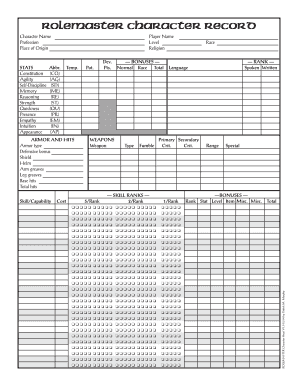
Get Mad Irishman Productions Rolemaster Character Record
How it works
-

Open form follow the instructions
-

Easily sign the form with your finger
-

Send filled & signed form or save
How to fill out the Mad Irishman Productions Rolemaster Character Record online
Filling out the Mad Irishman Productions Rolemaster Character Record online is an essential step for gamers looking to create their unique characters. This guide provides clear instructions to help users navigate the form effectively, ensuring all necessary information is accurately recorded.
Follow the steps to complete your Rolemaster Character Record efficiently
- Click ‘Get Form’ button to obtain the form and open it in your chosen online editor.
- Start by filling out the 'Stats' section. Enter values for each attribute such as Constitution, Agility, Self-Discipline, Memory, Reasoning, Strength, Quickness, Presence, Empathy, Intuition, and Appearance. Use the corresponding abbreviations (CO, AG, SD, ME, RE, ST, QU, PR, EM, IN, AP) for reference.
- Move to the 'Player Information' section. Input your Player Name, selected Level, and choose a Religion for your character. Ensure all fields are accurately filled.
- In the 'Armor and Hits' section, specify the Armor Type and Defensive Bonus. Add details for Shield, Helm, Arm Greaves, and Leg Greaves if applicable. Calculate and input Base Hits and Total Hits for your character.
- Fill out the 'Weapons' section by listing each weapon your character will use. Utilize the provided checkboxes to clarify rankings for each weapon, as indicated.
- In the 'Skill Ranks' section, note down your character's skill ratings using the 2/Rank system. Make sure to check the boxes corresponding to their ranks accurately.
- Include personal information such as Character Name, Profession, Place of Origin, Date of Birth, Age, Height, Weight, Hair color, Eye color, and Vision details in the relevant sections.
- Document your character's Personality and Background/Personal History in the appropriate fields to provide depth to your character.
- In the 'Equipment' section, list all items your character carries, along with their Locations. Calculate the Total Weight Carried and the Encumbrance Penalty, if applicable.
- Lastly, ensure that all fields are filled out completely, review your entries for accuracy, and then proceed to save your changes. You can also download, print, or share the form as needed.
Start creating your character by filling out the Mad Irishman Productions Rolemaster Character Record online today.