Loading
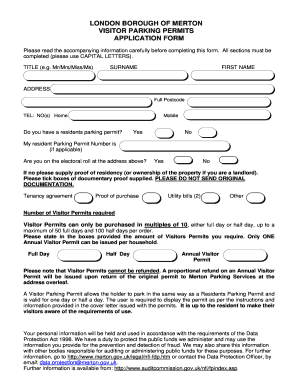
Get Merton Parking Permit
How it works
-

Open form follow the instructions
-

Easily sign the form with your finger
-

Send filled & signed form or save
How to fill out the Merton Parking Permit online
Filling out the Merton Parking Permit application online can streamline your process of securing parking for visitors. This guide will provide a clear overview and detailed instructions to assist you in completing the form accurately.
Follow the steps to successfully complete your application.
- Click ‘Get Form’ button to obtain the Merton Parking Permit application form and open it for editing.
- Begin by filling in your title, surname, and first name in the designated fields. Ensure that you use capital letters as instructed.
- Provide your full address including the postcode. Make sure this matches your official residence.
- Enter your home and mobile telephone numbers in the respective fields for contact purposes.
- Indicate whether you currently hold a resident parking permit by selecting 'Yes' or 'No'. If applicable, enter your resident parking permit number.
- Confirm your electoral roll status at your provided address by indicating 'Yes' or 'No'. If you select 'No', include proof of residency by selecting the appropriate documents you will provide.
- Specify the number of visitor permits you require. You may choose full day or half day permits, noting the limits on purchases.
- Complete the declaration section by signing your name, writing your full name in block capitals, and providing the date of the application.
- Provide payment details, indicating how you wish to pay (cheque or credit card). If paying by card, fill in the necessary card information accurately.
- Review all information for accuracy before submitting the form. Save your changes, then download, print, or share the completed application as required.
Start filling out your Merton Parking Permit application online today to ensure hassle-free parking for your visitors.
default. addObserver(<observer: Any>, selector: <Selector>, name: <NSNotification.Name?>, object: <Any?>) NotificationCenter provides an addObserver() method to receive an event. To listen to an event, you have to add an observer to the target notification name.