
Open form follow the instructions

Easily sign the form with your finger

Send filled & signed form or save
How to fill out the PH Pagibig FPF060 online
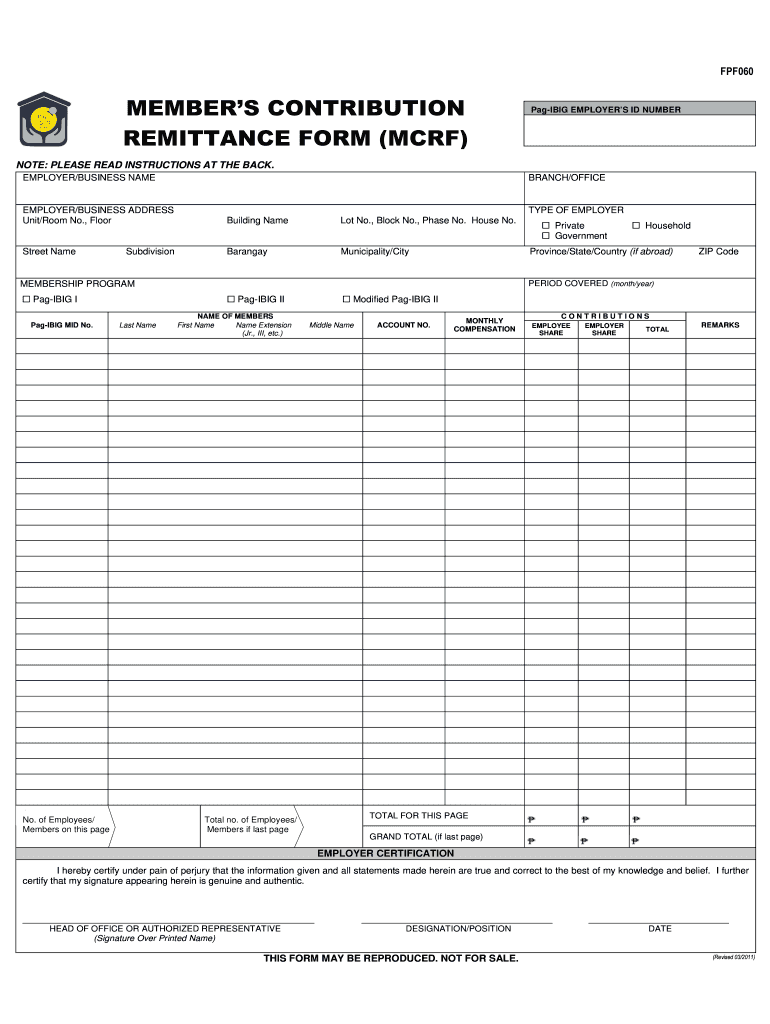
This guide provides a step-by-step approach to completing the PH Pagibig FPF060 online. Designed for users of all experience levels, it simplifies the process of filling out the Member's Contribution Remittance Form.
Follow the steps to complete the PH Pagibig FPF060 form online.
- Click ‘Get Form’ button to obtain the form and open it in the editor.
- Fill in the Pag-IBIG Employer’s ID number, which is assigned to your business for identification purposes.
- Enter the employer or business name as registered with the Department of Trade and Industry or the Securities and Exchange Commission.
- Specify the branch or office assignment to indicate where your remitting employer, business, or company is assigned.
- Provide the complete employer or business address. Include unit/room number, floor, building name, lot number, street name, barangay, municipality or city, province, and ZIP code.
- Indicate the type of employer. Choose whether your organization is categorized as private, government, or household.
- Select the membership program applicable to your remittance: Pag-IBIG I, Pag-IBIG II, or Modified Pag-IBIG II.
- Specify the period covered by the form, using the month and year for which contributions are being remitted.
- Enter the Pag-IBIG Membership Identification number associated with each member.
- List the names of members, including last name, first name, name extension (if any), and middle name.
- If applicable, include the account number for members with multiple Modified Pag-IBIG II accounts.
- Document the monthly compensation, detailing the basic salary and allowances received each month.
- Enter the amounts for employee share and employer share contributions. Ensure that these are calculated correctly without rounding off.
- Fill in the total contributions amount, which includes both employee and employer shares.
- Utilize the remarks section to report any changes in the employment status of members, following the required format.
- Indicate the total number of employees listed on this page. If this is the last page, also include the grand total.
- Complete the employer certification, including the signature of the head of office or authorized representative, title, and date.
- Once all sections are accurately filled out, save your changes. You can then download, print, or share the completed form as needed.
Complete your PH Pagibig FPF060 form online today to ensure timely remittance of contributions.
Experience a faster way to fill out and sign forms on the web. Access the most extensive library of templates available.
Related content
Sending out the payroll form is one of the duties of the human resource ... 1 Remittance...
Get answers to your most pressing questions about US Legal Forms API.
How to get MDF Pag-IBIG online for existing members?
As an existing member, you can access your MDF online by logging into your Pag-IBIG account. From there, you can view or download your updated form with ease. This access keeps your records current and ready for any necessary transactions. Additionally, if you need further help, uslegalforms can support you throughout the process.
How to fill out Pag-IBIG MDF form?
Filling out the Pag-IBIG MDF form requires personal information including your name, address, and employment details. You can fill it out online or print it for in-person submission. Make sure to check every detail for mistakes. If you prefer, uslegalforms has options to simplify this process and ensure you haven’t missed anything.
How to fill MDF form Pag-IBIG?
Filling out the MDF form for Pag-IBIG requires you to gather the necessary information, such as your personal data and employment details. The form can be completed online or printed for manual submission. Ensure you double-check all entries for accuracy. For a more guided experience, uslegalforms offers templates and support tailored to your needs.
How to get mid number in Pag-IBIG online?
To obtain your membership identification number (MID) online, access the Pag-IBIG website and use their MID retrieval tool. You’ll need personal information to verify your identity. This process is quick, allowing you to retrieve your MID without hassle. If you encounter any difficulties, uslegalforms is ready to help you every step of the way.
How do I update my MDF information online?
Updating your Membership Data Form (MDF) information online is straightforward. Log into your Pag-IBIG account and navigate to the MDF section. Here, you can edit your details as needed, ensuring all information is current. For any challenges you might face, uslegalforms can provide the support you need.
How to fill up Pag-IBIG membership form online?
To fill up the Pag-IBIG membership form online, visit the official Pag-IBIG website. You’ll find a downloadable form along with clear instructions on completing it. Ensure that you provide accurate information to avoid any delays. If you need assistance, consider uslegalforms, which offers guidance on navigating these forms effectively.
Can I access my Pag-IBIG account online?
Absolutely, you can access your Pag-IBIG account online by visiting their official website and logging in with your credentials. Once logged in, you can view your contributions, update your information, and manage your profile easily. This online access enhances your experience related to PH Pagibig FPF060, giving you better control over your account.
How can I submit my Pag-IBIG form online?
To submit your Pag-IBIG form online, access your account on the Pag-IBIG website. Follow the prompts to navigate to the form submission section, fill in the required information, and upload your necessary files. Doing this online saves you time and aligns with the efficiency of the PH Pagibig FPF060 process.
Can I apply for Pag-IBIG online?
Yes, you can apply for Pag-IBIG online through their official website. The online application process allows you to fill out necessary forms, upload documents, and submit your application conveniently. This option simplifies your experience with Pag-IBIG, especially when focusing on the benefits of PH Pagibig FPF060.
What is the MSRF form for Pag-IBIG?
The Mandated Savings Receipt Form (MSRF) for Pag-IBIG is essential for recording voluntary contributions. This form serves as proof for members who wish to track their additional contributions towards their savings. Utilizing the MSRF ensures your contributions are recognized, particularly with the PH Pagibig FPF060 features.
Use professional pre-built templates to fill in and sign documents online faster. Get access to thousands of forms.
If you believe that this page should be taken down, please follow our DMCA take down process here.