Loading

Open form follow the instructions

Easily sign the form with your finger

Send filled & signed form or save
How to fill out the Cow Production History Card online
Filling out the Cow Production History Card online is a straightforward process that helps keep track of your cow's production history. This guide will provide you with step-by-step instructions to ensure you complete the form accurately.
Follow the steps to complete the Cow Production History Card online.
- Press the ‘Get Form’ button to acquire the Cow Production History Card and open it for editing.
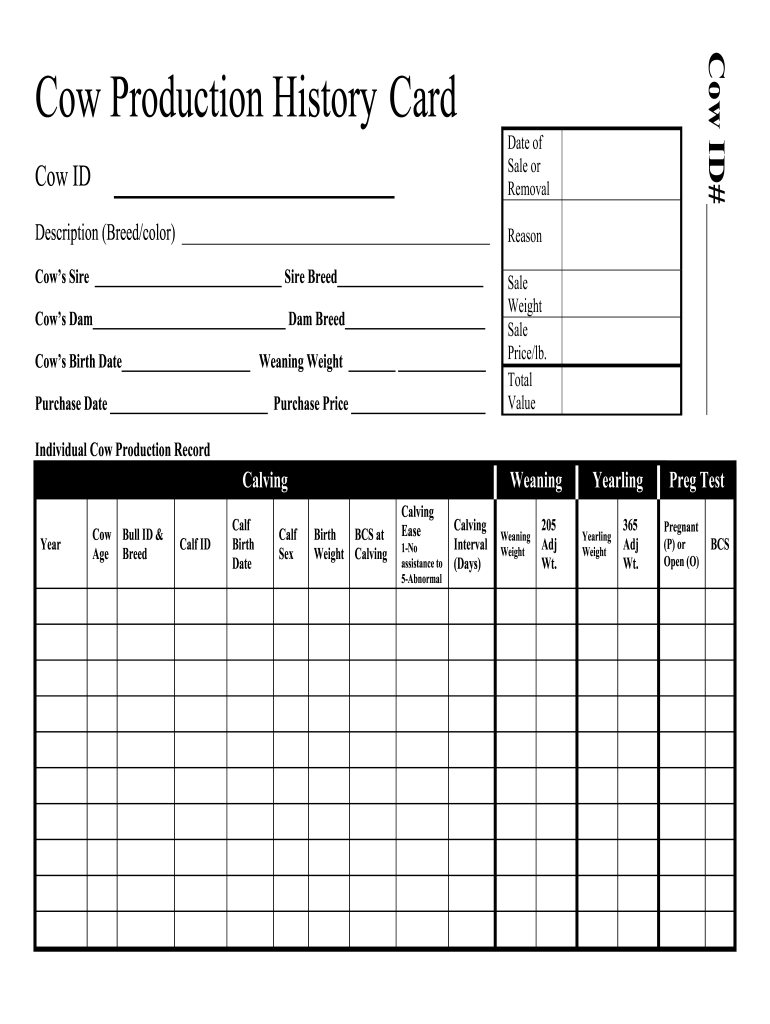
- In the first section, enter the Cow ID in the designated field to identify the cow in question.
- Record the Date of Sale or Removal to document when the cow was sold or removed from your herd.
- Provide a Description including the breed and color of the cow in the provided space.
- Fill in the Reason for sale or removal based on the circumstances surrounding the cow’s change in status.
- Detail the Cow’s Sire and Sire Breed in the corresponding fields to track the pedigree.
- Similarly, provide information about the Cow’s Dam and Dam Breed to assist in comprehensive record-keeping.
- Insert the Cow’s Birth Date to note the age of the cow accurately.
- Enter the Weaning Weight to evaluate the cow’s performance at weaning.
- Add the Purchase Date and Purchase Price to maintain financial records of the cow.
- Document the Sale Weight, Sale Price per pound, and Total Value for tracking economic benefits.
- Continue filling out the Individual Cow Production Record by noting the Calving Year and Cow Age.
- Record the Bull ID and Bull Breed to provide parental details for each calf.
- Enter the Calf ID and Calf Birth Date for tracking individual calf histories.
- Indicate the Calf Sex in the designated field.
- Fill in the Weaning Birth Weight to assess growth.
- Document the Body Condition Score (BCS) at Calving.
- Rate Calving Ease on a scale from 1 to 5, providing a clear understanding of the calving process.
- Record the Calving Interval (Days) to track the reproduction cycle.
- Insert Weaning Weight, 205 Adj Wt., Yearling Weight, and 365 Adj Wt. as necessary for production analytics.
- Complete the Preg Test section, indicating whether the cow is Pregnant (P) or Open (O).
- Finally, review all information for accuracy, then save your changes, and download, print, or share the form as required.
Complete your Cow Production History Card online today for efficient record-keeping.
Experience a faster way to fill out and sign forms on the web. Access the most extensive library of templates available.
Related content
Dec 13, 2021 — • the production history increase will only be applied for dairy cows...
Mar 31, 2015 — This interactive form may be used for keeping birthing records of...
Aug 25, 2025 — A Holstein cow with horns is shown holding a cow-themed Academy Award...
Get answers to your most pressing questions about US Legal Forms API.
How do you keep track of livestock?
Keeping track of livestock requires a systematic approach, including regular updates to records about each animal. Utilizing a Cow Production History Card allows you to record vital information such as health status, production rates, and breeding details. Consider integrating digital management tools to automate the tracking process, enhancing efficiency in your livestock management.
What is a milk production record?
A milk production record is a detailed account of the amount of milk produced by a cow over a specific timeframe. This record helps dairy farmers assess productivity levels and make necessary adjustments to feed and care routines. By documenting this information on a Cow Production History Card, farmers can track improvements and maintain high standards in their dairy operations.
How to profit from a cow?
To profit from a cow, focus on maximizing milk production while ensuring proper health care and nutrition. Regularly updating your Cow Production History Card can help track performance, identify areas for improvement, and boost overall profitability. Additionally, consider implementing breeding programs that enhance the quality and quantity of milk produced.
What is the main purpose of dairy cattle is to produce?
The main purpose of dairy cattle is to produce milk, which is vital for the dairy industry. They also contribute to beef production, providing additional economic value. Utilizing tools like the Cow Production History Card enables dairy farmers to measure production levels accurately and ensure their cows are meeting desired standards.
Why are production records important for dairy cattle?
Production records are crucial for dairy cattle because they provide valuable insights into each cow's performance. By keeping track of milk production and health indicators through Cow Production History Cards, farmers can optimize their operations. This systematic documentation helps in identifying high-performing animals while allowing for better resource allocation.
What is the record keeping of cattle production?
Record keeping of cattle production involves documenting various aspects such as milk yields, breeding cycles, and feed efficiency. Maintaining detailed records, particularly on Cow Production History Cards, allows farmers to make informed decisions that directly impact productivity. This disciplined approach ensures you can identify trends and adjust strategies effectively.
What is the most important activity of dairy farming?
The most important activity of dairy farming revolves around managing milk production while ensuring the health and well-being of the cows. It involves regular feeding, monitoring health indicators, and implementing breeding programs. Using a Cow Production History Card can significantly enhance this process by maintaining accurate records of each cow's performance and needs.
How to organize cattle records?
To effectively organize cattle records, start by creating a dedicated system for each animal, using a Cow Production History Card to record essential details such as breeding dates, health history, and production levels. This card should be easily accessible and updated regularly to ensure accuracy. Additionally, consider utilizing digital tools that can integrate with your existing record-keeping practices for better management.
How many cattle can one person manage?
The number of cattle one person can manage varies, depending on factors like experience, available resources, and technology used. With a solid system in place, such as maintaining a Cow Production History Card, one person can effectively manage anywhere from a small herd to several hundred cattle. Assess your capabilities and consider automation tools to boost efficiency.
How to keep track of livestock?
Keeping track of livestock requires consistency and organization. Utilizing a Cow Production History Card helps you systematically log each animal's essential data. Regular updates and analysis of this information empower you to make quick, informed decisions regarding your herd.
Use professional pre-built templates to fill in and sign documents online faster. Get access to thousands of forms.
If you believe that this page should be taken down, please follow our DMCA take down process here.