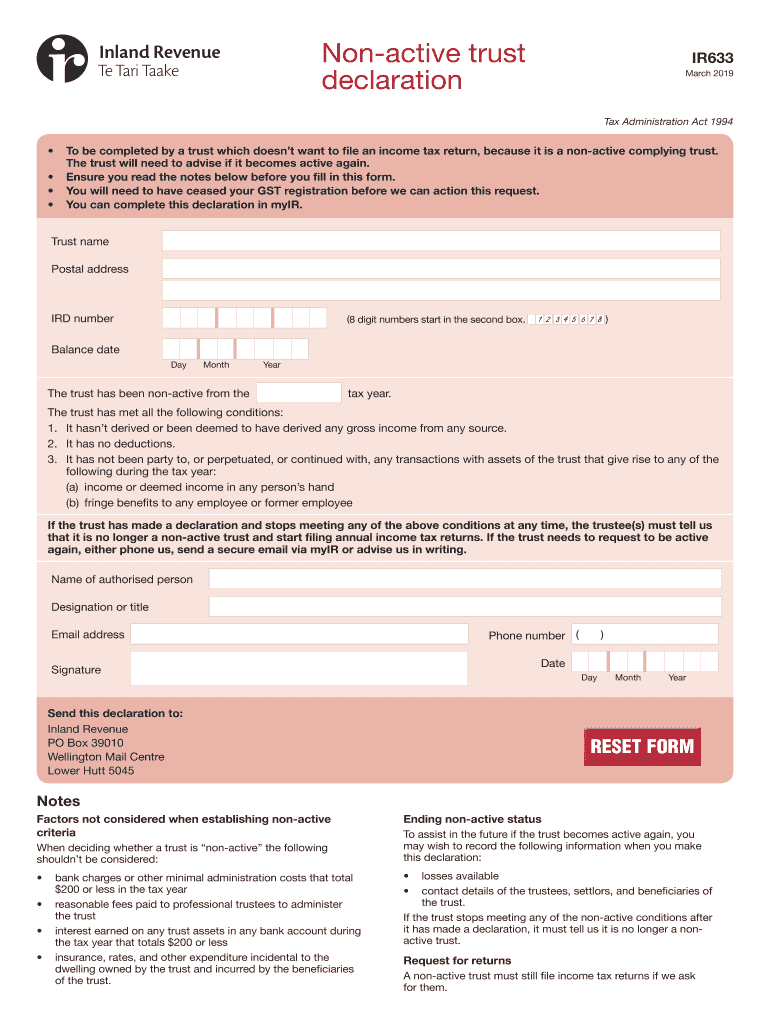
Nonactive trust declarationIR633 March 2019Tax Administration Act 1994To be completed by a trust which doesnt want to file an income tax return, because it is a nonactive complying trust. The trust.
Loading

Open form follow the instructions

Easily sign the form with your finger

Send filled & signed form or save
How to fill out the NZ IRD IR633 online
Completing the NZ IRD IR633 form is essential for trusts that wish to declare their non-active status and avoid filing income tax returns. This guide will walk you through each step of the process to ensure that you fill out the form correctly and efficiently.
Follow the steps to successfully complete the NZ IRD IR633 form online.
- Press the ‘Get Form’ button to acquire the IR633 form and open it for completion.
- Enter the trust name in the specified field. Ensure that the name is spelled correctly to avoid any discrepancies.
- Fill in the postal address for the trust. This should be where all correspondence will be directed.
- Input the IRD number, which consists of 8 digits starting in the second box. Make sure this number is accurate.
- Indicate the balance date by providing the day, month, and year. This signifies the end of the trust’s financial year.
- State the tax year during which the trust has been non-active. Ensure this aligns with your financial records.
- Confirm that the trust has met all the non-active criteria by checking the appropriate boxes, ensuring that no gross income or deductions have been incurred.
- Enter the name of the authorized person completing the declaration, along with their designation or title.
- Provide a valid email address for the authorized person to ensure easy communication with the Tax Authority.
- Include the signature of the authorized person, along with their phone number and the date the form is being filled out.
- Send the completed declaration to Inland Revenue at the provided postal address for processing. Make sure it is sent to the correct location.
- At the end of the process, you can save any changes, download a copy of the form, print it, or share it as needed.
Complete and submit your NZ IRD IR633 form online today to ensure compliance and avoid unnecessary filing.
Experience a faster way to fill out and sign forms on the web. Access the most extensive library of templates available.
Related content
Nz MD4HG,>N8RITK.3XiQ~q;%8h# K{]E yImBPr@7s 31n!q V,FLW k(JO86|Y | G-R ... pOM7M~s-/o...
Get answers to your most pressing questions about US Legal Forms API.
Can I open a New Zealand bank account from overseas?
Yes, you can open a New Zealand bank account from overseas, but you'll need to provide your NZ IRD IR633 and other identification documents. Some banks offer online applications for non-residents, though they may require additional verification. Research the specific requirements of the bank you choose to ensure a smooth application process.
How do I get proof of income from IRD NZ?
To obtain proof of income from NZ IRD IR633, you can request your income details through the IRD's online services or by contacting them directly. They provide statements of earnings that detail your income history and tax contributions. This information is particularly useful for applications requiring evidence of income, such as loans or rental agreements.
Can I open a bank account in NZ without an IRD number?
While it's possible to open a bank account in New Zealand without an NZ IRD IR633, you may face limitations. Some banks allow limited access to services without this number, but for full functionality, it's best to apply for one. Avoiding the IRD number could restrict your transaction capabilities, making obtaining it a practical choice.
What is required to open a bank account in NZ?
When opening a bank account in New Zealand, you typically need to provide personal identification like your NZ IRD IR633, proof of address, and possibly your employment details. Different banks may have specific requirements, so it's a good idea to check directly with them. Make sure to gather these documents before your visit to streamline the process.
Do I need an IRD number to open a bank account in NZ?
Yes, you generally need an NZ IRD IR633 to open a bank account in New Zealand. Most banks require this number to comply with local regulations. Having an IRD number helps the bank manage your tax obligations and ensures your financial activities are correctly recorded.
What documents are required for an IRD in New Zealand?
To obtain an NZ IRD IR633, you need to provide documents such as proof of identity, residency, and additional identification like a passport or driver's license. You may also need to present evidence of your address, like a utility bill. These documents help ensure that the IRD can accurately process your application and provide you with your IRD number efficiently.
What are the tax rates codes in NZ?
Tax rate codes in NZ define how income from various sources, including trusts, is taxed under the NZ IRD IR633 guidelines. These codes dictate the applicable tax rates based on income brackets and trust types. Familiarity with these codes allows for better financial and tax planning. For clarity on tax codes, consider using the resources available through uslegalforms to navigate the complexities.
What are the criteria for a non-active trust?
active trust typically does not conduct any financial activities, which means it generates little to no income. The NZ IRD IR633 outlines specific criteria, such as failure to distribute assets or earn income, that characterize a nonactive trust. Understanding these criteria helps you maintain compliance and avoid potential fines. You can mitigate confusion by using uslegalforms to determine and document your trust's status.
What makes a trust active?
A trust is considered active when it generates income through investments or operational activities. In the context of NZ IRD IR633, an active trust must report its earnings and comply with tax obligations efficiently. Staying informed about what constitutes an active trust is vital for compliance purposes. Uslegalforms offers solutions to help you track and report your trust’s activities properly.
What is an IR6 in NZ?
An IR6 is a tax return form used by individuals and entities to report income earned from trusts in New Zealand. Under the NZ IRD IR633, completing an IR6 requires accuracy, especially in reporting distributions and gains. This form plays a significant role in ensuring proper tax compliance for trust activities. You can find user-friendly resources on uslegalforms to assist you with completing your IR6 form accurately.
Use professional pre-built templates to fill in and sign documents online faster. Get access to thousands of forms.
If you believe that this page should be taken down, please follow our DMCA take down process here.