Loading
Get University Of Vermont Subaward Invoice Payment Certification Form 2020-2025
How it works
-

Open form follow the instructions
-

Easily sign the form with your finger
-

Send filled & signed form or save
How to fill out the University of Vermont Subaward Invoice Payment Certification Form online
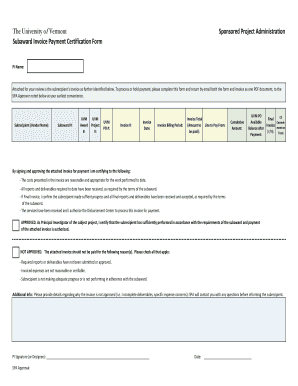
Completing the University of Vermont Subaward Invoice Payment Certification Form is an essential step in managing your project finances. This guide will provide you with detailed instructions on how to accurately fill out the form online to ensure timely payment processing.
Follow the steps to successfully complete the form online.
- Click ‘Get Form’ button to obtain the form and open it in the editor.
- Begin by filling out the Principal Investigator (PI) name at the top. Ensure that you enter the name of the person responsible for overseeing the project.
- Enter the Subrecipient (Vendor Name) in the designated field. This should reflect the name of the organization or individual providing services.
- Fill in the Subaward Number. This unique identifier helps track your specific funding arrangement.
- Provide the UVM Award Project Number, ensuring accuracy to avoid any payment delays.
- Input the Purchase Order (PO) Number related to the invoice, if applicable.
- Enter the Invoice Number and Invoice Date, as they are crucial for processing and auditing purposes.
- Indicate the Invoice Billing Period by specifying the dates for which the invoiced services were provided.
- Clearly state the Invoice Total, which is the amount requested for payment.
- Note the Cumulative Amount if applicable, representing total payments requested by the subrecipient to date.
- Check the ‘Final Invoice’ box if this is the last invoice for the project, indicating that all work is complete.
- Confirm the available commitment balance after payment by indicating yes or no.
- By signing, you are certifying that the costs presented are reasonable and the deliverables have been received as required.
- If the invoice is not approved, provide detailed reasons for rejection in the designated area.
- Sign and date the form in the PI Signature field or designate another individual if necessary.
- Once all fields are completed, save your changes, and download, print, or share the form as needed.
Complete your documents online to streamline your project management.
Industry-leading security and compliance
US Legal Forms protects your data by complying with industry-specific security standards.
-
In businnes since 199725+ years providing professional legal documents.
-
Accredited businessGuarantees that a business meets BBB accreditation standards in the US and Canada.
-
Secured by BraintreeValidated Level 1 PCI DSS compliant payment gateway that accepts most major credit and debit card brands from across the globe.