Loading
Get Clinical Editing Appeal Form
How it works
-

Open form follow the instructions
-

Easily sign the form with your finger
-

Send filled & signed form or save
How to fill out the Clinical Editing Appeal Form online
Filling out the Clinical Editing Appeal Form online can simplify the process of submitting your dispute. This guide will help you navigate each section of the form, ensuring that you provide all necessary information accurately and efficiently.
Follow the steps to successfully complete your Clinical Editing Appeal Form.
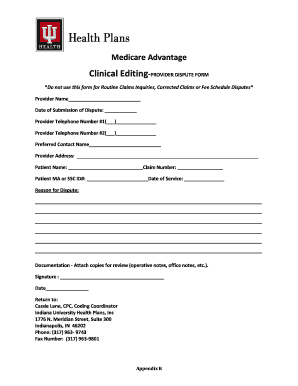
- Press the ‘Get Form’ button to access the Clinical Editing Appeal Form and open it for editing.
- Fill in the provider name. This should be the name of the person or organization submitting the dispute.
- Enter the date of submission of the dispute. Use the format MM/DD/YYYY for clarity.
- Provide two telephone numbers where the provider can be reached. Make sure to label them as Telephone Number #1 and Telephone Number #2.
- Write down the preferred contact name, which should be the person who can address questions regarding the dispute.
- Input the provider's address, ensuring that it is complete and accurate for correspondence.
- Fill in the patient's name and the corresponding claim number to connect the dispute to the specific claim.
- Indicate the patient's Medicare Advantage (MA) or Secondary Subscriber Coverage (SSC) ID number, along with the date of service related to the claim.
- In the reason for dispute section, clearly articulate the issues you are contesting. Provide detailed explanations so that reviewers understand the context.
- Attach necessary documentation, such as operative notes or office notes, to support your dispute as indicated. Ensure that these are included in your submission.
- Sign and date the form. Your signature ensures that you are authorizing the submission of the appeal.
- Make sure to save your changes, and upon completion, download or print the form as needed. You may also share it as required for submission.
Take the first step in your appeal process by completing your Clinical Editing Appeal Form online today.
You or your authorized representative must send us a written statement explaining why you disagree with our determination on your request for benefits or payment. You can also use the Member Appeal Form (PDF) if you'd like. The form is optional and can be used by itself or with a formal letter of appeal.