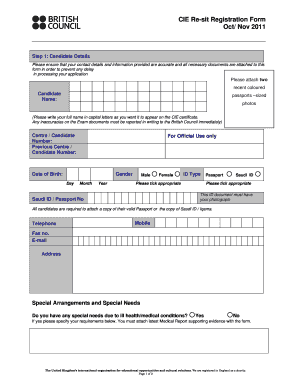
S form in order to prevent any delay in processing your application Please attach two recent coloured Candidate Name: passports sized photos (Please write your full name in capital letters as you want it to appear on the CIE certificate. Any inaccuracies on the Exam documents must be reported in writing to the British Council immediately) Centre / Candidate Number: Previous Centre / Candidate Number: For Official Use only Date of Birth: Gender Day Month Year Male Female I.
Open form follow the instructions
Easily sign the form with your finger
Send filled & signed form or save
How to fill out the UK British Council CIE Re-sit Registration Form online
Filling out the UK British Council CIE Re-sit Registration Form is a straightforward process that ensures your registration for exams is handled efficiently. This guide will provide you with clear, step-by-step instructions to assist you in completing the form online.
Follow the steps to complete the registration form accurately.
- Click ‘Get Form’ button to obtain the form and open it in the editor.
- Begin by entering your candidate details. Accurately provide your full name in capital letters as you wish it to appear on the CIE certificate. Include your date of birth, gender, and contact information. It is crucial to attach two recent colored passport-sized photos, and ensure your ID type—either a passport or Saudi ID—is properly selected along with the respective ID number.
- In the Subjects Entry Fee Calculation section, cite all subject codes and option codes for the examinations you are registering for. Make sure to enter the correct subject title and codes as indicated. For each subject, calculate the fees based on the number of subjects and the specified fees for each qualification level.
- Complete the Declaration section by reading the statements carefully and ticking the appropriate boxes. This is to confirm that your information is accurate, that you understand the fee liability, and that you comply with the CIE regulations.
- Finally, review all entered information for accuracy before saving changes, downloading, printing, or sharing the completed form.
Begin your registration process by completing the UK British Council CIE Re-sit Registration Form online today.
Experience a faster way to fill out and sign forms on the web. Access the most extensive library of templates available.
Related content
by KAA Gamage · 2020 · Cited by 468 — Online delivery and assessment during COVID-19...
Required forms and approvals for re-submission to CIE: a. Course Selection Approval Form...
Jul 28, 2025 — The minimum requirement for admission is an overall band score of 7.0...
Get answers to your most pressing questions about US Legal Forms API.
How can I register myself for IELTS?
You can easily register yourself for IELTS by heading to the British Council website. Look for the section dedicated to the UK British Council CIE Re-sit Registration Form. Follow the prompts, fill in your details, choose your test date, and make your payment to complete the registration.
How do I get my certificate from British Council?
After completing your exam with the British Council, your certificate will be processed and sent to you. Typically, you can expect to receive it within a few days. For specific questions about your UK British Council CIE Re-sit Registration Form, check their website or contact their customer service for assistance.
How to register with the British Council?
To register with the British Council, first, visit their official site. You will find options that guide you to the UK British Council CIE Re-sit Registration Form. Completing this form allows you to access various services, including exam registration and preparation resources.
How can I register for British Council IELTS?
To register for the British Council IELTS, you need to visit their official website. There, you will find a straightforward option for the UK British Council CIE Re-sit Registration Form. Follow the instructions provided to create an account, select your test date and location, and complete your payment.
How much does the Cambridge test cost?
The CAE – paying, registering and preparing. The prices for the C1 Advanced will vary as the test centres can decide on the price of the test; however, you can expect to pay somewhere between 150-175 euros (165- 195 USD). Usually, you can pay online or in-person with a debit or credit card (VISA/ Master Card).
How do I register for Cambridge?
There are three easy steps to registering for your Cambridge English Exam. Find an exam centre – offered by more than 2,800 centres in 130 countries. Use our online search and find a centre near you. Contact your exam centre. ... Choose when and how you take your exam.
How do I register for Cambridge A level exam?
How to register for your exam Choose your exam. If you're not sure which exam is right for you, take our free multiple-choice test to help you decide. ... Find an exam centre. To take your Cambridge English exam, you will need to register directly with an authorised exam centre. ... Book your exam.
How do I register for Cambridge A levels?
How to register for your exam Choose your exam. If you're not sure which exam is right for you, take our free multiple-choice test to help you decide. ... Find an exam centre. To take your Cambridge English exam, you will need to register directly with an authorised exam centre. ... Book your exam.
How much is Cambridge registration?
The registration fee is #25,000 for all the programs. You can select the method of payment while registering either by Bank Payment (transfer, POS, USSD, ATM transfer, online mobile banking) or Online Payment (using your ATM details to pay online). If you want to write the exam by October/Nov this year.
How do I Enrol British Council?
Step 1: You will take a written test followed by a face-to-face language consultation. This will take approximately 60 minutes. Step 2: Our British Council Sales and Customer Management team will help to place you in the right level and plan your study pathway with you.
Use professional pre-built templates to fill in and sign documents online faster. Get access to thousands of forms.
If you believe that this page should be taken down, please follow our DMCA take down process here.