Loading
Form preview
  • US Legal Forms
  • Form Library
  • Foreign Forms
  • Foreign Philippines Other Forms
  • Ph Ceap Retirement Form No. 9

Get Ph Ceap Retirement Form No. 9

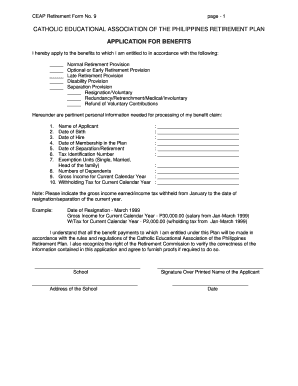
/Involuntary Refund of Voluntary Contributions Hereunder are pertinent personal information needed for processing of my benefit claim: 1. 2. 3. 4. 5. 6. 7. Name of Applicant Date of Birth Date of Hire Date of Membership in the Plan Date of Separation/Retirement Tax Identification Number Exemption Units (Single, Married, Head of the family) 8. Numbers of Dependents 9. Gross Income for Current Calendar Year 10. Withholding Tax for Current Calendar Year : :.

How it works

  1. Open form

    Open form follow the instructions

  2. Easily sign form

    Easily sign the form with your finger

  3. Share form

    Send filled & signed form or save

How to fill out the PH CEAP Retirement Form No. 9 online

Filling out the PH CEAP Retirement Form No. 9 online is an essential step in applying for your retirement benefits. This guide will provide you with clear, step-by-step instructions to help you complete the form accurately and efficiently.

Follow the steps to fill out the form online.

  1. Click ‘Get Form’ button to obtain the form and open it in your chosen editor.
  2. Carefully review the sections indicating the type of retirement benefit you are applying for: Normal Retirement Provision, Optional or Early Retirement Provision, Late Retirement Provision, Disability Provision, or Separation Provision.
  3. Select the reason for your separation: Resignation/Voluntary, Redundancy/Retrenchment/Medical/Involuntary, or Refund of Voluntary Contributions.
  4. Provide your personal information required for processing your benefits claim, including your name, date of birth, date of hire, date of membership in the plan, date of separation/retirement, tax identification number, exemption units, number of dependents, gross income for the current calendar year, and withholding tax.
  5. Be mindful to indicate your gross income earned and income tax withheld from January to your resignation/separation date of the current year, following the example provided in the form.
  6. Review your entries for accuracy and ensure all required fields are filled out correctly.
  7. After completing the form, make sure to save your changes, and you can choose to download, print, or share the filled form.

Start filling out your forms online today to secure your benefits!

Get form

Experience a faster way to fill out and sign forms on the web. Access the most extensive library of templates available.
Get form

Related content

STATE OF CONNECTICUT ENERGY ASSISTANCE ...
Complete this form if you or a household member are a person with a disability who does...
Learn more
COLLECTIVE BARGAINING AGREEMENT ...
University's contributions plus income under the CEAP Retirement Plan (CEAP. Plan)), upon...
Learn more
COLLECTIVE BARGAINING AGREEMENT ...
University's contributions plus income under the CEAP Retirement Plan (CEAP. Plan)), upon...
Learn more

Related links form

Athens/Clark County Criminal Background Check Form - Coe Uga Fmd Uga Beneficiary Designation - UGA Division Of External Affairs - Externalaffairs Uga Cash Reimbursement Form - Warnell School Of Forest Resources - Forestry Uga

Questions & Answers

Get answers to your most pressing questions about US Legal Forms API.

Contact support

To file for retirement benefits, you need to complete the PH CEAP Retirement Form No. 9 and submit it to your retirement plan provider. Make sure to follow any specific filing instructions they provide. If you encounter difficulties, consider using the uslegalforms platform to simplify the paperwork and guide you through the process.

It is advisable to apply for your retirement benefits at least three to six months before your intended retirement date. Applying early ensures that you have enough time to process the PH CEAP Retirement Form No. 9 and resolve any potential issues. Early application also enables you to plan financially for your transition.

Starting the retirement process involves understanding your benefits and completing the PH CEAP Retirement Form No. 9. First, review your retirement plan and decide when you want to retire. After that, gather the necessary documents to support your application and submit the form.

When applying for your retirement benefits, you need the PH CEAP Retirement Form No. 9, proof of your age, and documentation of your employment history. You may also need to submit tax forms or other financial records. Having these documents ready can streamline your application process.

To claim your retirement benefits, you must complete the PH CEAP Retirement Form No. 9. This form requires you to provide basic information about your employment and the benefits you seek. After filling out the form, submit it to your retirement plan provider. Make sure to keep a copy for your records.

Get This Form Now!

Use professional pre-built templates to fill in and sign documents online faster. Get access to thousands of forms.
Get form
If you believe that this page should be taken down, please follow our DMCA take down processhere.

Industry-leading security and compliance

US Legal Forms protects your data by complying with industry-specific security standards.
  • In businnes since 1997
    25+ years providing professional legal documents.
  • Accredited business
    Guarantees that a business meets BBB accreditation standards in the US and Canada.
  • Secured by Braintree
    Validated Level 1 PCI DSS compliant payment gateway that accepts most major credit and debit card brands from across the globe.
Get PH CEAP Retirement Form No. 9
Get form
  • Adoption
  • Bankruptcy
  • Contractors
  • Divorce
  • Home Sales
  • Employment
  • Identity Theft
  • Incorporation
  • Landlord Tenant
  • Living Trust
  • Name Change
  • Personal Planning
  • Small Business
  • Wills & Estates
  • Packages A-Z
  • Affidavits
  • Bankruptcy
  • Bill of Sale
  • Corporate - LLC
  • Divorce
  • Employment
  • Identity Theft
  • Internet Technology
  • Landlord Tenant
  • Living Wills
  • Name Change
  • Power of Attorney
  • Real Estate
  • Small Estates
  • Wills
  • All Forms
  • Forms A-Z
  • Form Library
  • Legal Hub
  • About Us
  • Help Portal
  • Legal Resources
  • Blog
  • Affiliates
  • Contact Us
  • Delete My Account
  • Site Map
  • Industries
  • Forms in Spanish
  • Localized Forms
  • State-specific Forms
  • Forms Kit
  • Real Estate Handbook
  • All Guides
  • Notarize
  • Incorporation services
  • For Consumers
  • For Small Business
  • For Attorneys
  • USLegal
  • FormsPass
  • pdfFiller
  • signNow
  • altaFlow
  • DocHub
  • Instapage
Form Packages
  • Adoption
  • Bankruptcy
  • Contractors
  • Divorce
  • Home Sales
  • Employment
  • Identity Theft
  • Incorporation
  • Landlord Tenant
  • Living Trust
  • Name Change
  • Personal Planning
  • Small Business
  • Wills & Estates
  • Packages A-Z
Form Categories
  • Affidavits
  • Bankruptcy
  • Bill of Sale
  • Corporate - LLC
  • Divorce
  • Employment
  • Identity Theft
  • Internet Technology
  • Landlord Tenant
  • Living Wills
  • Name Change
  • Power of Attorney
  • Real Estate
  • Small Estates
  • Wills
  • All Forms
  • Forms A-Z
  • Form Library
Customer Service
  • Legal Hub
  • About Us
  • Help Portal
  • Legal Resources
  • Blog
  • Affiliates
  • Contact Us
  • Delete My Account
  • Site Map
  • Industries
  • Forms in Spanish
  • Localized Forms
  • State-specific Forms
  • Forms Kit
Legal Guides
  • Real Estate Handbook
  • All Guides
Prepared for you
  • Notarize
  • Incorporation services
Our Customers
  • For Consumers
  • For Small Business
  • For Attorneys
Our Sites
  • USLegal
  • FormsPass
  • pdfFiller
  • signNow
  • altaFlow
  • DocHub
  • Instapage
Social Media
Call us now toll free:
+1 833 426 79 33
As seen in:
© Copyright 1999-2026 airSlate Legal Forms, Inc. 3720 Flowood Dr, Flowood, Mississippi 39232
  • Your Privacy Choices
  • Terms of Service
  • Privacy Notice
  • Content Takedown Policy
  • Bug Bounty Program