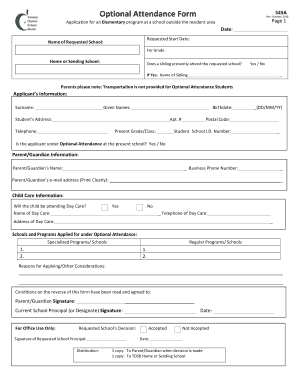
OptionalAttendanceFormPage1ApplicationforanElementaryprogramataschooloutsidetheresidentarea545ARev.October2018Date:RequestedStartDate:NameofRequestedSchool:ForGrade:HomeorSendingSchool:Doesasiblingpresently.
Open form follow the instructions
Easily sign the form with your finger
Send filled & signed form or save
How to fill out the Canada TDSB 545A online
The Canada TDSB 545A form is required for applying to an elementary program at a school outside the resident area. This guide provides step-by-step instructions for completing this form online, ensuring a smooth application process.
Follow the steps to successfully complete the Canada TDSB 545A online.
- Click ‘Get Form’ button to retrieve the Canada TDSB 545A and access it in your preferred online editor.
- Begin by entering the date of your application in the appropriate field. Make sure the date format is correct.
- Input the requested start date for the student in the designated field. Ensure this date aligns with school term start dates.
- In the 'Name of Requested School' section, write the full name of the school you wish your child to attend.
- Select the grade level the student will be applying for by filling in the relevant information in the designated field.
- Indicate the home or sending school by providing the necessary details in the specified area.
- Confirm if a sibling currently attends the requested school by checking 'Yes' or 'No.' If 'Yes,' provide the sibling's name in the space provided.
- Complete the applicant’s personal information section, including surname, given names, birthdate, address, telephone number, and present grade/class.
- Indicate whether the applicant is under Optional Attendance at their current school by selecting 'Yes' or 'No.'
- Fill in the parent/guardian's details, such as their name, business phone number, and email address, ensuring the email is legible.
- Answer whether the child will be attending day care. If 'Yes,' provide the name, address, and telephone number of the day care.
- List the schools and programs you are applying for under Optional Attendance, including any specialized programs.
- Provide your reasons for applying or any other considerations in the designated section.
- Sign the form where indicated as the parent/guardian and ensure the current school principal or designate also signs.
- Once all information is complete, you may save changes, download, print, or share the completed form as needed.
Take the next step in your child's education by completing the Canada TDSB 545A online today.
Experience a faster way to fill out and sign forms on the web. Access the most extensive library of templates available.
Related content
This qualitative historical context case study examines the factors that influenced the...
Get answers to your most pressing questions about US Legal Forms API.
What is the largest high school in the TDSB?
The largest high school in the TDSB is the Earl Haig Secondary School, which accommodates over 2,000 students. It boasts a wide array of academic and extracurricular programs, making it attractive to students from various backgrounds. Institutions like Earl Haig play an important role in the community, so exploring options like Canada TDSB 545A can provide deeper insights into what they offer.
What is the second largest school board in Canada?
The second largest school board in Canada is the Peel District School Board, which serves a large student population in the Greater Toronto Area. Following closely is the TDSB, which continues to expand its programs and services. This size allows for diverse educational offerings, so you might find the programs under Canada TDSB 545A particularly beneficial.
Which school board is best in Canada?
Determining the best school board in Canada often depends on your specific needs. Factors such as student support services, academic performance, and extracurricular activities can influence your choice. The TDSB is recognized for its commitment to inclusivity and student achievement. Explore options like the Canada TDSB 545A to evaluate the features that matter most to you.
How to apply for public high school in Canada?
To apply for a public high school in Canada, you'll first need to check the requirements of your chosen school board. The TDSB, for example, has a straightforward online application process. You'll gather relevant documents, complete necessary forms, and submit them through their portal. Resources like the Canada TDSB 545A can simplify this process by providing important information you need.
What does the TDSB stand for in Canada?
TDSB stands for the Toronto District School Board. This board oversees public education in Toronto, Ontario, and it serves a diverse population of students. The TDSB offers a range of programs from kindergarten to Grade 12. Understanding how Canada TDSB 545A integrates into the public education system can help you navigate the options available.
How do I create a student account on College Board?
To create a student account on the College Board website, visit their homepage and select 'Sign Up'. You will need to provide your personal details, including your name, email address, and birth date. After verifying your email, your account will be active, allowing you to access resources to support your goals in relation to Canada TDSB 545A.
What is the format for TDSB email?
The TDSB email format typically follows this structure: firstname.lastname@tdsb.on.ca. Ensure that you use the correct format when setting up your email or communicating with others. This standard helps facilitate smooth communication regarding Canada TDSB 545A and other important matters.
How do I create a TDSB student account?
Creating a TDSB student account involves visiting the TDSB website and navigating to the account registration page. You will need to submit personal information, including your name and date of birth. After completing the form, you will receive a confirmation for your account, granting you access to numerous resources tied to Canada TDSB 545A.
How to set up TDSB email on iPhone?
To set up your TDSB email on your iPhone, go to 'Settings', then select 'Mail', and tap on 'Accounts'. Choose 'Add Account' and select 'Microsoft Exchange'. Enter your TDSB email address, password, and any additional settings required. This setup allows you to efficiently manage your communications related to Canada TDSB 545A.
What is the student password requirement for TDSB?
The TDSB password requirements stipulate that passwords must be a minimum of eight characters long and include at least one uppercase letter, one lowercase letter, and one number. Some passwords may also require a special character. Keeping your password secure is essential, especially when accessing resources related to Canada TDSB 545A.
Use professional pre-built templates to fill in and sign documents online faster. Get access to thousands of forms.
If you believe that this page should be taken down, please follow our DMCA take down process here.