Loading
Get Australia Post Gift Card Balance
How it works
-

Open form follow the instructions
-

Easily sign the form with your finger
-

Send filled & signed form or save
How to fill out the Australia Post Gift Card Balance online
Navigating the process of redeeming your Australia Post Gift Card Balance can be straightforward with the right guidance. This guide will provide a clear, step-by-step approach to filling out the necessary form online, ensuring that users can effectively manage their card balance.
Follow the steps to complete your Australia Post Gift Card Balance form
- Click ‘Get Form’ button to access the form and open it in your preferred editor.
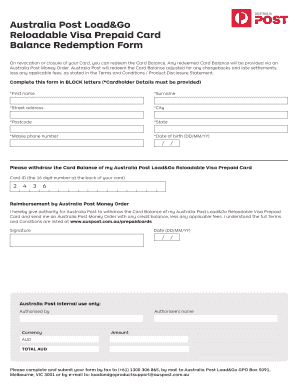
- Fill in the Cardholder Details section in BLOCK letters. This includes your First Name and Surname.
- Input your Mobile Phone Number and Date of Birth (in the format DD/MM/YY).
- Locate your Card ID, which is the 16-digit number found on the back of your Australia Post Load&Go Reloadable Visa Prepaid Card, and enter it.
- Confirm your request for reimbursement by checking the box to authorize Australia Post to withdraw your Card Balance and send you an Australia Post Money Order, minus any applicable fees.
- Sign and date the form (using DD/MM/YY format) to validate your request.
- Once completed, save your changes, and consider downloading or printing the form for your records.
- Submit your completed form by fax, mail, or email as specified in the form instructions.
Complete your Australia Post Gift Card Balance form online today for a seamless experience.
To check your prezzee balance, simply log into the prezzee app or website. Navigate to the balance section where you can view your remaining funds. Staying informed about your balance helps you maintain control over your Australia Post Gift Card Balance.