Loading
Get Da 4237-r 1985-2026
How it works
-

Open form follow the instructions
-

Easily sign the form with your finger
-

Send filled & signed form or save
How to fill out the DA 4237-R online
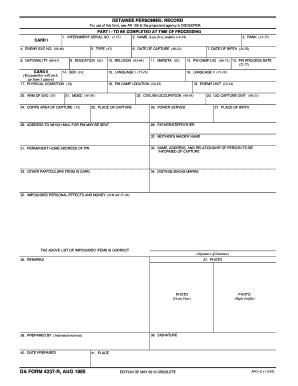
Filling out the DA 4237-R form accurately is essential for maintaining comprehensive detainee personnel records. This guide provides clear instructions to help you navigate the online filling process with confidence and ease.
Follow the steps to successfully complete the DA 4237-R online
- Click the ‘Get Form’ button to access the DA 4237-R form and open it in your preferred online editor.
- Begin with Part I – To be completed at time of processing. Start by entering the internment serial number in field 1, using a numeric format from 1-13.
- In field 4, enter the enemy service number, ensuring the input is correctly captured within the range of 38-46.
- Proceed to input the nationality of the detainee in field 8, utilizing characters 60-61.
- Continue filling out Card II of the form. In field 5, select the type (47) and move to field 9 for the education entry (62).
- For field 14, indicate the sex of the individual (14), followed by the arm of service in field 20 (35).
- Input the date of capture in field 6 (48-53) and the date of birth in field 7 (54-59).
- Enter the prisoner of war camp UIC in field 12 (66-71) and the processing date in field 13 (72-77).
- Indicate the languages spoken by using fields 15-16 for Language I and fields 17-18 for Language II.
- For field 18, provide the prisoner of war camp location (20-22) and fill out field 21 with the Military Occupational Specialty Code (36-39).
- Input the corps area of capture in field 24 (52) and fill out the fields related to physical condition (19), rank (35-37), and name (full, 14-34).
- Provide additional details in fields 19 (enemy unit) and 22 (civilian occupation) as required.
- Continue to complete information in fields 25 to 34, detailing the place of capture, address for mail, place of birth, parental names, and their relationship.
- Remember to include the significant particulars, distinguishing marks, and any impounded personal effects in fields 35-36.
- Lastly, review all filled sections for accuracy. Save your changes, and you may download, print, or share the completed form as needed.
Complete your DA 4237-R form online today for efficient document management.
A DA Form 200 is primarily used for documenting the transfer of property and ensuring accountability within military organizations. This form helps maintain accurate records of military assets and property transfers. By using this form properly, you can avoid discrepancies and maintain organizational integrity. Platforms like US Legal Forms can provide additional insights on this process.