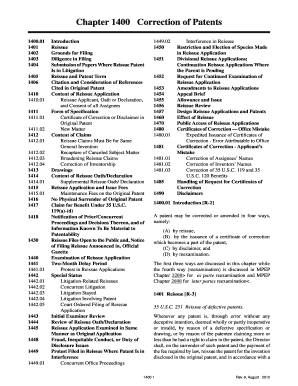
415.01 1416 1417 1418 1430 1440 1441 1441.01 1442 1442.01 1442.02 1442.03 1442.04 1442.05 1443 1444 1445 1448 1449 1449.01 Introduction Reissue Grounds for Filing Diligence in Filing Submission of Papers Where Reissue Patent Is in Litigation Reissue and Patent Term Citation and Consideration of References Cited in Original Patent Content of Reissue Application Reissue Applicant, Oath or Declaration, and Consent of all Assignees Form of Specification Certificate of Correction or Disclaimer in .
Loading
Open form follow the instructions
Easily sign the form with your finger
Send filled & signed form or save
How to fill out and sign USPTO Chapter 1400 Correction of Patents online?
Get your online template and fill it in using progressive features. Enjoy smart fillable fields and interactivity.Follow the simple instructions below:
The preparation of legitimate documents can be costly and labor-intensive. Nonetheless, with our prebuilt online templates, everything becomes easier.
Now, generating a USPTO Chapter 1400 Correction of Patents takes no longer than 5 minutes. Our state online samples and clear instructions eliminate human errors.
Utilize the fast search and advanced cloud editor to create an accurate USPTO Chapter 1400 Correction of Patents. Eliminate the monotony and create documents online!
- Select the template from the catalog.
- Fill in all necessary details in the required fillable fields. The intuitive drag-and-drop interface makes it easy to add or move fields.
- Ensure all information is accurately filled out, with no errors or missing sections.
- Apply your electronic signature to the document.
- Simply click Done to save the changes.
- Download the file or print your PDF version.
- Send promptly to the recipient.
Tips on how to fill out, edit and sign USPTO Chapter 1400 Correction of Patents online
How to fill and sign USPTO Chapter 1400 Correction of Patents
Get your online template and fill it in using progressive features. Enjoy smart fillable fields and interactivity.Follow the simple instructions below:
The preparation of legitimate documents can be costly and labor-intensive. Nonetheless, with our prebuilt online templates, everything becomes easier.
Now, generating a USPTO Chapter 1400 Correction of Patents takes no longer than 5 minutes. Our state online samples and clear instructions eliminate human errors.
Utilize the fast search and advanced cloud editor to create an accurate USPTO Chapter 1400 Correction of Patents. Eliminate the monotony and create documents online!
- Select the template from the catalog.
- Fill in all necessary details in the required fillable fields. The intuitive drag-and-drop interface makes it easy to add or move fields.
- Ensure all information is accurately filled out, with no errors or missing sections.
- Apply your electronic signature to the document.
- Simply click Done to save the changes.
- Download the file or print your PDF version.
- Send promptly to the recipient.
How to edit USPTO Chapter 1400 Correction of Patents
How to modify Obtain USPTO Chapter 1400 Amendment of Patents 2012: personalize forms online
Authorize and distribute Obtain USPTO Chapter 1400 Amendment of Patents 2012 along with any additional business and personal paperwork online without squandering time and resources on printing and mailing. Maximize the benefits of our online form editor utilizing an integrated compliant electronic signature tool.
Signing and submitting Obtain USPTO Chapter 1400 Amendment of Patents 2012 templates digitally is faster and more efficient than handling them on paper. Nonetheless, it necessitates using online solutions that ensure a high level of data security and provide you with a certified tool for generating eSignatures. Our powerful online editor is precisely what you need to finalize your Obtain USPTO Chapter 1400 Amendment of Patents 2012 and other personal and business or tax templates accurately and correctly in accordance with all regulations. It includes all the necessary tools to effortlessly and swiftly complete, modify, and sign documents online and add Signature fields for other parties, indicating who and where should sign.
It requires just a few straightforward steps to complete and sign Obtain USPTO Chapter 1400 Amendment of Patents 2012 online:
When signing Obtain USPTO Chapter 1400 Amendment of Patents 2012 with our powerful online editor, you can always be assured it is legally binding and court-admissible. Prepare and submit documents in the most effective way possible!
- Open the chosen file for further editing.
- Utilize the top toolkit to insert Text, Initials, Image, Check, and Cross marks to your document.
- Highlight the crucial details and redact or eliminate sensitive ones if necessary.
- Click on the Sign tool above and choose how you wish to eSign your document.
- Draw your signature, type it, upload its image, or opt for an alternative method that suits you.
- Switch to the Edit Fillable Fields panel and place Signature areas for others.
- Click on Add Signer and input your recipient’s email to assign this field to them.
- Ensure that all information provided is complete and accurate before you click Done.
- Share your documents with others utilizing one of the available methods.
How to fill and sign USPTO Chapter 1400 Correction of Patents
Get your online template and fill it in using progressive features. Enjoy smart fillable fields and interactivity.Follow the simple instructions below:
The preparation of legitimate documents can be costly and labor-intensive. Nonetheless, with our prebuilt online templates, everything becomes easier.
Now, generating a USPTO Chapter 1400 Correction of Patents takes no longer than 5 minutes. Our state online samples and clear instructions eliminate human errors.
Utilize the fast search and advanced cloud editor to create an accurate USPTO Chapter 1400 Correction of Patents. Eliminate the monotony and create documents online!
- Select the template from the catalog.
- Fill in all necessary details in the required fillable fields. The intuitive drag-and-drop interface makes it easy to add or move fields.
- Ensure all information is accurately filled out, with no errors or missing sections.
- Apply your electronic signature to the document.
- Simply click Done to save the changes.
- Download the file or print your PDF version.
- Send promptly to the recipient.
Experience a faster way to fill out and sign forms on the web. Access the most extensive library of templates available.
Related content
A patent may be corrected or amended in eight ways, namely by: (1) reissue,. (2) the...
Sep 16, 2025 — A detailed explanation of each of these processes can be found in Chapter...
Mar 9, 2020 — patents, trademarks, and other policies and procedures related to...
Get answers to your most pressing questions about US Legal Forms API.
Can you change the order of inventors on a patent?
Yes, you can change the order of inventors on a patent, but you must submit a request to the USPTO as described in the USPTO Chapter 1400 Correction of Patents. This request requires supporting documentation that justifies the change in order. Proper handling of this process can prevent legal conflicts in the future.
How do I contact USPTO for certificate of correction?
You can contact the USPTO for a certificate of correction through their official website or customer service. Look for the relevant section on patent corrections, as outlined in the USPTO Chapter 1400 Correction of Patents. Having your patent information handy will help in obtaining clear and prompt assistance.
How to correct inventorship in a patent?
To correct inventorship in a patent, file a request for correction with the USPTO, following the procedures detailed in the USPTO Chapter 1400 Correction of Patents. Include necessary information about the patent, reasons for the correction, and the corresponding forms. Utilizing legal services can streamline this process to ensure accuracy.
What is the 1.48 correction of inventorship?
The 1.48 correction of inventorship refers to a specific provision in U.S. patent law that allows for changing the named inventors on a patent. This applies especially when errors were made in naming inventors or when inventors were omitted entirely. To proceed, you must follow the guidelines outlined in the USPTO Chapter 1400 Correction of Patents.
How do you correct inventorship of a patent?
Correcting inventorship involves submitting a request to the USPTO for a certificate of correction under the US patent rules. According to the USPTO Chapter 1400 Correction of Patents, the application must include a statement explaining the change and supporting documents to validate your claim. Legal assistance may enhance your chances of a successful correction.
Is there a time limit for certificate of correction?
Yes, there is a time limit for obtaining a certificate of correction under the USPTO Chapter 1400 Correction of Patents. Generally, you must file for a certificate of correction within two months of the error's discovery. Speed is essential, as delays could affect your patent's enforceability.
Can an inventor be removed from a patent?
Yes, an inventor can be removed from a patent, but this process requires the application of the USPTO Chapter 1400 Correction of Patents. The patent owner needs to petition the USPTO with sufficient evidence supporting the removal. Often, this requires the involvement of legal experts to ensure compliance and proper documentation to avoid future disputes.
What is a certificate of correction of patent?
A certificate of correction is an official document issued by the USPTO that fixes errors in a patent. This may include clerical mistakes, misidentifications of inventors, or other inaccuracies. Obtaining a certificate of correction allows the patentholder to maintain the legal strength and integrity of their patent.
How do you amend a patent?
Amending a patent involves filing a request for reissue or correction under USPTO Chapter 1400 Correction of Patents. You must submit your amendments alongside relevant documentation that explains the changes. This process ensures that the patent accurately reflects the intended invention.
How do I contact the USPTO for a certificate of correction?
You can contact the USPTO by visiting their website or calling their customer service for assistance regarding a certificate of correction. It's important to provide your patent number and any relevant information related to your request. The USPTO Chapter 1400 Correction of Patents process can be complex, so having clear communication will help streamline your inquiry.
Use professional pre-built templates to fill in and sign documents online faster. Get access to thousands of forms.
If you believe that this page should be taken down, please follow our DMCA take down process here.