Loading
Get Village Health
How it works
-

Open form follow the instructions
-

Easily sign the form with your finger
-

Send filled & signed form or save
How to fill out the Village Health online
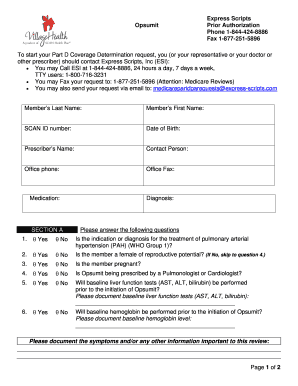
This guide provides a step-by-step approach to completing the Village Health form for . By following these instructions, users can ensure that their requests are accurately submitted for prior authorization.
Follow the steps to complete the Village Health Prior Authorization form online.
- Click ‘Get Form’ button to obtain the form and open it in the editor.
- Complete the member's last name, first name, SCAN ID number, and date of birth in the designated fields.
- Fill in the prescriber’s name, contact person, office phone, and office fax, ensuring all information is correct.
- Provide details regarding the medication and diagnosis related to the request.
- Answer all questions in Section A by selecting 'Yes' or 'No' and provide any additional required information, particularly for the baseline tests.
- In Section B, the prescriber must sign and date the form. Ensure the signature is clear and legible.
- Once all sections are completed, review the form for accuracy. You can then save changes, download, print, or share the form as needed.
Take the next step in your health management by completing the Village Health form online today.
Eligibility for a SCAN Health Plan includes people who are enrolled in Medicare and live within the designated regions served by SCAN. Furthermore, individuals under 65 with specific qualifying conditions may also apply. As part of the Village Health initiative, SCAN strives to create inclusive health solutions that cater to various demographics. Consider reaching out to SCAN for personalized assistance regarding your eligibility status.