Get Mvp Health Care Admission Notification 2011-2026
How it works
-

Open form follow the instructions
-

Easily sign the form with your finger
-

Send filled & signed form or save
How to fill out the MVP Health Care Admission Notification online
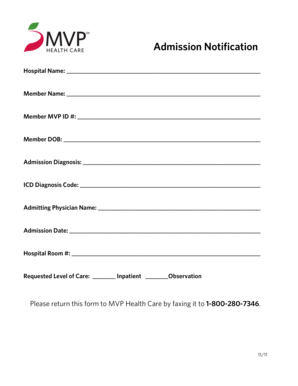
The MVP Health Care Admission Notification is a vital document for users to report a hospital admission. This guide provides clear and detailed instructions for accurately completing the form online to ensure a smooth notification process.
Follow the steps to complete your admission notification effectively.
- Press the ‘Get Form’ button to access the MVP Health Care Admission Notification form and open it in your chosen editor.
- Begin by entering the hospital name in the designated field. Ensure that the name is clearly spelled to avoid any confusion.
- Next, fill in the member's full name, ensuring accuracy, as this information is critical for identification.
- Provide the member MVP ID number in the corresponding section. This ID helps to verify the member's status with MVP Health Care.
- Enter the date of birth (DOB) for the member. Use the format MM/DD/YYYY to maintain consistency and clarity.
- In the 'Admission Diagnosis' field, describe the condition or reason for the hospital admission briefly but clearly.
- Input the appropriate ICD diagnosis code, which is a standard code used for diagnostic purposes in healthcare.
- Fill in the name of the admitting physician. It is essential for communication between healthcare providers and the insurance company.
- Record the date of admission in the specified section. Make sure this date is accurate as it impacts coverage and services.
- Enter the hospital room number if assigned. This information may assist in the coordination of care.
- Select the requested level of care by checking the appropriate box for either inpatient or observation.
- Once you have completed filling out the form, review all the information for accuracy.
- Save your changes, and you may choose to download, print, or share the completed form as required.
- Finally, ensure to return the completed form to MVP Health Care by faxing it to 1-800-280-7346.
Complete your MVP Health Care Admission Notification online now to ensure timely processing.
MVP Health Care primarily offers services in specific regions, predominantly in New York and Vermont. While it has aspirations for broader reach, its core services currently cater to localized markets. Residents in these areas can benefit significantly from their specialized coverage options. Leveraging the MVP Health Care Admission Notification ensures that members stay updated on their local health care resources and services.