Loading
Get Anthem E301 Ct 2013-2026
How it works
-

Open form follow the instructions
-

Easily sign the form with your finger
-

Send filled & signed form or save
How to fill out the Anthem E301 CT online
The Anthem E301 CT is a critical document for managing dental membership enrollment and changes. This guide provides step-by-step instructions to help users accurately complete the form online, ensuring a smooth process.
Follow the steps to successfully complete the Anthem E301 CT online.
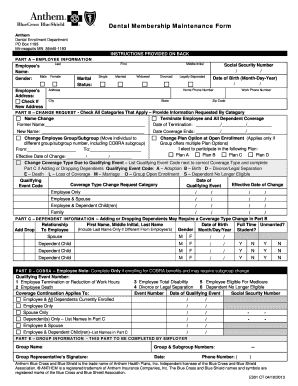
- Click the ‘Get Form’ button to access the Anthem E301 CT form, which will allow you to open it in a digital editor.
- Begin by completing Part A, which requires your employee information. Fill in your name, gender, marital status, date of birth, social security number, and contact details.
- In Part B, indicate the type of change request by checking all applicable categories. Provide any additional details requested, such as your former name if you are changing your name.
- If you are terminating coverage, specify the date of termination and any related details. If changing your employee group or health plan option, provide the necessary information to facilitate the change.
- For changes related to qualifying events, such as marriage or the birth of a child, list the appropriate qualifying event code and ensure to indicate the effective date for the change.
- Part C requires details about any dependents being added or dropped. List each dependent's name, date of birth, and relationship to you, and indicate whether they are full-time students.
- If applicable, complete Part D to enroll in COBRA benefits, selecting the correct qualifying event number and providing relevant dates.
- Finally, in Part E, have your employer complete the group information section, including the group name and signatures. Review your form thoroughly for any missing information.
- After completing all sections, you can save changes, download, print, or share the completed form as necessary.
Take the next step in managing your dental membership by completing the Anthem E301 CT online today.
Yes, Blue Cross Blue Shield is operating under the Anthem brand in Connecticut. If you have an Anthem E301 CT plan, you are receiving the Blue Cross Blue Shield services through Anthem. This integration helps streamline your healthcare experience while ensuring you receive quality support. Should you have further questions, contacting Anthem's customer service can clarify any doubts you may have.