Please keep a copy for your records June 8, 2016, SP-AC_Masters_v2 Office of the Registrar Phone: 201.216.3756 Fax: 201.216.8030 registrar@stevens.edu.

Open form follow the instructions

Easily sign the form with your finger

Send filled & signed form or save
How to fill out the Stevens Institute Master's Study Plan and Application for Candidacy online
This guide provides a thorough and supportive overview of how to complete the Stevens Institute Master's Study Plan and Application for Candidacy online. By following the steps outlined here, users can confidently navigate the form and ensure they submit all required information accurately.
Follow the steps to successfully complete and submit your application online.
- Click ‘Get Form’ button to obtain the form and open it in the editor.
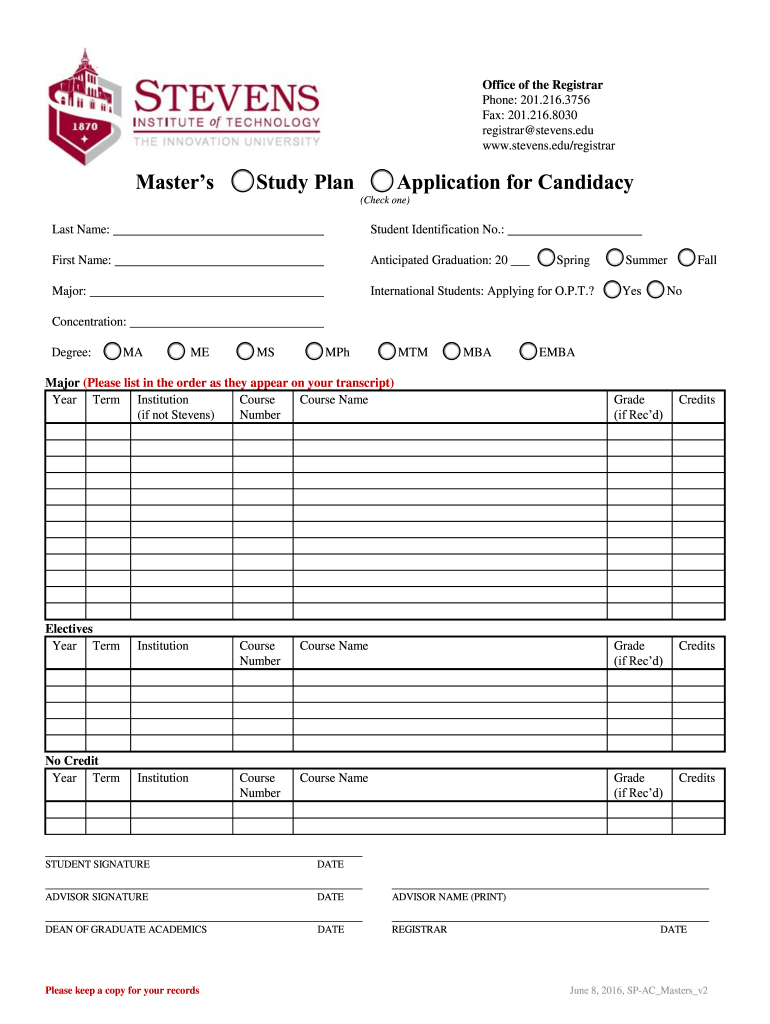
- Begin by entering your last name in the designated field. Next, provide your student identification number to ensure proper identification.
- In the first name field, enter your first name as it appears on your official documents.
- Specify your anticipated graduation date by selecting the appropriate year in the format provided.
- Indicate your major by selecting from the provided options. If applicable, provide any concentrations as required.
- For international students, indicate if you are applying for Optional Practical Training (O.P.T.) by selecting 'Yes' or 'No' accordingly.
- Proceed to the coursework section, where you will input details for each course. Include the year, term, and institution where the course was taken, along with the course number, course name (if not from Stevens), received grade, and credits.
- If applicable, enter any elective courses using the same format as the previous step.
- For any courses that have not received credit, fill out their respective details under the 'No Credit' section, following the previously established format.
- Sign and date the form in the provided section. Make sure to have your advisor sign and print their name in the designated areas as well.
- Submit the form to the Dean of Graduate Academics and leave space for their signature and date, as well as for the registrar.
- After completing all sections, ensure that you save your changes. You can also choose to download, print, or share the form as needed.
Complete your Master's Study Plan and Application for Candidacy online today for a seamless submission experience.
Experience a faster way to fill out and sign forms on the web. Access the most extensive library of templates available.
Related content
This guide outlines many of these aid programs and shows how to apply for them. Our...
The Application for Candidacy takes precedence over all Study Plans and Change of Study...
The focus of the Laboratory's research program is on methods and their cost-effectiveness...
Get answers to your most pressing questions about US Legal Forms API.
What is a study plan for master degree?
As you begin your Master's program, it is important for you and your major professor to establish a study plan, which is a list of the courses you plan to take to meet degree requirements. In some academic units, your committee may also be involved in the creation of your study plan.
What is the acceptance rate for Stevens Institute of Technology Masters program?
Stevens Institute of Technology doesn't require applicants to its online master's degree program in data science to submit a GRE score, but it will accept them. Accepted students, on average, have an undergraduate GPA of 3.5 and a GRE score of 310. The acceptance rate to the program for the 2021-2022 year was 87.6%.
What GPA do you need for Stevens Institute of Technology Masters?
Typically, a GPA of 3.0 (on a 4-point scale) or better at the bachelor's level, and 3.5 or better at the master's level, are required.
What GRE score is required for Stevens?
To attend Stevens Institute of Technology, you must have a GRE score of 300-305.
Is Stevens Institute of Technology a good school for Masters?
Stevens Institute of Technology is among the top 10 in the nation for 'best online graduate Computer Information Technology programs' in 2022 ing to U.S. News & World Report. Apart from this, the Computer Science course of Stevens Institute of Technology ranks at 176-200 in the Times Higher Education rankings. Q.
What GPA do you need for Stevens Masters?
Typically, a GPA of 3.0 (on a 4-point scale) or better at the bachelor's level, and 3.5 or better at the master's level, are required.
Is it hard to get into Stevens Institute of Technology graduate program?
Stevens Institute of Technology has an acceptance rate of 46%. Half the applicants admitted to Stevens Institute of Technology who submitted test scores have an SAT score between 1380 and 1510 or an ACT score of 31 and 34.
Use professional pre-built templates to fill in and sign documents online faster. Get access to thousands of forms.
If you believe that this page should be taken down, please follow our DMCA take down process here.