Loading
Get Talx Tax Credit Questionnaire 2012-2026
How it works
-

Open form follow the instructions
-

Easily sign the form with your finger
-

Send filled & signed form or save
How to fill out the TALX Tax Credit Questionnaire online
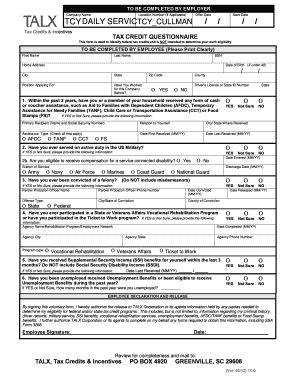
Filling out the TALX Tax Credit Questionnaire is a crucial step in identifying potential federal tax credits that may be available to you. This guide will provide a clear, step-by-step approach to assist you in completing the form accurately and efficiently.
Follow the steps to effectively complete the TALX Tax Credit Questionnaire.
- Click ‘Get Form’ button to obtain the TALX Tax Credit Questionnaire and open it in your preferred editing tool.
- Begin by filling out the header section, which includes sections labeled 'To be completed by employer.' Provide the company name and location number if applicable. Ensure to note the 'Offer Date' and 'Start Date'.
- Next, move to the 'To be completed by employee' section. Print clearly when entering your first name, last name, social security number (SSN), and home address.
- Continue by entering your date of birth, city, state, zip code, position you are applying for, and whether you have previously worked for the company. Select either 'Yes' or 'No'.
- Respond to question 1 regarding any cash or voucher assistance received in the past 2 years. If applicable, provide the necessary details such as the primary recipient's name, relation to yourself, and the type of assistance.
- For question 2, indicate whether you have served on active duty in the US Military and provide details if you select 'Yes'.
- In question 3, answer if you have ever been convicted of a felony, ensuring to record the offense type and dates of conviction.
- For question 4, indicate participation in State or Veterans Affairs Vocational Rehabilitation Programs or the Ticket to Work Program, and provide relevant details if applicable.
- Moving on to question 5, confirm if you have received Supplemental Security Income (SSI) benefits in the last 3 months, and provide the last receipt date.
- In question 6, declare if you have been unemployed or eligible for unemployment benefits during the past year, along with the number of months of unemployment.
- Finally, sign and date the employee declaration and release section, authorizing TALX Corporation to obtain necessary information. Review the form for completeness.
- Once you have completed the form, save your changes. You have the option to download, print, or share the form as needed.
Start filling out your TALX Tax Credit Questionnaire online today to explore potential benefits.
Yes, WOTC is a positive program designed to support workers and businesses alike. It encourages employers to hire from underserved groups, fostering inclusivity in the labor market. Completing the TALX Tax Credit Questionnaire is the best way to start benefiting from this program. It enables you to understand your options and take action toward earning valuable tax credits.