Loading
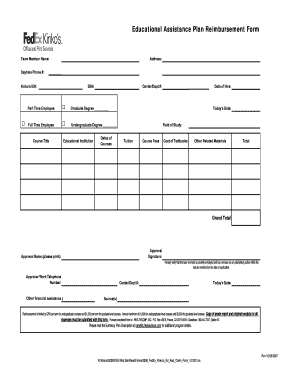
Get Fedex Kinko's Educational Assistance Plan Reimbursement Form 2007-2026
How it works
-

Open form follow the instructions
-

Easily sign the form with your finger
-

Send filled & signed form or save
How to fill out the FedEx Kinko's Educational Assistance Plan Reimbursement Form online
This guide provides clear instructions for users on how to effectively fill out the FedEx Kinko's Educational Assistance Plan Reimbursement Form online. Following these steps will help ensure a smooth and successful submission for educational reimbursements.
Follow the steps to complete the reimbursement form online.
- Press the ‘Get Form’ button to obtain the form and open it in your preferred editor.
- Begin by filling out the 'Team Member Name' field with your full name.
- Input your 'Address', ensuring to include city, state, and zip code.
- Enter your 'Daytime Phone #' for contact purposes.
- Provide your 'Kinko's ID#' which can be found on your employee profile.
- Fill in your 'SSN' (Social Security Number) as required.
- Indicate your 'Center/Dept #' to identify your department.
- Select your employment status by marking either 'Part Time Employee' or 'Full Time Employee'.
- If applicable, specify your 'Graduate Degree' or 'Undergraduate Degree'.
- In the 'Course Title' field, write the name of the course for which you are requesting reimbursement.
- Provide the name of the 'Educational Institution' where you are enrolled.
- List the 'Dates of Courses' to indicate the duration of your studies.
- Fill in your 'Date of Hire' using the format MM/DD/YYYY.
- Input 'Today's Date' to record the submission date.
- Specify your 'Field of Study' relevant to your course.
- Detail the 'Tuition' amount you are seeking reimbursement for.
- Include any 'Course Fees' that apply to your educational expenses.
- List the 'Cost of Textbooks' purchased for the course.
- Mention any 'Other Related Materials' expenses incurred.
- Calculate and enter the 'Total' of all expenses listed above.
- Indicate the 'Grand Total' for your reimbursement request.
- Collect the 'Approval Signature' from your supervisor or manager.
- Print the name of the approver in the 'Approval Name (please print)' section.
- Ensure that the approver verifies your employment status and absence of disciplinary actions by signing.
- Record the 'Approver Work Telephone Number' for verification.
- Provide information on any 'Other financial assistance $' you may be receiving.
- Fill in the 'Center/Dept #' again, if required.
- Reiterate 'Today's Date' for clarity in the approval section.
- Mention the 'Source(s)' of any other funds allocated for your education.
- Once all fields have been completed, save your changes. You can download, print, or share the form as needed.
Complete your documents online today to ensure you maximize your educational assistance benefits.
1-855-FDXMYWAY should get you in touch with someone that can help. That's the number for Employee Solutions.