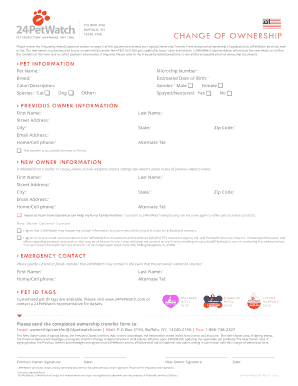
CHANGE OF OWNERSHIP Please review the Frequently Asked Questions section on page 2 of this document and send your signed Ownership Transfer Form and proof of ownership (if applicable) to 24PetWatch.

How it works
  • Open form

    Open form follow the instructions

  • Easily sign form

    Easily sign the form with your finger

  • Share form

    Send filled & signed form or save

How to fill out the 24PetWatch 24PW-OWNERSHIP-FM online

Filling out the 24PetWatch 24PW-OWNERSHIP-FM online is a straightforward process that ensures the legal transfer of pet ownership. This guide will walk you through each section of the form, providing clear instructions to help you complete it with confidence.

Follow the steps to complete the online ownership transfer form.

  1. Click 'Get Form' button to obtain the form and open it in the designated area for editing.
  2. Begin by filling out the pet information section. Required fields include the pet's name, microchip number, breed, estimated date of birth, color/description, species, and gender.
  3. In the previous owner information section, enter the first and last name, street address, city, state, zip code, email address, and home/cell phone number of the previous owner. Note that all fields marked with an asterisk (*) are mandatory.
  4. Move on to the new owner information section. If applicable, indicate if the pet was adopted and include adoption papers in lieu of the previous owner's name. Fill in the first and last name, street address, city, state, zip code, email address, and home/cell phone number of the new owner.
  5. Review the optional consent section to decide whether you consent to contact regarding pet insurance products and to have your contact information released for pet recovery purposes.
  6. Provide an emergency contact by filling in the first and last name, home/cell phone, and alternate telephone number. This is someone who can be contacted if you cannot be reached.
  7. If you wish to include customized pet ID tags, follow the instructions provided or reach out to a 24PetWatch representative.
  8. Review all the information entered to ensure accuracy. The new owner and previous owner must provide signatures and dates where indicated.
  9. Finally, submit the completed form along with any required proof of ownership documents via email, mail, or fax as directed below or in the FAQs section.

Start your ownership transfer process online today!

Get form

Experience a faster way to fill out and sign forms on the web. Access the most extensive library of templates available.

Questions & Answers

Get answers to your most pressing questions about US Legal Forms API.

Contact support

How do I register my pet microchip?

To register your pet microchip, head over to the 24PetWatch registration page. You'll need your microchip number and some personal information. Once you complete the online registration, your pet will be linked to your profile, ensuring their information is up to date. Keeping your pet's chip registration current is crucial for their safety.

Registering your 24 hour pet watch is a simple process. Visit the 24PetWatch website and create an account if you don’t have one. Input the necessary details, including your pet’s microchip number, to complete the registration. This step enhances pet recovery efforts and promotes responsible pet ownership.

To update your 24PetWatch microchip information, access your account on the 24PetWatch platform. Navigate to the account settings section where you can change your contact or address details. This step is essential for maintaining accurate information about your pet and increasing their chances of getting home if they go missing.

Updating your 24 hour pet watch microchip is straightforward. Log into your 24PetWatch account using your registered email and password. You can easily update your contact details or your pet’s information. Keeping this information current helps ensure your pet's safety.

To register your 24 hour pet watch microchip, visit the 24PetWatch website. You will need the microchip number and some personal details about you and your pet. Follow the prompts to complete the registration. This process ensures your pet's information is safe and accessible.

Filing a claim with 24PetWatch is a straightforward process. Start by logging into your account on the 24PetWatch website and navigate to the claims section. Fill out the necessary forms with accurate information, and submit your claim for prompt processing.

The only reason you would want to remove a microchip from a dog would be if you had stolen the dog. If you have bought a chipped dog, you should re-register the chip to your name. A chip can be removed; but you have to find it. ... The only reason you would do something like that is if you stole the dog.

You can register your information for free at 24PetWatch. It says you have to pay them but you can get through the flow if you don't pay them. Most microchip makers like HomeAway and AKCPetReunite (and there are about 100 of them) say you have to pay them to register.

US Manufacturer Codes for ISO Microchips: 981 Datamars. 98102 = Microfindr, Datamars, Bayer resQ, Found Animals, Peeva, Crystal Tag. 98101 = Banfield.

You can update your contact details by contacting the pet microchip registry your pet is enrolled with. Visit the company's website for information on updating your pet's record online, or to get the telephone number to call.

Get This Form Now!

Use professional pre-built templates to fill in and sign documents online faster. Get access to thousands of forms.

If you believe that this page should be taken down, please follow our DMCA take down process here.

24PetWatch 24PW-OWNERSHIP-FM Form

This form is available in several versions. Select the version you need from the drop-down list below.

Get 24PetWatch 24PW-OWNERSHIP-FM