Loading
Get Wv Hazard Communication Chemical Inventory
How it works
-

Open form follow the instructions
-

Easily sign the form with your finger
-

Send filled & signed form or save
How to fill out the WV Hazard Communication Chemical Inventory online
The WV Hazard Communication Chemical Inventory is an essential tool for maintaining compliance with safety standards regarding hazardous materials. This guide provides step-by-step instructions to help you fill out the form accurately and efficiently.
Follow the steps to complete the inventory form online.
- Press the ‘Get Form’ button to access the document and open it in your editor.
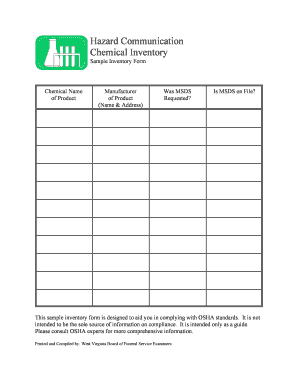
- In the first section, enter the chemical name of the product in the designated field. Make sure to spell the name correctly to avoid any discrepancies.
- Next, provide the manufacturer's name and address in the specified section. This is crucial information as it helps identify the source of the chemicals.
- After that, indicate whether a Material Safety Data Sheet (MSDS) was requested for the chemical. You can answer this question by selecting the appropriate option.
- Then, check if the MSDS is currently on file by selecting 'Yes' or 'No.' This aids in ensuring that all necessary documents are readily accessible for safety inspections.
- Once you have filled out all the necessary fields, review your entries for accuracy and completeness.
- Finally, save your changes, then choose to download, print, or share the completed form as needed.
Start filling out your WV Hazard Communication Chemical Inventory online today!
Filling out a GHS label involves identifying the chemical's hazards, selecting the appropriate hazard statements and pictograms, and including safety measures. It's important to present the information clearly and accurately to facilitate safety and compliance. By referring to the WV Hazard Communication Chemical Inventory, you can streamline the label creation process and improve overall safety practices.