Loading
Form preview
  • US Legal Forms
  • Form Library
  • Other Forms
  • Pennsylvania Other Forms
  • Pa Psrs-1305 2012

Get Pa Psrs-1305 2012-2026

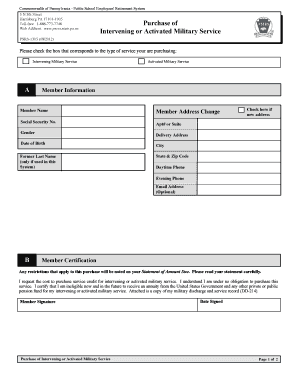
O receive a military pension from the United States Government or any other private or public pension fund based solely on your active military service, you may not purchase retirement credit for intervening or activated military service with the Pennsylvania Public School Employees’ Retirement System (PSERS). Credit may only be purchased if a copy of your DD-214 papers indicate that your discharge was other than undesirable, bad conduct, or dishonorable. What is Intervening Military Service?.

How it works

  1. Open form

    Open form follow the instructions

  2. Easily sign form

    Easily sign the form with your finger

  3. Share form

    Send filled & signed form or save

How to fill out the PA PSRS-1305 online

The PA PSRS-1305 form is essential for individuals looking to purchase service credit for intervening or activated military service within the Pennsylvania Public School Employees' Retirement System. This guide provides a clear, step-by-step process to help you complete the form accurately and efficiently.

Follow the steps to easily complete the PA PSRS-1305 online.

  1. Press the ‘Get Form’ button to access the form and open it for editing.
  2. In section A, fill out your member information, including your name, address, Social Security number, and date of birth. Ensure all details are accurate and complete.
  3. In section B, provide your certification by signing and dating the form, confirming your request for the cost to purchase service credit and your ineligibility for an annuity based solely on your military service.
  4. In section C, specify employment information. Have your employer enter their assigned number, name, school year, service rendered, expected units, salary, and months applied for. Each school year should be listed separately.
  5. In section D, ensure your employer certifies the military leave absence. They will need to sign, provide their telephone number, and date the certification.
  6. Review all sections for accuracy and completeness. Ensure that the required attachments, including your military discharge and service record (DD-214), are included.
  7. Save your changes, and proceed to download, print, or share the form as necessary for submission.

Complete the PA PSRS-1305 online today to take a significant step toward securing your military service credit.

Get form

Experience a faster way to fill out and sign forms on the web. Access the most extensive library of templates available.
Get form

Related content

PSERS Health Insurance Program
PSRS-1305 (07/2019). Commonwealth of Pennsylvania - Public School Employees' Retirement...
Learn more
TIMING OF 29 PULSARS DISCOVERED IN THE PALFA ...
by AG Lyne · 2017 · Cited by 38 — PSRs J0045−7319, B1259−63, J1638−4725...
Learn more

Related links form

CHILD SUPPORT INFORMATION FORM - Onondaga County Fidelity Security Life Insurance Company 73534 Form PATIENT HISTORY FORM Name: Chief Complaint: Lsu System Voluntary Benefits Enrollment Form

Questions & Answers

Get answers to your most pressing questions about US Legal Forms API.

Contact support

PA PSRs, or Pennsylvania Public School Retirement System, is a retirement plan designed for public school employees in Pennsylvania. This system provides essential retirement benefits, including pension calculations based on service and contributions. Understanding PA PSRs is vital for educators and public school staff planning for their future after retirement. Discover more details and how the system works on the US Legal Forms website concerning PA PSRS-1305.

The PA Patient Safety Organization focuses on improving healthcare quality and reducing errors through data collection and analysis. Their mission is to foster a culture of safety within hospitals and healthcare organizations. Membership in this organization provides valuable resources and support for enhancing patient safety standards. To learn more about how this relates to PA PSRS-1305, check out the offerings on US Legal Forms.

The Safe Staffing Act in PA establishes staffing level requirements for healthcare facilities to ensure quality patient care. This legislation aims to protect patients and improve outcomes by mandating minimum nurse-patient ratios. Adherence to this act is essential for maintaining safety in the healthcare environment. For comprehensive legal resources related to compliance, including insights on PA PSRS-1305, explore the US Legal Forms platform.

The PA teacher pension multiplier is a calculation used to determine retirement benefits for Pennsylvania teachers. It factors in years of service and final salary to provide a pension amount. Understanding this multiplier is crucial for teachers planning for retirement, as it impacts their financial security. For guidance on navigating these calculations effectively, consider using resources such as the US Legal Forms concerning PA PSRS-1305.

The PA retired employees health program provides health benefits to retired employees. This program is essential for managing health care costs in retirement, ensuring former employees receive necessary medical care. By enrolling in this program, retirees can access a variety of health services, thereby enhancing their quality of life. For more information on how this relates to PA PSRS-1305, visit the US Legal Forms platform.

PA teachers' pensions are calculated using the PA PSRS-1305 model, which specifically addresses educators' unique service and compensation structures. The calculation involves your average salary over a defined period, as well as your years of teaching service. Understanding these elements helps you project your pension benefits accurately, ensuring that you are well-prepared for retirement.

Calculating the Pennsylvania state pension typically involves the PA PSRS-1305 guidelines, which factor in your average salary, years of service, and a predetermined multiplier. This structured approach ensures that your pension corresponds to the contributions made throughout your career. It is beneficial to keep track of your service record to get a comprehensive perspective of your expected pension.

The amount for a state pension in Pennsylvania varies based on several factors, including your employment history and contributions. The PA PSRS-1305 formula plays a vital role in this calculation, ensuring that pensions are equitable and reflect actual service. By delving into your specific details, you can gain a better understanding of what you might receive from your state pension.

To determine your pension amount, you can reference the PA PSRS-1305 guidelines, which provide a straightforward calculation method. Start by considering your average salary, total years of service, and applicable multiplier. This process allows you to estimate what you may receive upon retirement, helping you make informed financial decisions for your future.

The average pension for a Pennsylvania state employee can vary based on factors such as years of service and salary. Generally, many employees see a pension that reflects their career earnings and service time, often calculated using the PA PSRS-1305 standard. This formula helps ensure that pension distributions are fair and consistent across the board. Therefore, understanding your individual benefits is essential.

Get This Form Now!

Use professional pre-built templates to fill in and sign documents online faster. Get access to thousands of forms.
Get form
If you believe that this page should be taken down, please follow our DMCA take down processhere.

Industry-leading security and compliance

US Legal Forms protects your data by complying with industry-specific security standards.
  • In businnes since 1997
    25+ years providing professional legal documents.
  • Accredited business
    Guarantees that a business meets BBB accreditation standards in the US and Canada.
  • Secured by Braintree
    Validated Level 1 PCI DSS compliant payment gateway that accepts most major credit and debit card brands from across the globe.
Get PA PSRS-1305
Get form
  • Adoption
  • Bankruptcy
  • Contractors
  • Divorce
  • Home Sales
  • Employment
  • Identity Theft
  • Incorporation
  • Landlord Tenant
  • Living Trust
  • Name Change
  • Personal Planning
  • Small Business
  • Wills & Estates
  • Packages A-Z
  • Affidavits
  • Bankruptcy
  • Bill of Sale
  • Corporate - LLC
  • Divorce
  • Employment
  • Identity Theft
  • Internet Technology
  • Landlord Tenant
  • Living Wills
  • Name Change
  • Power of Attorney
  • Real Estate
  • Small Estates
  • Wills
  • All Forms
  • Forms A-Z
  • Form Library
  • Legal Hub
  • About Us
  • Help Portal
  • Legal Resources
  • Blog
  • Affiliates
  • Contact Us
  • Delete My Account
  • Site Map
  • Industries
  • Forms in Spanish
  • Localized Forms
  • State-specific Forms
  • Forms Kit
  • Real Estate Handbook
  • All Guides
  • Notarize
  • Incorporation services
  • For Consumers
  • For Small Business
  • For Attorneys
  • USLegal
  • FormsPass
  • pdfFiller
  • signNow
  • altaFlow
  • DocHub
  • Instapage
Form Packages
  • Adoption
  • Bankruptcy
  • Contractors
  • Divorce
  • Home Sales
  • Employment
  • Identity Theft
  • Incorporation
  • Landlord Tenant
  • Living Trust
  • Name Change
  • Personal Planning
  • Small Business
  • Wills & Estates
  • Packages A-Z
Form Categories
  • Affidavits
  • Bankruptcy
  • Bill of Sale
  • Corporate - LLC
  • Divorce
  • Employment
  • Identity Theft
  • Internet Technology
  • Landlord Tenant
  • Living Wills
  • Name Change
  • Power of Attorney
  • Real Estate
  • Small Estates
  • Wills
  • All Forms
  • Forms A-Z
  • Form Library
Customer Service
  • Legal Hub
  • About Us
  • Help Portal
  • Legal Resources
  • Blog
  • Affiliates
  • Contact Us
  • Delete My Account
  • Site Map
  • Industries
  • Forms in Spanish
  • Localized Forms
  • State-specific Forms
  • Forms Kit
Legal Guides
  • Real Estate Handbook
  • All Guides
Prepared for you
  • Notarize
  • Incorporation services
Our Customers
  • For Consumers
  • For Small Business
  • For Attorneys
Our Sites
  • USLegal
  • FormsPass
  • pdfFiller
  • signNow
  • altaFlow
  • DocHub
  • Instapage
Social Media
Call us now toll free:
+1 833 426 79 33
As seen in:
© Copyright 1999-2026 airSlate Legal Forms, Inc. 3720 Flowood Dr, Flowood, Mississippi 39232
  • Your Privacy Choices
  • Terms of Service
  • Privacy Notice
  • Content Takedown Policy
  • Bug Bounty Program