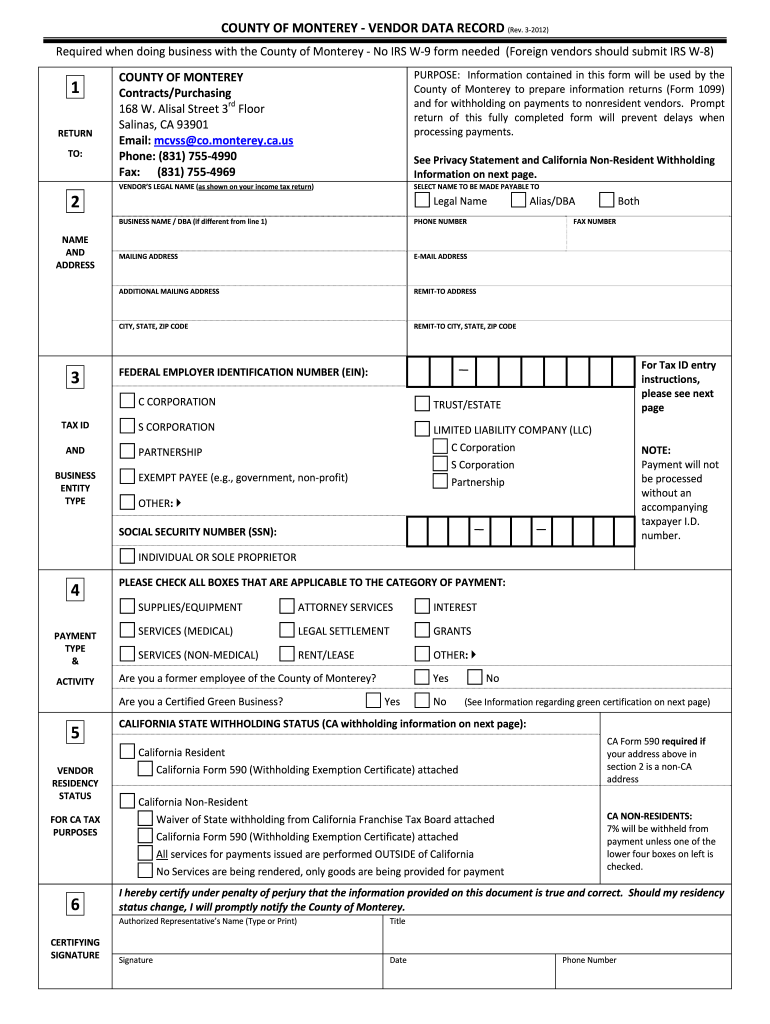
D submit IRS W 8) 1 RETURN TO: 2 NAME AND ADDRESS 3 COUNTY OF MONTEREY Contracts/Purchasing 168 W. Alisal Street 3rd Floor Salinas, CA 93901 Email: mcvss co.monterey.ca.us Phone: (831) 755 4990 Fax: (831) 755 4969 PURPOSE: Information contained in this form will be used by the County of Monterey to prepare information returns (Form 1099) and for wit.

Open form follow the instructions

Easily sign the form with your finger

Send filled & signed form or save
How to fill out the CA Vendor Data Record - Monterey County online
The CA Vendor Data Record is an essential form for individuals and businesses looking to conduct transactions with the County of Monterey. This guide provides clear and supportive instructions on how to complete the form effectively online.
Follow the steps to complete the form accurately.
- Press the ‘Get Form’ button to obtain the form and open it in your preferred online editor.
- Enter the vendor's legal name as it appears on their income tax return. For individuals or sole proprietors, include the full name of the owner.
- Fill in the business name or 'Doing Business As' (DBA) if it's different from the legal name.
- Provide a valid phone number and fax number, ensuring that the contact information is current.
- Enter the primary mailing address where correspondence will be sent, and include any additional mailing addresses if applicable.
- Indicate the remit-to address for payment. Ensure that it is distinct from the mailing address if applicable.
- Input the Federal Employer Identification Number (EIN) or Social Security Number (SSN), as required for tax identification.
- Select the category for the business entity type, ensuring you check the appropriate box for your organization.
- Indicate the applicable payment types and activities by checking all relevant boxes.
- Certify the accuracy of the information provided by signing and dating the form. Include your printed name and title.
- Review your entries for accuracy and completeness before submitting.
- Once completed, you can save changes, download the form, print it, or share it as necessary.
Complete your CA Vendor Data Record online today to ensure timely processing of your payments.
Experience a faster way to fill out and sign forms on the web. Access the most extensive library of templates available.
Related content
... Data Record and submit to County (see where/how to submit below); Vendors must submit...
There are a variety of companies that allow you to purchase parcel datasets for nearly...
Introduction. Manual Overview. The manual is divided into the following sections: •...
Get answers to your most pressing questions about US Legal Forms API.
How to fill out the California resale certificate?
Filling out the California resale certificate requires you to accurately provide your business information and the type of goods you are buying. It's important to enter your seller's permit number and ensure that the certificate is signed and dated. By maintaining an organized CA Vendor Data Record - Monterey County, you facilitate smoother transactions and legal compliance.
How to fill out California resale certificate?
To fill out a California resale certificate, start by entering your business name and address, followed by the seller's name. Next, provide your seller's permit number and a description of the property being purchased. Always remember to save a copy for your records and ensure it meets the specifications set by the CA Vendor Data Record - Monterey County to avoid complications.
How to fill out a sales tax exemption certificate?
Filling out a sales tax exemption certificate involves entering your business information, including name, address, and the reason for the exemption. You must also provide your tax ID and confirm that the items being purchased will be used for exempt purposes. Once completed, ensure that this document aligns with the CA Vendor Data Record - Monterey County for seamless transactions.
Is EIN the same as resale number?
No, an Employer Identification Number (EIN) is not the same as a resale number. The EIN identifies your business for tax purposes, while the resale number allows you to make tax-exempt purchases for resale. When managing your CA Vendor Data Record - Monterey County, it's essential to keep these numbers distinct to ensure proper usage.
How do I file an annual statement of information in California?
To file an annual statement of information in California, you must complete the necessary forms available from the Secretary of State's website. This document includes important details about your business, such as addresses and officers. Ensuring your CA Vendor Data Record - Monterey County is updated with this information keeps your records accurate and helps avoid potential penalties.
How do I contact the County of Monterey?
To contact the County of Monterey, you can visit their official website for detailed contact information. They provide various resources to assist you with inquiries related to the CA Vendor Data Record - Monterey County. Additionally, you can reach them by phone or in person at designated county offices. Having these contacts handy can ease any process related to your business affairs.
What happens if I don't file a statement of information in California?
If you fail to file a statement of information in California, your business may face significant penalties. This could include fines or administrative dissolution, which means your company could lose its legal status. For businesses dealing with the CA Vendor Data Record - Monterey County, maintaining compliance is vital to avoid disruptions. It's always better to stay ahead by filing on time to keep your operations running smoothly.
Where do I file a statement of information in California?
Filing a statement of information in California can be done at the office of the Secretary of State. They accept submissions via their online portal, by mail, or directly at their office locations. For those focusing on the CA Vendor Data Record - Monterey County, confirming local requirements may save time and ensure accuracy. Always verify the specific filing requirements for your business type before submission.
Where do I file a statement of information in CA?
To file a statement of information in California, you should submit it to the Secretary of State's office. This office handles all business filings, including those pertinent to the CA Vendor Data Record - Monterey County. You can easily file online through their official website, by mail, or in person at the designated office. Ensure you have all necessary details ready to facilitate a smooth process.
What is the tax in Monterey CA?
The minimum combined 2023 sales tax rate for Monterey, California is 9.25%. This is the total of state, county and city sales tax rates. The California sales tax rate is currently 6%. The County sales tax rate is 0.25%.
Use professional pre-built templates to fill in and sign documents online faster. Get access to thousands of forms.
If you believe that this page should be taken down, please follow our DMCA take down process here.