Loading
Form preview
  • US Legal Forms
  • Form Library
  • Other Forms
  • California Other Forms
  • Ca 41-nc 2018

Get Ca 41-nc 2018-2025

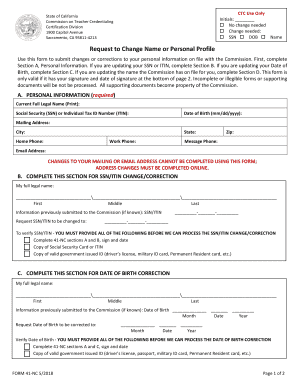
CTC Use Only Initials: No change needed Change needed: SSN DOB NameState of California Commission on Teacher Credentialing Certification Division 1900 Capitol Avenue Sacramento, CA 958114213Request.

How it works

  1. Open form

    Open form follow the instructions

  2. Easily sign form

    Easily sign the form with your finger

  3. Share form

    Send filled & signed form or save

How to fill out the CA 41-NC online

The CA 41-NC form is designed for individuals wishing to submit changes or corrections to their personal information with the Commission on Teacher Credentialing in California. This guide provides clear, step-by-step instructions for completing the form online, ensuring that all required information is accurately provided.

Follow the steps to complete the CA 41-NC form online effectively.

  1. Press the ‘Get Form’ button to obtain the CA 41-NC form and open it within your browser.
  2. In Section A, Personal Information, enter your current full legal name, Social Security Number (SSN) or Individual Tax ID Number (ITIN), date of birth, mailing address, city, state, and your phone numbers. Ensure all details are accurate and formatted correctly.
  3. If you are changing your SSN or ITIN, proceed to Section B. Fill in your full legal name again, provide the previous SSN/ITIN if known, and the new SSN/ITIN you wish to update it to. Make sure to gather and attach the required supporting documents for verification, including a copy of your Social Security card or ITIN and valid government-issued ID.
  4. For a date of birth correction, navigate to Section C. Enter your full legal name, the date of birth you previously submitted, and your requested corrected date of birth. Again, ensure you provide the necessary supporting documentation, such as a valid government-issued ID that verifies your new date of birth.
  5. If you are requesting a name change, complete Section D. Clearly indicate your former full legal name and the new name you are requesting. Depending on the reason for your name change (e.g., marriage, dissolution), provide the appropriate supporting documents as stipulated in the form. This may include a certified marriage certificate or dissolution document alongside your Social Security card or ITIN with the new name.
  6. Finally, ensure you sign and date the form at the bottom of page 2. This signature indicates your authorization for the changes and affirms that the information provided is accurate under penalty of perjury. Save your changes, then download or print the completed form for submission.

Complete your CA 41-NC form online today and ensure your personal information is current!

Get form

Experience a faster way to fill out and sign forms on the web. Access the most extensive library of templates available.
Get form

Related content

Application For Credential Authorizing Public...
This application (Form 41-4) is the Commission's universal application, and is used for...
Learn more
Change of Name Request
Requestor will need to complete Commission on Teacher. Credentialing REQUEST TO CHANGE...
Learn more
c-pro 3 nano HPRU
41. Fans 1 circuit breaker NO. 42. DHW resistor circuit breaker NC. 43. DHW resistor...
Learn more

Related links form

Airport Limousine Charter Bus Reservation/Booking Form Please ... MEDICAL INFORMATION FORM MEDIF - ANA - Ana Co Do Not Submit This Form For Data Reduction. Call (800 ... - QCNet Meguro Language Center Pdf

Questions & Answers

Get answers to your most pressing questions about US Legal Forms API.

Contact support

The CA 41-NC refers to a specific type of form used within the credentialing process. This form, known as the 41-4, is essential for verifying an individual's qualifications. By submitting the CA 41-NC, you ensure that all relevant information is accurately documented. It helps streamline the application process for potential educators and professionals.

The CTC typically takes several weeks to clear a credential. This duration can depend on various factors including submission volume and expected processing times. Using CA 41-NC helps ensure that you have everything in order for a quicker clearance.

Checking your CTC status online is easy and can be done through the IRS website. You will need your personal details to access your information. Remember to keep a note of your CA 41-NC application reference as it may be required for tracking updates.

To send transcripts to the CTC, you can do so by following the instructions provided on the application form. Generally, this involves mailing or electronically submitting your transcripts as specified. Referencing CA 41-NC can provide additional clarity on the submission process.

After processing your CTC application, the deposit usually occurs within a few weeks. The timing can vary, especially during peak tax seasons. Make sure you’ve applied using CA 41-NC, as it can enhance the efficiency of your application and the deposit timing.

When you apply for the CTC, the processing usually takes several weeks. This duration depends on the accuracy and completeness of your application. Properly completed forms using CA 41-NC can help streamline the process, reducing wait times.

The processing time for the Child Tax Credit (CTC) can vary. Generally, it takes a few weeks to process your application after submission. However, factors such as holidays and application volume can affect this timeframe. If you're using CA 41-NC to apply, make sure to provide all required documents to avoid delays.

The timeframe to receive credentials from the CTC can vary based on several factors, generally ranging from 6 to 12 weeks. If you are submitting forms related to the CA 41-NC, it can influence the overall processing time. To aid in speeding up your application, ensure you complete all necessary forms accurately, and consider using uslegalforms for structured guidance throughout the entire CTC process.

Failing to clear your preliminary credential can lead to potential setbacks in your teaching career. Without proper clearance, you may not be eligible to apply for a clear credential or secure a permanent teaching position. It's essential to stay proactive in managing your CA 41-NC requirements, ensuring that you meet all deadlines and regulations. Resources like uslegalforms can assist in navigating this process effectively.

When it comes to changing your name with the CTC, the process typically takes about 2 to 4 weeks. However, this timeline may vary based on submission completeness and other factors related to the CA 41-NC process. To ensure a smooth transition, it’s best to follow the specific instructions provided by the CTC and consider using the resources available on uslegalforms to guide you through submitting your name change.

Get This Form Now!

Use professional pre-built templates to fill in and sign documents online faster. Get access to thousands of forms.
Get form
If you believe that this page should be taken down, please follow our DMCA take down processhere.

Industry-leading security and compliance

US Legal Forms protects your data by complying with industry-specific security standards.
  • In businnes since 1997
    25+ years providing professional legal documents.
  • Accredited business
    Guarantees that a business meets BBB accreditation standards in the US and Canada.
  • Secured by Braintree
    Validated Level 1 PCI DSS compliant payment gateway that accepts most major credit and debit card brands from across the globe.
Get CA 41-NC
Get form
Form Packages
Adoption
Bankruptcy
Contractors
Divorce
Home Sales
Employment
Identity Theft
Incorporation
Landlord Tenant
Living Trust
Name Change
Personal Planning
Small Business
Wills & Estates
Packages A-Z
Form Categories
Affidavits
Bankruptcy
Bill of Sale
Corporate - LLC
Divorce
Employment
Identity Theft
Internet Technology
Landlord Tenant
Living Wills
Name Change
Power of Attorney
Real Estate
Small Estates
Wills
All Forms
Forms A-Z
Form Library
Customer Service
Your Privacy Choices
Terms of Service
Privacy Notice
Legal Hub
Content Takedown Policy
Bug Bounty Program
About Us
Help Portal
Legal Resources
Blog
Affiliates
Contact Us
Delete My Account
Site Map
Industries
Forms in Spanish
Localized Forms
State-specific Forms
Forms Kit
Legal Guides
Real Estate Handbook
All Guides
Prepared for You
Notarize
Incorporation services
Our Customers
For Consumers
For Small Business
For Attorneys
Our Sites
US Legal Forms
USLegal
FormsPass
pdfFiller
signNow
altaFlow
DocHub
Instapage
Social Media
Call us now toll free:
+1 833 426 79 33
As seen in:
  • USA Today logo picture
  • CBC News logo picture
  • LA Times logo picture
  • The Washington Post logo picture
  • AP logo picture
  • Forbes logo picture
© Copyright 1997-2025
airSlate Legal Forms, Inc.
3720 Flowood Dr, Flowood, Mississippi 39232
Form Packages
Adoption
Bankruptcy
Contractors
Divorce
Home Sales
Employment
Identity Theft
Incorporation
Landlord Tenant
Living Trust
Name Change
Personal Planning
Small Business
Wills & Estates
Packages A-Z
Form Categories
Affidavits
Bankruptcy
Bill of Sale
Corporate - LLC
Divorce
Employment
Identity Theft
Internet Technology
Landlord Tenant
Living Wills
Name Change
Power of Attorney
Real Estate
Small Estates
Wills
All Forms
Forms A-Z
Form Library
Customer Service
Your Privacy Choices
Terms of Service
Privacy Notice
Legal Hub
Content Takedown Policy
Bug Bounty Program
About Us
Help Portal
Legal Resources
Blog
Affiliates
Contact Us
Delete My Account
Site Map
Industries
Forms in Spanish
Localized Forms
State-specific Forms
Forms Kit
Legal Guides
Real Estate Handbook
All Guides
Prepared for You
Notarize
Incorporation services
Our Customers
For Consumers
For Small Business
For Attorneys
Our Sites
US Legal Forms
USLegal
FormsPass
pdfFiller
signNow
altaFlow
DocHub
Instapage
Social Media
Call us now toll free:
+1 833 426 79 33
As seen in:
  • USA Today logo picture
  • CBC News logo picture
  • LA Times logo picture
  • The Washington Post logo picture
  • AP logo picture
  • Forbes logo picture
© Copyright 1997-2025
airSlate Legal Forms, Inc.
3720 Flowood Dr, Flowood, Mississippi 39232