Loading
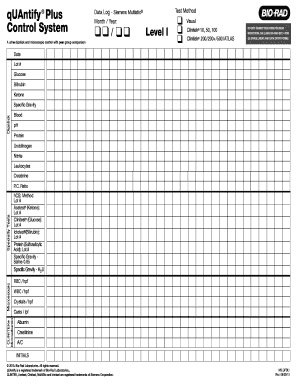
Get Do Not Submit This Form For Data Reduction. Call (800 ... - Qcnet
How it works
-

Open form follow the instructions
-

Easily sign the form with your finger
-

Send filled & signed form or save
How to fill out the Do Not Submit This Form For Data Reduction. Call (800) 824-6665 - QCNet online
This guide provides clear instructions on how to accurately fill out the Do Not Submit This Form For Data Reduction. Designed for users seeking guidance, the steps outlined here will help ensure that the form is completed correctly and efficiently.
Follow the steps to fill out the form correctly.
- Click the ‘Get Form’ button to access the form and open it in your document editor.
- Enter the month and year at the top of the form under 'Data Log - Siemens Multistix®.' Ensure the format is MM/YYYY.
- Fill in the 'Test Method' section by selecting the appropriate level, either Level I or Level II, based on your testing requirements.
- Provide the 'Date' and 'Lot #' for each test being recorded. Ensure these details match the specifications of the testing kits used.
- For each test result section, such as Glucose, Bilirubin, and Ketone, enter your test results accurately in the designated fields.
- Complete the 'Specialty Tests' section with details such as P.C. Ratio and the hCG test method, along with their corresponding lot numbers.
- In the Microscopic section, input results for parameters like RBC/hpf and WBC/hpf accurately.
- After completing all sections and confirming the accuracy of your entries, save the changes. You can also download, print, or share the completed form as needed.
Complete your forms online for efficient and accurate processing.
Related links form
To contact Bio-Rad Unity, you can visit their official website or call their dedicated support line at (800) ... - QCNet. They offer assistance for various inquiries, including product usage and troubleshooting. Engaging directly with their team ensures you receive accurate and timely assistance tailored to your needs.