Loading
Form preview
  • US Legal Forms
  • Form Library
  • RMV Forms
  • Kentucky RMV Forms
  • Ky Tc 69-008 2013

Get Ky Tc 69-008 2013

6 $ #7 $ #8 $ #9 $ #10 $ #11 ACTUAL PERCENTAGE AMOUNT: (if applicable): % $ % $ $ % #12 $ $ % #13 $ $ % #14 $ $ % #15 $ $ % $ % $ % $0.00 ** This section is only needed if any information is entered on page 2 ** COMPANY VALIDATION: I accept the certification terms on page 1 in reference to the work performed as defined on page 1. Date: COUNTY: $ (automatically transfers to page 1) Initial: NOTE: If the amount of this bill applies to more than one cou.

How it works

  1. Open form

    Open form follow the instructions

  2. Easily sign form

    Easily sign the form with your finger

  3. Share form

    Send filled & signed form or save

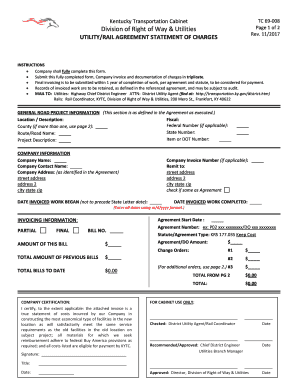
How to fill out the KY TC 69-008 online

Filling out the KY TC 69-008 online can streamline your utility and rail agreement processes. This guide provides clear instructions on completing each section of the form efficiently and accurately.

Follow the steps to complete the KY TC 69-008 form online.

  1. Click ‘Get Form’ button to obtain the form and open it in the editor.
  2. Begin by entering the general road project information. Provide details such as the location/description, fiscal information, federal number (if applicable), county, state number, route/road name, item or AAR-DOT number, and a brief project description.
  3. Fill in the company information section. Include the company name, contact person's name, as well as the complete company address which should match the information in the agreement.
  4. Record the date invoiced work began. Ensure this date does not precede the State letter date. Then, include the company invoice number (if applicable), the remit to address, and mark if it is the same as the agreement address.
  5. Specify the date invoiced work was completed and the agreement start date. Make sure all dates are entered in the m/d/yyyy format.
  6. Complete the invoicing information by indicating whether this is a partial or final bill. Enter the bill number, amount of this bill, purchase order number, statute/agreement type, agreement/PRDO amount, and any change orders.
  7. Calculate and enter the total amount of previous bills and total bills to date. Ensure these calculations are accurate for processing.
  8. Sign the company certification section, certifying that the information provided is true and adheres to the required regulations.
  9. If there are additional orders that need to be documented, use page 2. Fill in the relevant change order amounts and specify any applicable actual percentages.
  10. Once all sections are completed, review the form for accuracy. Save your changes, and you can then download, print, or share the completed form as needed.

Complete your KY TC 69-008 form online today to streamline your billing process.

Get form

Experience a faster way to fill out and sign forms on the web. Access the most extensive library of templates available.

Related content

Division of Right of Way & Utilities
Kentucky Transportation Cabinet. Division of Right of Way & Utilities. UTILITY/RAIL...
Learn more

Related links form

Ssa21 Funny Golf Awards Certificates Acceptance Letter V5 E1 Form.xlsx - BSSSb

Get This Form Now!

Use professional pre-built templates to fill in and sign documents online faster. Get access to thousands of forms.
If you believe that this page should be taken down, please follow our DMCA take down processhere.
Get KY TC 69-008
  • Adoption
  • Bankruptcy
  • Contractors
  • Divorce
  • Home Sales
  • Employment
  • Identity Theft
  • Incorporation
  • Landlord Tenant
  • Living Trust
  • Name Change
  • Personal Planning
  • Small Business
  • Wills & Estates
  • Packages A-Z
  • Affidavits
  • Bankruptcy
  • Bill of Sale
  • Corporate - LLC
  • Divorce
  • Employment
  • Identity Theft
  • Internet Technology
  • Landlord Tenant
  • Living Wills
  • Name Change
  • Power of Attorney
  • Real Estate
  • Small Estates
  • Wills
  • All Forms
  • Forms A-Z
  • Form Library
  • Legal Hub
  • About Us
  • Help Portal
  • Legal Resources
  • Blog
  • Affiliates
  • Contact Us
  • Delete My Account
  • Site Map
  • Industries
  • Forms in Spanish
  • Localized Forms
  • State-specific Forms
  • Forms Kit
  • Real Estate Handbook
  • All Guides
  • Notarize
  • Incorporation services
  • For Consumers
  • For Small Business
  • For Attorneys
  • USLegal
  • FormsPass
  • pdfFiller
  • signNow
  • altaFlow
  • DocHub
  • Instapage
Form Packages
  • Adoption
  • Bankruptcy
  • Contractors
  • Divorce
  • Home Sales
  • Employment
  • Identity Theft
  • Incorporation
  • Landlord Tenant
  • Living Trust
  • Name Change
  • Personal Planning
  • Small Business
  • Wills & Estates
  • Packages A-Z
Form Categories
  • Affidavits
  • Bankruptcy
  • Bill of Sale
  • Corporate - LLC
  • Divorce
  • Employment
  • Identity Theft
  • Internet Technology
  • Landlord Tenant
  • Living Wills
  • Name Change
  • Power of Attorney
  • Real Estate
  • Small Estates
  • Wills
  • All Forms
  • Forms A-Z
  • Form Library
Customer Service
  • Legal Hub
  • About Us
  • Help Portal
  • Legal Resources
  • Blog
  • Affiliates
  • Contact Us
  • Delete My Account
  • Site Map
  • Industries
  • Forms in Spanish
  • Localized Forms
  • State-specific Forms
  • Forms Kit
Legal Guides
  • Real Estate Handbook
  • All Guides
Prepared for you
  • Notarize
  • Incorporation services
Our Customers
  • For Consumers
  • For Small Business
  • For Attorneys
Our Sites
  • USLegal
  • FormsPass
  • pdfFiller
  • signNow
  • altaFlow
  • DocHub
  • Instapage
Social Media
Call us now toll free:
+1 833 426 79 33
As seen in:
© Copyright 1999-2026 airSlate Legal Forms, Inc. 17 Station Street, Suite 303, Brookline, MA 02445
  • Your Privacy Choices
  • Terms of Service
  • Privacy Notice
  • Content Takedown Policy
  • Bug Bounty Program
KY TC 69-008
This form is available in several versions.
Select the version you need from the drop-down list below.
2017 KY TC 69-008
Select form
  • 2017 KY TC 69-008
  • 2013 KY TC 69-008
Select form