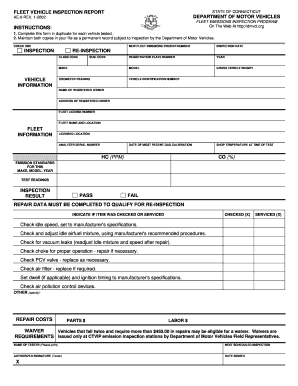
E this form in duplicate for each vehicle tested. 2. Maintain both copies in your file as a permanent record subject to inspection by the Department of Motor Vehicles. CHECK ONE NEW FLEET EMISSIONS STICKER NUMBER INSPECTION DATE REGISTRATION PLATE NUMBER YEAR MAKE MODEL GROSS VEHICLE WEIGHT ODOMETER READING VEHICLE IDENTIFICATION NUMBER INSPECTION RE-INSPECTION CLASS CODE VEHICLE INFORMATION SUB. CODE NAME OF REGISTERED OWNER ADDRESS OF REGISTERED OWNER FLEET LICENSE NUMBER FLEE.
Open form follow the instructions
Easily sign the form with your finger
Send filled & signed form or save
How to fill out the CT AE-9 online
The CT AE-9 form is essential for documenting fleet vehicle emissions inspections in Connecticut. This guide will provide clear, step-by-step instructions to help you fill out the form accurately and efficiently online.
Follow the steps to complete the CT AE-9 online
- Press the 'Get Form' button to access the CT AE-9 form and open it in the editor.
- Begin by selecting the inspection type at the top of the form, either 'New Fleet Emissions Sticker Number' or 'Re-inspection.'
- Fill in the inspection date, registration plate number, year, make, model, gross vehicle weight, and odometer reading for the vehicle being inspected.
- Enter the vehicle identification number (VIN) along with the class code and subsection code as required.
- Input the name and address of the registered owner. Also, include the fleet license number and fleet name along with its location.
- Complete the licensed location and the analyzer serial number, followed by the date of the most recent gas calibration.
- Provide the emission test readings for hydrocarbons (HC) in parts per million (PPM) and carbon monoxide (CO) percentages.
- Indicate the inspection result by selecting 'Pass' or 'Fail.' If the vehicle fails, you must fill in the repair data section to qualify for re-inspection.
- For each checked item, mark 'Checked' or 'Serviced.' Include the repair costs by specifying parts and labor expenses.
- Complete the name of the tester, next scheduled inspection date, and include the authorized signature with the date signed.
- Once all fields are filled accurately, you can save changes, download, print, or share the completed form as needed.
Start filling out your CT AE-9 online today to ensure your fleet vehicles meet emission standards.
Experience a faster way to fill out and sign forms on the web. Access the most extensive library of templates available.
Related content
The following forms are useful for the protection and improvement of the health and safety...
The Dual Enrollment program allows qualified high school students the opportunity to...
Nov 5, 2020 — Changing Flow Rate Units". 8. Press the SAMPLE key to display Ct AUto . 9...
Get answers to your most pressing questions about US Legal Forms API.
What is the Sound Blaster AE-9?
The Sound Blaster AE-9 is a premium internal sound card designed for audiophiles and gamers. It features advanced audio processing, high-quality DAC, and customizable sound profiles. By incorporating the CT AE-9 into your audio setup, you experience sound clarity and richness unlike any other. This device is built to enhance your media consumption, providing an exceptional auditory experience.
How to Sound Blaster AE-9?
Setting up the Sound Blaster AE-9 involves a few simple steps. First, connect the device to your PC using the USB interface. Next, install the relevant drivers and software to unlock its full potential. Once set up, you can enjoy an immersive audio experience tailored to your preferences with the CT AE-9.
Is the Sound Blaster AE-9 worth it?
Evaluating whether the Sound Blaster AE-9 is worth it depends on your audio requirements. If you demand superior sound quality and versatile functionality, investing in the CT AE-9 makes sense. Many users have found it to be an essential upgrade, especially for gaming or music production. Ultimately, your specific audio needs will dictate if this investment is right for you.
What is AE-9?
The AE-9 is an advanced audio interface celebrated for its high-resolution sound quality and versatile connectivity. Designed with gamers, creators, and audiophiles in mind, it offers a range of features that enhance your listening experience. Utilizing the CT AE-9 can elevate your audio enjoyment, making it an excellent choice for various applications. By integrating this device, you can unlock a world of superior sound performance.
What is the difference between Sound Blaster AE-9 and AE 9PE?
The Sound Blaster AE-9 and AE 9PE are closely related, but they cater to different users. The AE-9 generally provides robust features, while the AE 9PE often includes additional enhancements for professionals. When considering audio interfaces, both products have their strengths, with the CT AE-9 being a versatile option for various audio setups. It's essential to evaluate your specific audio needs to choose the right one.
What is the difference between AE sound and a sound?
AE sound refers specifically to audio quality and processing enhanced by devices like the CT AE-9. In contrast, a sound can include any typical audio experience without special enhancements. Therefore, AE sound represents a higher fidelity and clarity, especially useful for audiophiles or gamers. Understanding this distinction can help you appreciate the unique capabilities of devices like the CT AE-9.
What is the difference between Sound BlasterX AE 5 and Creative Sound BlasterX AE 5 Plus?
The Sound BlasterX AE 5 and Creative Sound BlasterX AE 5 Plus share similarities, but the Plus version offers enhanced features. Specifically, the AE 5 Plus includes a more advanced DAC and improved software options. If you are looking for superior audio quality, the AE 5 Plus might be the better choice. Additionally, both models provide excellent sound experiences, making them suitable for different needs.
How do I download Sound Blaster?
Downloading the necessary software for your CT AE-9 is simple. Visit the official Sound Blaster website and navigate to the support section to find the relevant drivers and software for your device. Once downloaded, follow the installation prompts to ensure you unlock the full potential of your sound card.
How to Sound Blaster?
Using the CT AE-9 effectively means utilizing its software features. After installing the card and software, explore the equalizer settings and audio effects available within the Sound Blaster app. This allows you to tailor your listening experience whether you're gaming, watching movies, or listening to music.
How to install a sound card step by step?
To install the CT AE-9 sound card, first power off your PC and unplug it from the electrical outlet. Open the case and locate an available PCIe slot, then gently insert the sound card until it clicks into place. Close the case, power on your PC, and install the drivers for your new CT AE-9 to get started with enhanced audio quality.
Use professional pre-built templates to fill in and sign documents online faster. Get access to thousands of forms.
If you believe that this page should be taken down, please follow our DMCA take down process here.